
KVM vs VirtualBox comes down to this: use KVM if you care about Linux-native speed, automation, and production workloads; use VirtualBox if you want fast desktop virtualization with an easy GUI. They overlap, sure, but they aren't aimed at exactly the same job.
KVM and VirtualBox are both virtualization tools, but they serve different needs. KVM is a Linux-based, kernel-integrated hypervisor built for high performance and production workloads, while VirtualBox is a hosted hypervisor designed for easy desktop use, testing, and cross-platform convenience. If you want speed and scalability, choose KVM; if you want simplicity, choose VirtualBox. Understanding what is vps server infrastructure can help put these hypervisors into perspective, as they form the backbone of modern remote virtualized computing.
If you're new to virtualization or just need a refresher on what is vm actually, keep that distinction in mind from the start. That's where most comparisons go off the rails.
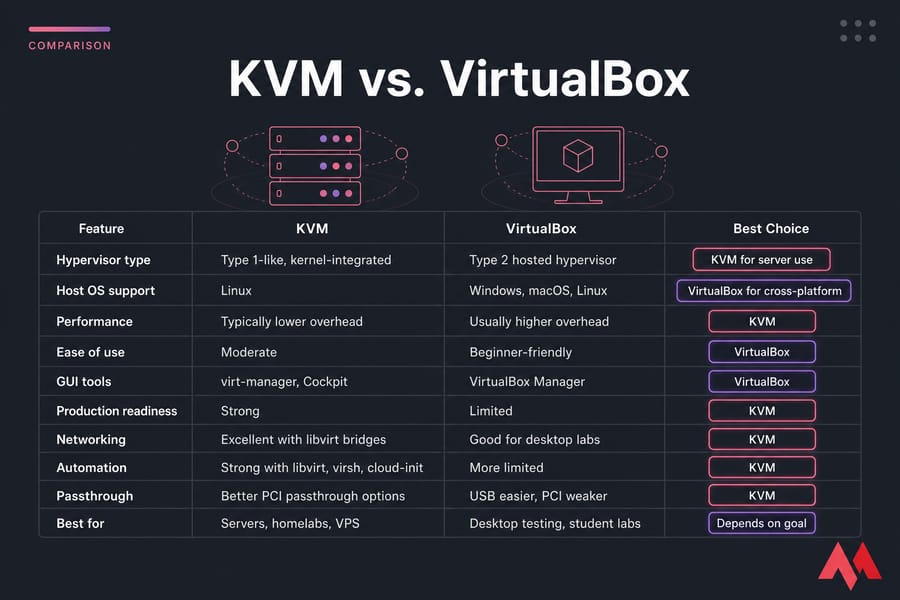
| Feature | KVM | VirtualBox | Best Choice |
|---|---|---|---|
| Hypervisor type | Type 1-like, kernel-integrated | Type 2 hosted hypervisor | KVM for server use |
| Host OS support | Linux | Windows, macOS, Linux | VirtualBox for cross-platform |
| Performance | Typically lower overhead | Usually higher overhead | KVM |
| Ease of use | Moderate | Beginner-friendly | VirtualBox |
| GUI tools | virt-manager, Cockpit | VirtualBox Manager | VirtualBox |
| Production readiness | Strong | Limited | KVM |
| Networking | Excellent with libvirt bridges | Good for desktop labs | KVM |
| Automation | Strong with libvirt, virsh, cloud-init | More limited | KVM |
| Passthrough | Better PCI passthrough options | USB easier, PCI weaker | KVM |
| Best for | Servers, homelabs, VPS | Desktop testing, student labs | Depends on goal |
To understand why the performance gap exists, start with the architecture. If you want more background first, MonoVM's guides on KVM virtualization and what is a hypervisor are worth a look.
🚀 What KVM and VirtualBox actually are
KVM means Kernel-based Virtual Machine. It's built into the Linux kernel through kernel modules and uses Intel VT-x or AMD-V hardware acceleration to run guest operating systems efficiently. In practice, KVM usually shows up as part of a stack: QEMU provides device emulation, libvirt handles management, virsh gives you CLI control, and virt-manager adds a GUI.
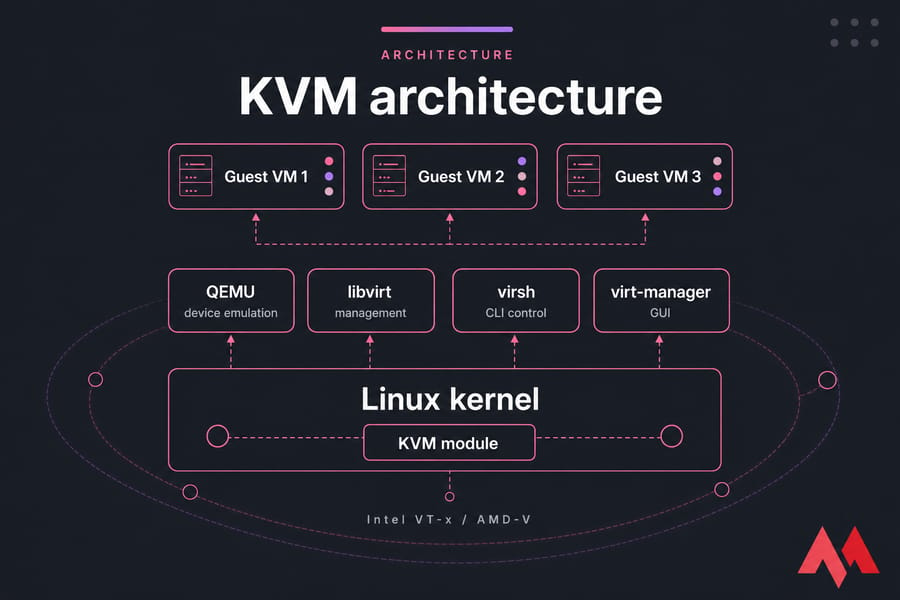
That stack matters. People often say "KVM vs VirtualBox," but a more accurate mental model is QEMU/KVM plus libvirt tools versus VirtualBox. If you've ever compared qemu vs virtualbox or libvirt vs virtualbox, that's the missing context.
And this is why KVM is everywhere in VPS platforms, Proxmox VE, and OpenStack-style environments. It's Linux-first, scriptable, and comfortable running headless VMs for months. That's a very different vibe from a desktop app you open to test Ubuntu for an afternoon. For deep administration tasks, utilizing specialized vps server management tools streamlines the oversight of these complex environments.
For a broader view, see MonoVM's article on open-source virtualization platforms.
VirtualBox, by contrast, is Oracle VM VirtualBox a hosted hypervisor that runs on top of a host OS. You install it on Windows, macOS, or Linux, create a VM through VirtualBox Manager, and boot your guest OS. It's popular because it feels approachable. Students use it. Developers use it. I've used it plenty for quick throwaway labs when I didn't want to think too hard.
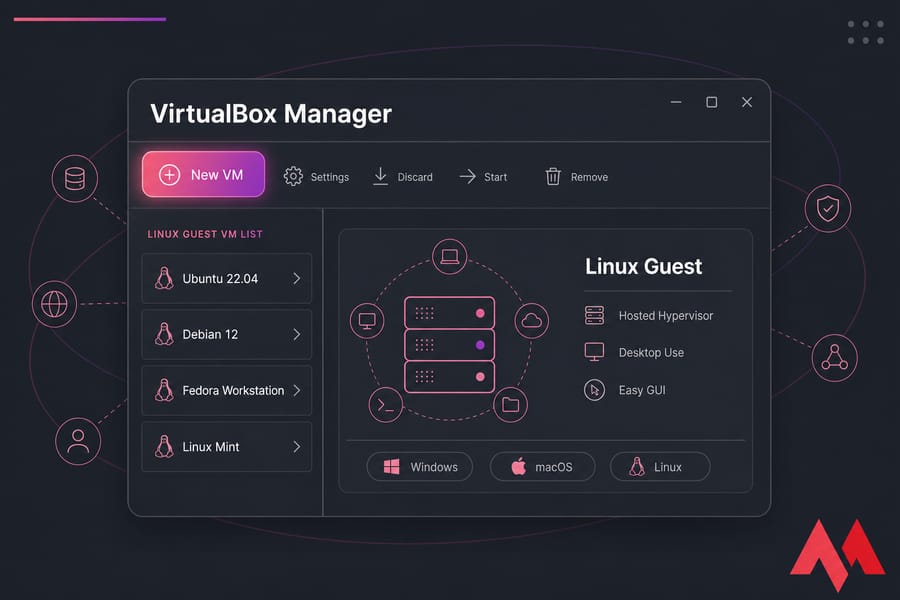
VirtualBox is still useful. It's especially handy when you want a desktop VM on a Windows laptop, or you're testing a distro install without committing to a deeper Linux-native setup.
If that's your lane, MonoVM also has guides on Windows virtual machine setups and linux virtual machine options.
🔧 Type 1 vs Type 2 hypervisor differences in KVM vs VirtualBox
This is the core technical split. A type 1 hypervisor runs very close to the hardware. A type 2 hypervisor runs on top of a host operating system. VirtualBox is clearly type 2. KVM is the nuanced one.
KVM depends on Linux as the host operating system, so it's not bare metal in the classic VMware ESXi sense. But because KVM is integrated into the Linux kernel as a kernel module, it's commonly treated as type 1 or at least type 1-like on Linux. That's fair enough in practice. It sits much closer to the hardware than VirtualBox does.
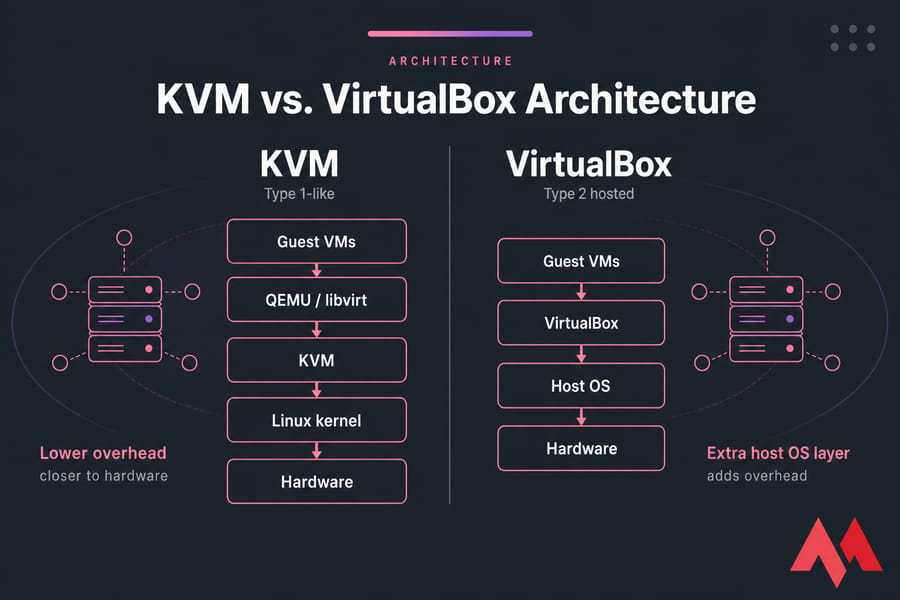
So what does this actually mean? Lower virtualization overhead, better isolation, and cleaner scaling for KVM in most Linux setups. VirtualBox adds another layer between the guest and the hardware, which is part of why it tends to feel less efficient under sustained load. Exploring virtual machine types can clarify how structural architectural positions impact resource limits.
📊 KVM vs VirtualBox performance comparison
For virtualbox vs kvm performance, KVM usually wins on Linux. Not because of magic — mostly because of architecture, VirtIO support, and better integration with server-style workflows.
| Workload | KVM Result | VirtualBox Result | Recommendation |
|---|---|---|---|
| Local test VM | Fast, but more setup | Very convenient | VirtualBox |
| Ubuntu server lab | Efficient and stable | Works, less ideal long term | KVM |
| CI/CD build box | Better headless automation | Usable, less natural | KVM |
| Always-on service | Better fit | Usually not the right tool | KVM |
| Database/app server | Better disk I/O and networking | More overhead | KVM |
| Cross-platform desktop lab | Linux-only host limitation | Very flexible | VirtualBox |
CPU and memory overhead are typically lower with KVM. Disk I/O is often better too, especially when you use VirtIO drivers in the guest. Networking is another big one. Bridged networking with libvirt is strong, and KVM is comfortable with headless VM setups, automation, and production patterns. VirtualBox can do NAT, bridged networking, and snapshots just fine, but once you push into heavier loads, the cracks show.
USB passthrough is often easier to get going in VirtualBox for casual desktop use. PCI passthrough and GPU passthrough? KVM is the serious option there, though setup can get fiddly. I've seen beginners skip BIOS settings or IOMMU checks and then blame KVM unfairly, honestly. For those administering multi-tenant or heavy storage platforms, understanding structural optimization via nvme vs ssd technology can offer radical improvements alongside hypervisor choices.
Nested virtualization is possible in some scenarios with both, but KVM generally fits advanced lab work better. If you monitor VMs closely, you'll also notice why resource behavior matters over time; MonoVM's piece on VM metrics is useful, though this article is the short version.
⚡ Architectural Deep Dive: Why KVM Outperforms
The core performance variance boils down to context switching and memory allocation. KVM leverages the host Linux kernel directly as its scheduler, meaning a guest VM process is treated as a standard Linux task. This minimizes context-switching penalties. In contrast, VirtualBox relies on a host-level application runtime that introduces intermediate emulation buffers. Consequently, when evaluating raw mathematical computations, high-throughput network routing, or extreme database transactions, KVM maintains minimal CPU performance deviation compared to bare-metal hardware.
💡 Ease of use, features, and the best use cases
VirtualBox is usually easier for beginners. Install, click New, pick an ISO, done. On Ubuntu, Debian, or Fedora, KVM can also be pretty friendly if you use virt-manager, but the moment you touch virsh, storage pools, bridges, or cloud-init, the learning curve gets steeper.
Feature-wise, both support snapshots, cloning, NAT, and host-only networking. KVM pulls ahead in automation, headless operation, and infrastructure tooling. Vagrant, libvirt, and cloud-init fit naturally into KVM-based workflows. VirtualBox can work with Vagrant too, but it's more of a desktop convenience story than a server-grade one.
| Scenario | Better Option | Why |
|---|---|---|
| Testing Linux distros on a laptop | VirtualBox | Quick setup and easy GUI |
| Linux homelab | KVM | Closer to real server workflows |
| Developer workstation on Windows/macOS | VirtualBox | Cross-platform convenience |
| Ubuntu server practice | KVM | Matches production better |
| Production VM | KVM | Better performance and isolation |
| Student lab | VirtualBox | Lower friction |
| Self-hosting and automation | KVM | CLI, libvirt, and headless strength |
| VPS-style deployment path | KVM | Natural transition to hosted infrastructure |
If you're asking about kvm vs virtualbox for development, I'd say VirtualBox for quick local app testing, KVM for heavier Linux-native dev work. For a serious homelab, KVM usually wins. For production workloads, it's not close pick KVM. For enterprise developers seeking agile environments, deploying a specialized vps for developers based on KVM architectural virtualization saves immense compilation and delivery overhead.
🔍 KVM vs VirtualBox pros and cons
KVM pros: better performance, Linux-native design, strong automation, production-ready, better for server virtualization and passthrough.
KVM cons: Linux-centric, more moving parts, steeper learning curve.
VirtualBox pros: easy GUI management, cross-platform, excellent for desktop virtualization and temporary test environments.
VirtualBox cons: more overhead, weaker fit for production workloads, less natural for large-scale automation.</p
🤔 KVM or VirtualBox: which should you choose?
Choose KVM if you answer yes to most of these:
- Are you on a Linux host?
- Do you care about better disk I/O and network throughput?
- Will this VM run all the time?
- Do you want automation, CLI control, or cloud-style workflows?
- Are you building toward a Linux server or VPS environment?
Choose VirtualBox if your answer is yes here:
- Do you need a desktop VM fast?
- Are you using Windows or macOS as the host?
- Is this mostly a local test environment?
- Do you prefer GUI-first management?
I personally think the cleanest rule is this: VirtualBox for convenience, KVM for commitment. Once your lab starts to matter, KVM usually becomes the better long-term choice.
If you're comparing nearby options too, see KVM vs Proxmox, KVM vs VMware, and VMware vs VirtualBox.
⚠️ Common Mistakes to Avoid in Virtualization
- Over-allocating Host vCPUs: Allocating more virtual cores to a guest machine than physical threads exist on your host CPU creates devastating scheduling lockups. This is especially true in VirtualBox where scheduling has higher context abstraction.
- Neglecting VirtIO Drivers: When running guest systems inside KVM, defaulting to generic IDE or SATA disk emulation severely restricts performance. Always choose VirtIO for disk and network configurations to achieve near-native performance levels.
- Forgetting Hardware Virtualization Extension Options: If Intel VT-x or AMD-V is disabled inside your motherboard UEFI/BIOS, hypervisors must switch to highly inefficient software translation modes.
🌐 When a KVM VPS makes more sense than local virtualization
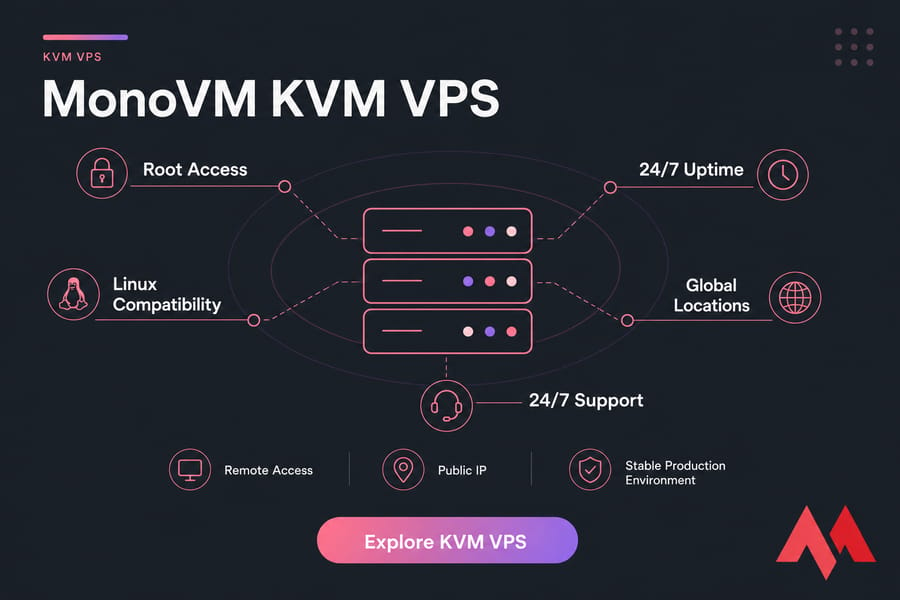
If your desktop VM now needs 24/7 uptime, remote access, a public IP, and a stable production environment, local virtualization starts feeling cramped. That's usually the moment to stop tinkering and move the workload.
KVM VPS hosting gives you root access, better isolation, and a Linux-friendly setup that mirrors real deployment more closely. If you've outgrown the local VM stage, compare VM vs VPS and then check MonoVM's KVM VPS hosting, Linux VPS, VM Hosting and broader VPS hosting options. That's the practical path for always-on services.

An experienced tech and developer blog writer, specializing in VPS hosting and server technologies. Fueled by a passion for innovation, I break down complex technical concepts into digestible content, simplifying tech for everyone.