Imagine you want to move forward with your latest projects on Windows 11 while simultaneously running a specialized Linux distribution for network security testing. To achieve all of this on a single machine, you need virtualization. Two of the most popular tools in this field are VMware and VirtualBox. Both allow you to partition a physical system into multiple virtual machines, but they differ in terms of features and performance. So, you want to know which one is right for you. In this MonoVM article, by examining the key features and important differences between these two tools, we answer this important question. Stay with us until the end of the article.
What Is VMware?
VMware, which is now considered part of the Broadcom empire, has been recognized for decades as the gold standard of the virtualization industry. Currently, both VMware Workstation Pro for Windows and Linux and VMware Fusion Pro for Mac are completely free for all users, including personal, educational, and commercial use.
If you want to learn more about VMware and its advantages and features, the blog post What Is VMware will answer all your questions about this tool.
From a structural perspective, VMware is a Type 2 hypervisor that sits on top of the host operating system layer. However, deep optimizations in the VMM Virtual Machine Monitor layer have enabled its performance in CPU processing and RAM management to come impressively close to physical systems. The table below clearly shows the key features of VMware.
|
VMware Technical Features in 2026 |
Details and Performance |
|
Licensing Model |
Free for all uses, personal and commercial |
|
Supported Architecture |
x86_64 Windows and Linux and ARM64 Mac |
|
Hardware Version |
Hardware Version 22 with next generation optimizations |
|
3D Graphics |
Support for DirectX 11 and OpenGL 4.5 |
|
Management Tools |
dictTool for advanced editing of vmx settings |
If you're planning to set up a Windows environment, our guide on What Is a Windows Virtual Machine walks through everything you need to know before getting started.
What Is Oracle VM VirtualBox?
If we consider VMware a symbol of corporate power, Oracle VM VirtualBox is undoubtedly the champion of the open source world. This software, which is published under the GNU GPL v2 license, has now reached a level of maturity that has turned it into a serious competitor for commercial versions. VirtualBox, because of its true cross platform capability, runs on a wide range of operating systems including Windows, Linux, macOS, and even Oracle Solaris and provides a consistent user interface across all of them.
If you're specifically interested in running open-source environments, our What is a Linux Virtual Machine guide covers setup and optimization in detail.
One of the most important developments is the transfer of key features such as disk encryption, VRDP server, and USB webcam emulation from the paid extension package to the main open source package. This change has not only increased user security by default, but has also resolved many licensing challenges in enterprise environments.
|
VirtualBox Technical Features in 2026 |
Details and Performance |
|
License |
Completely free and open source GPL v2 |
|
Host System Compatibility |
Windows, Linux, macOS, Solaris |
|
Virtual Disk Formats |
Support for VDI, VMDK, VHD, HDD, QED |
|
Network Capabilities |
New NAT engine with full IPv6 support |
|
ARM Status |
ARM64 support on Mac and Windows preview |
If you are not familiar with the basic concepts of virtualization, we recommend that before continuing to read, you first study the article What Is VM to become more familiar with the concept of virtual machines and their types.
VMware vs VirtualBox: A Comprehensive Feature Comparison
To make the right choice between these two, we need to dive into some technical details to better understand the fundamental differences in resource management and specialized capabilities.
1. OS Compatibility
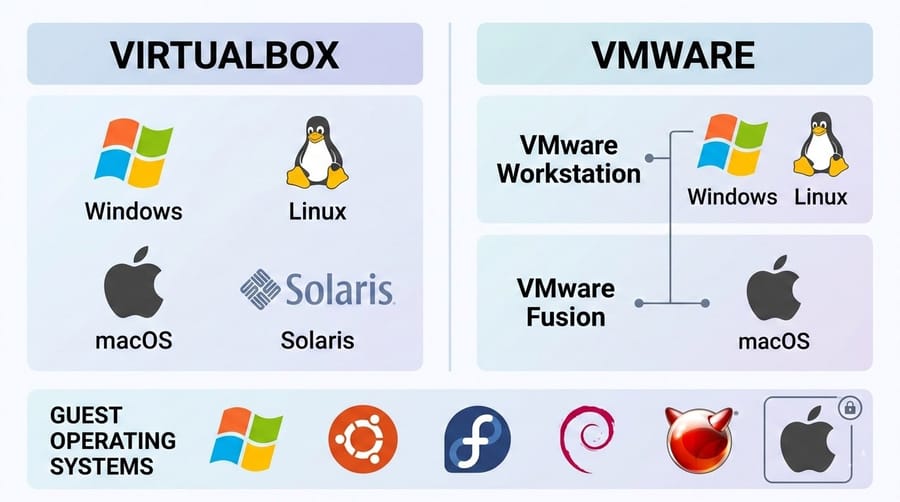
VMware and VirtualBox both install on most common systems, but they differ at the host platform level. Oracle VM VirtualBox supports Windows, Linux, macOS, and Solaris. VMware Workstation runs on Windows and Linux, and its Mac specific version, VMware Fusion, installs only on macOS.
In terms of guest operating systems, both platforms allow you to run Windows, various Linux distributions, and even FreeBSD. However, legally installing macOS as a guest is only permitted in VMware Fusion. Overall, VirtualBox is more flexible on host systems, but for macOS, Fusion is considered the more optimized choice.
2. Performance and Resource Management
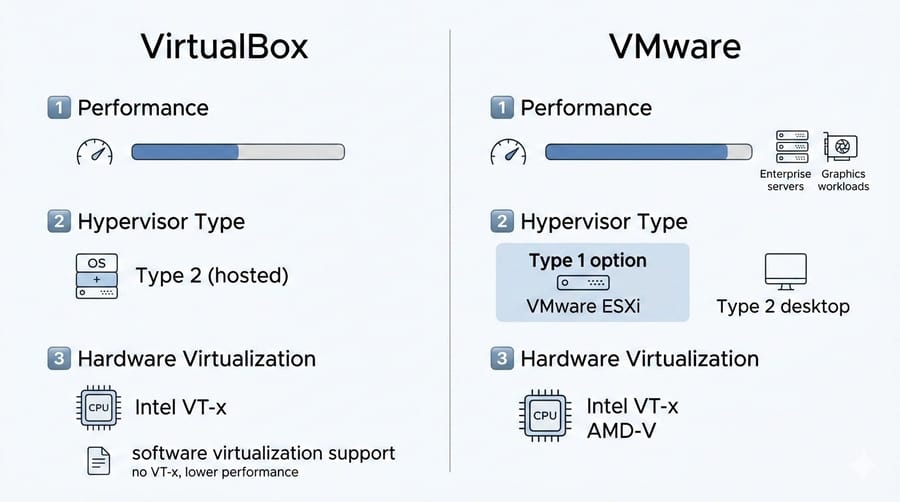
In terms of performance, VMware is usually slightly ahead, especially under heavy workloads. If you require maximum performance, for example large enterprise servers or complex graphics processing, using a Type 1 bare metal hypervisor such as VMware ESXi is recommended.
On the other hand, if you plan to run a virtual machine on a regular computer with an installed operating system, a Type 2 hypervisor, which both VirtualBox and Workstation belong to, is sufficient. Both platforms support hardware virtualization technologies such as Intel VT x and AMD V, which must be enabled in the host system BIOS or UEFI to achieve optimal efficiency. VirtualBox can even operate on older hardware without VT x by using software virtualization. We will discuss performance benchmarks of these two further below.
3. Storage and Disk Management
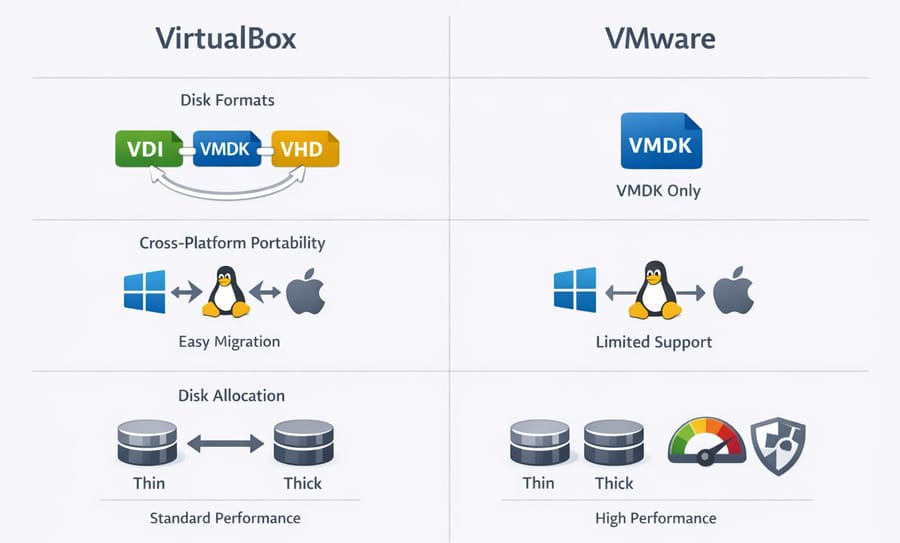
In the area of virtual disk files, VirtualBox demonstrates exceptional flexibility. It natively supports formats such as VDI, its proprietary format, VMDK, the VMware format, and VHD, the Microsoft format. This capability allows engineers to move virtual machines across platforms without relying on heavy conversion tools.
In contrast, VMware primarily focuses on the VMDK format, which, although highly stable and optimized, introduces certain limitations in cross platform portability. Regarding disk allocation, both platforms support dynamic thin provisioned and fixed thick provisioned disks. However, VMware delivers more stable performance in managing dynamic disks under heavy workloads and is more effective at preventing disk file fragmentation.
4. Graphics Acceleration and Visual Experience
This is where VMware continues to maintain its lead. VMware Workstation Pro supports DirectX 11 and OpenGL 4.5 and allows up to 8 GB of graphics memory to be assigned to a virtual machine, making it the best option for running CAD software, video editing applications, and even light gaming in a virtual environment.
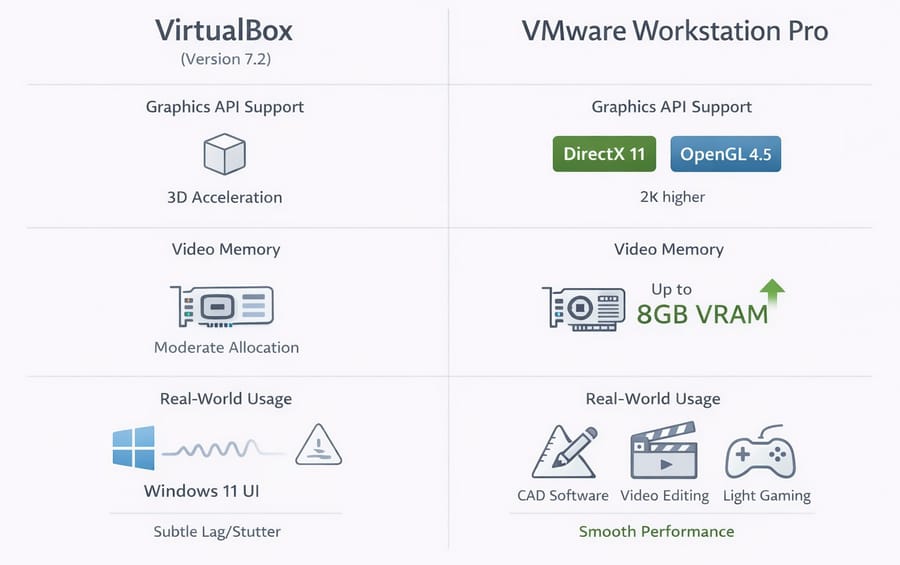
In comparison, VirtualBox version 7.2 has improved 3D acceleration on Linux and Mac, but it still occasionally experiences slowdowns and screen stuttering when running heavy user interfaces, such as Windows 11 with full visual effects enabled.
5. Networking and Simulation Capabilities
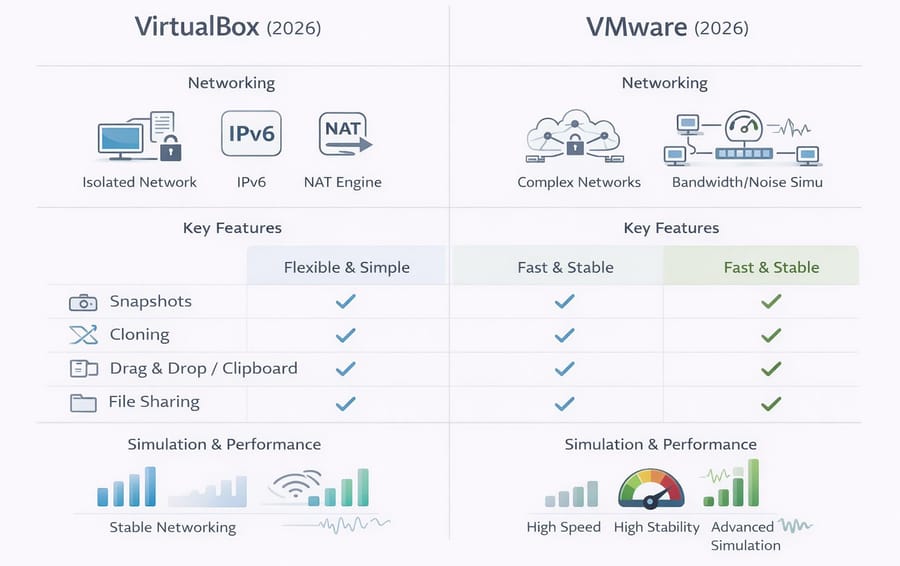
For security specialists and network administrators, networking capabilities are critical. In 2026, VMware upgraded its Virtual Network Editor to a new level. You can create fully isolated networks with complex topologies and even simulate physical network characteristics such as limited bandwidth or noise.
VirtualBox also significantly improved network stability in 2025 by introducing a new NAT engine based on libslirp, and it performs very well in managing IPv6 addresses within isolated environments.
|
Feature Compared |
VMware 2026 |
VirtualBox 2026 |
|
Snapshots |
Extremely fast with branch management |
Powerful but with a slightly outdated interface |
|
Cloning |
Supports Linked Clones for space efficiency |
Supports both full and linked clones |
|
Drag and Drop and Clipboard |
Very smooth and stable, even on Linux |
Good, but sometimes problematic on ARM systems |
|
File Sharing |
VMware Shared Folders with high speed |
VirtualBox Shared Folders with easy configuration |
The table above clearly shows VMware’s lead in networking and simulation capabilities.
6. Security and Updates
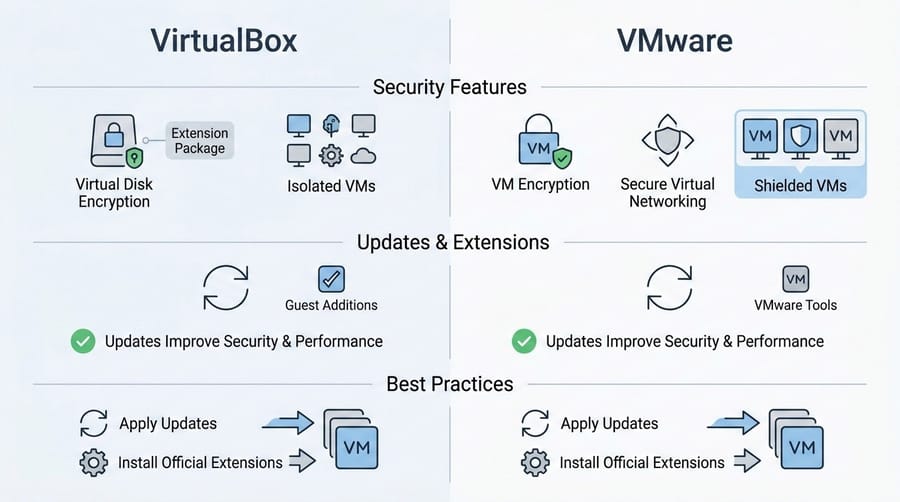
From a security perspective, both platforms operate with strong isolation between virtual machines. VMware provides more advanced tools such as VM encryption and more secure virtual networking, although organizational use may require licensing. VirtualBox offers virtual disk encryption through its extension package.
Both vendors regularly release updates to address security vulnerabilities and introduce new features. For example, installing Guest Additions or VMware Tools improves both security and performance of virtual machines. In short, applying regular updates and installing the official platform extensions, Guest Additions or VMware Tools, is essential for maintaining security and optimal performance.
7. Enterprise vs Home Use
If you plan to build infrastructure for a large enterprise, you should not even consider VirtualBox. VMware Workstation or VMware ESXi are the standard choices. Features such as integration with vSphere, creation of virtual clusters, and advanced automation tools are among the key strengths of this platform.
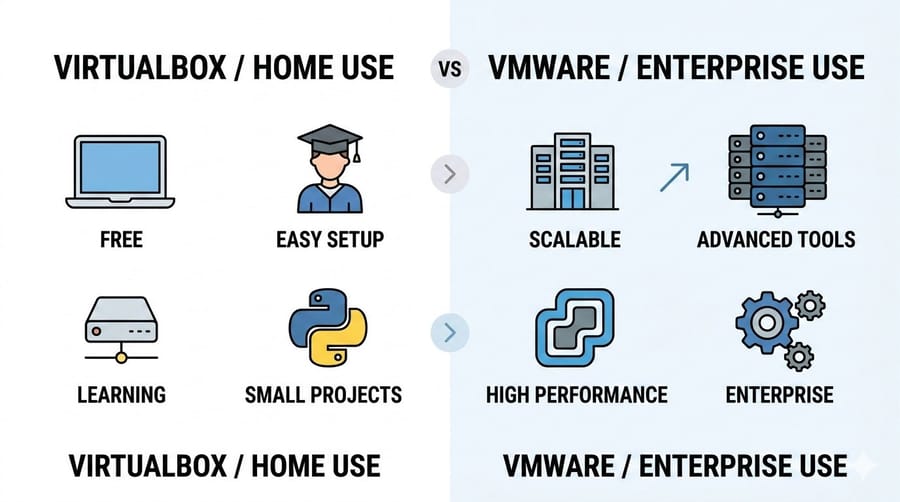
However, if you simply want a Linux environment to learn Python or need to run legacy software, VirtualBox is not only sufficient but also enjoyable to use. Because it is free and easy to set up, VirtualBox is an excellent option for individuals, students, and smaller projects. In other words, if your budget is limited and you need the simplest deployment path, VirtualBox is a convenient choice. For heavy commercial workloads or environments that require scalability, VMware offers greater long-term value.
VMware vs VirtualBox Benchmark Comparison
In tests conducted in 2026 on a system equipped with 32 GB of RAM and a 10 core processor, the following results were obtained.
1. Memory Consumption
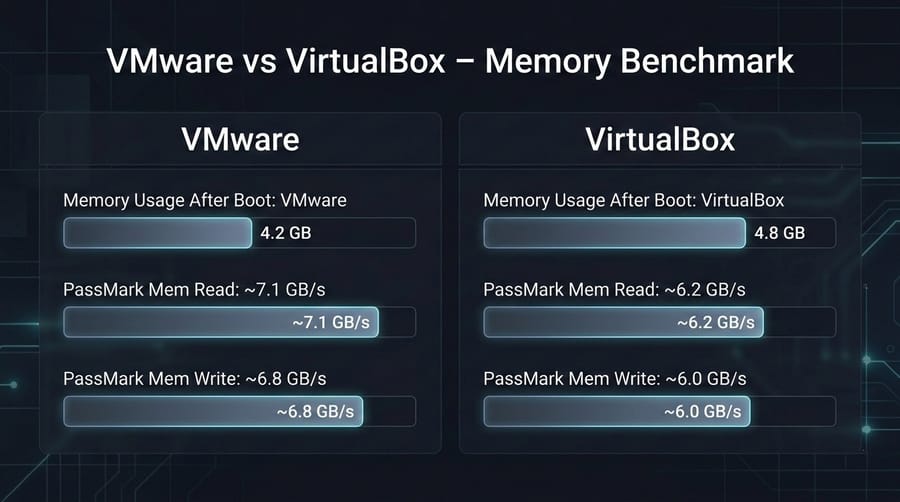
When running a Windows 11 virtual machine with 4 GB of allocated RAM, VMware consumed only about 4.2 GB of host system memory after full boot. In contrast, Oracle VM VirtualBox used approximately 4.8 GB of RAM. This difference is due to VMware memory compression technologies, which allow you to run more virtual machines simultaneously. You can also see their PassMark benchmark scores in the table below.
|
Metric |
VMware |
VirtualBox |
|
PassMark Mem Read |
~7.1 GB/s |
~6.2 GB/s |
|
PassMark Mem Write |
~6.8 GB/s |
~6.0 GB/s |
As you can see, VMware achieves better scores in both memory read and write tests.
2. CPU Efficiency
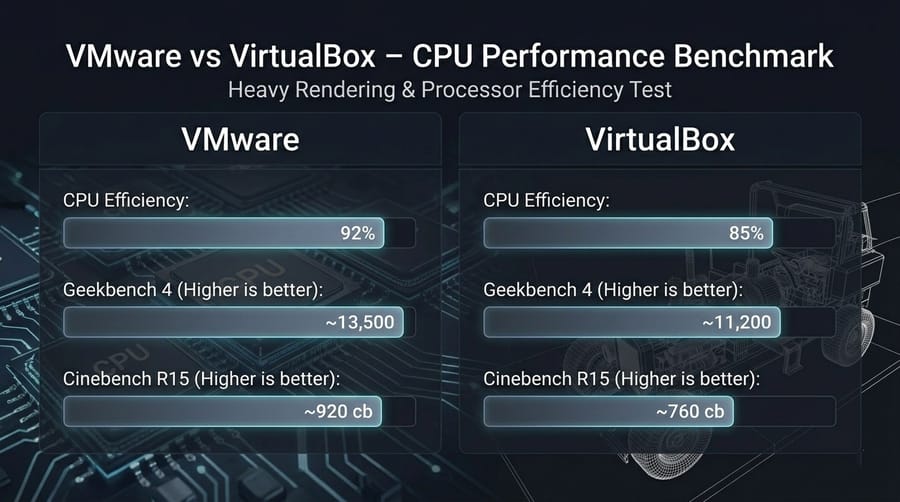
In a heavy rendering test, the virtual machine running on VMware achieved 92 percent of the host processor’s real performance. This figure was around 85 percent for VirtualBox. If your workload involves intensive mathematical processing or video editing in a virtual environment, VMware is the clear winner. The CPU benchmark results from Geekbench and Cinebench are as follows, comparing processor performance across both virtualization platforms.
|
Metric |
VMware |
VirtualBox |
|
Geekbench 4 Higher is better |
~13,500 |
~11,200 |
|
Cinebench R15 Higher is better |
~920 cb |
~760 cb |
These results indicate that VMware performs approximately 10 to 15 percent better in general CPU benchmarks.
3. Disk I/O Speed
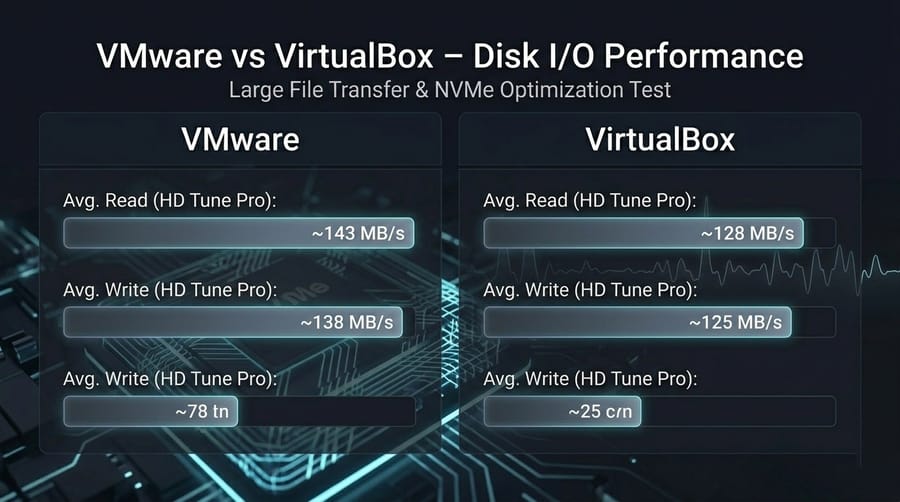
With the introduction of optimized NVMe drivers in version 25H2, file read and write speeds in VMware have increased significantly. In large file copy tests, VMware performed about 15 percent faster than VirtualBox. This advantage becomes especially noticeable during guest operating system updates or antivirus scans inside the virtual environment.
|
Metric |
VMware |
VirtualBox |
|
Avg. Read HD Tune Pro |
~143 MB/s |
~128 MB/s |
|
Avg. Write HD Tune Pro |
~138 MB/s |
~125 MB/s |
VMware delivers better sequential read and write speeds, although VirtualBox can outperform it in certain specific 4K read scenarios.
4. VM Boot Time and File Transfer
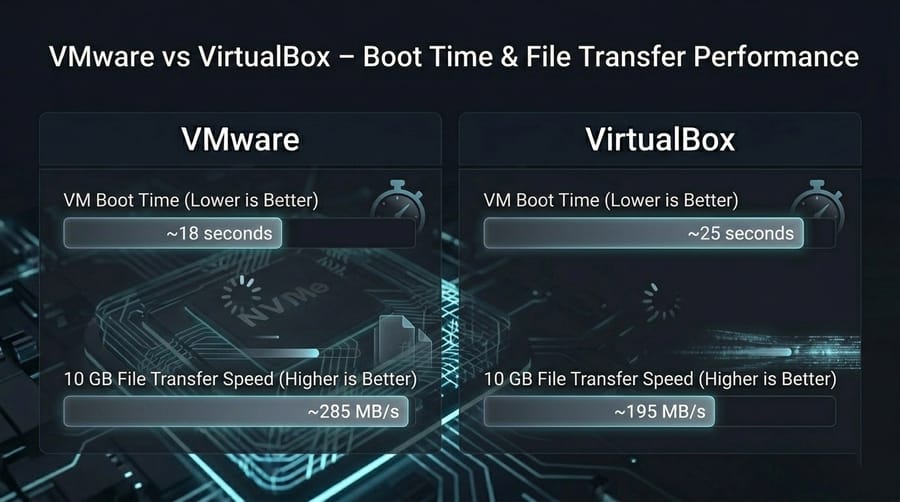
In practical testing, the virtual machine on VMware booted about 7 seconds faster and achieved nearly 90 MB per second higher speed when transferring a 10 GB file. This difference in everyday usage, especially when frequently launching virtual machines or moving large files, results in a smoother experience and higher productivity with VMware.
|
Metric |
VMware |
VirtualBox |
|
VM Boot Time |
~18 seconds |
~25 seconds |
|
10 GB File Transfer Speed |
~285 MB/s |
~195 MB/s |
Based on the table above, in everyday tasks such as VM booting or file transfer, VMware performs faster.
To better understand how these performance differences relate to architecture and deployment models, read our Virtual Machine Types guide and explore which VM category best fits your workload.
Comparative Table of Advantages and Disadvantages at a Glance
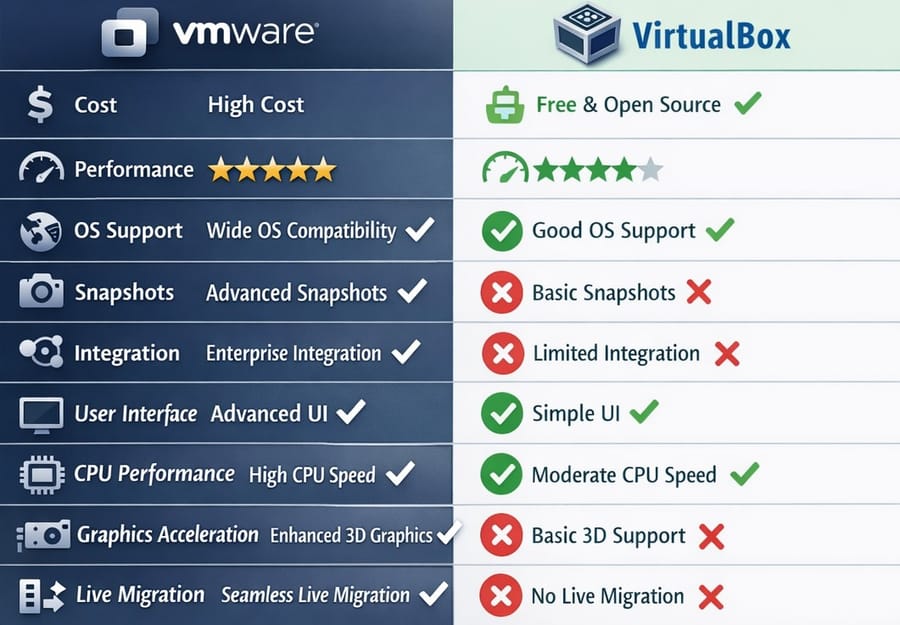
To make your decision easier, take a look at the comparison table below, prepared based on 2026 performance data.
|
Feature |
VMware |
VirtualBox |
|
Cost |
Player version free; Workstation and Fusion paid about $79 to $150 |
Completely free and open source |
|
Performance |
Very high, optimized for heavy workloads |
Good to moderate, suitable for light to medium workloads |
|
OS Support |
Host Windows and Linux; Mac with Fusion; Guest Windows, Linux, macOS |
Host Windows, Linux, Mac, Solaris; Guest Windows, Linux and more |
|
Snapshots |
Advanced in Pro and cloud versions |
Basic snapshot support with fewer capabilities |
|
Integration |
Enterprise tools such as advanced networking and vSphere |
More limited features, mainly suitable for home environments |
|
User Interface |
Professional and more complex |
Simple and beginner friendly |
|
CPU Performance |
Very high and optimized |
Good for light and medium tasks |
|
Graphics Acceleration |
Excellent, supports DX11 and OpenGL 4.3 |
Limited and in some cases experimental |
|
Live Migration Support |
No in desktop version |
Yes, between different hosts |
Note: The table above provides a concise comparison of key features. For example, VMware performs better in advanced graphical workloads and when running multiple virtual machines simultaneously, while Oracle VM VirtualBox offers core features free of charge.
Powerful Alternatives Beyond VMware and VirtualBox
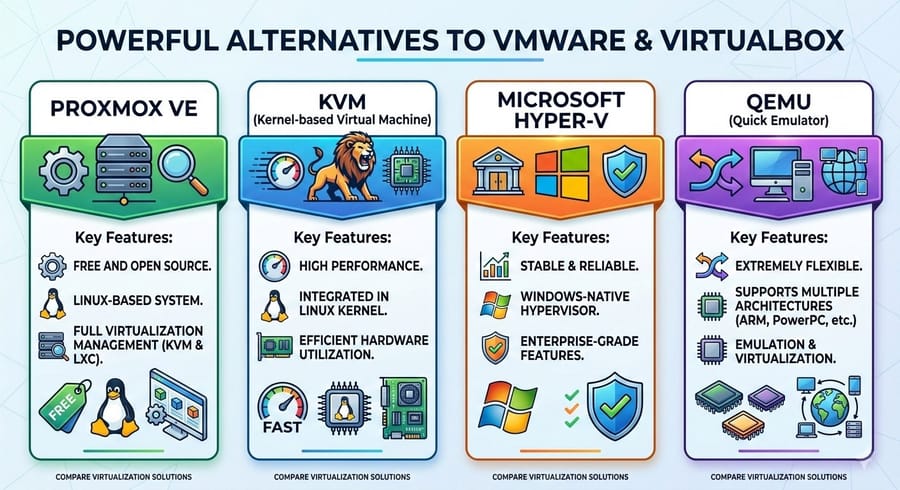
Sometimes neither VMware nor VirtualBox fully meets your specific requirements. In such cases, you should consider alternative solutions. Which alternatives?
- Proxmox VE: Proxmox is a complete Linux based virtualization management platform built on KVM and LXC. It is fully free and its management capabilities are comparable to VMware vCenter. For those who want to set up a home server or a small data center, Proxmox is often the first choice.
- KVM: If you are looking for pure performance, few solutions can match KVM. This technology is integrated directly into the Linux kernel, allowing virtual machines to access hardware with minimal overhead.
- Microsoft Hyper-V: The built in Windows hypervisor is highly powerful. If your work is entirely within the Windows ecosystem, Hyper-V offers exceptional stability. However, it may conflict with certain other software, such as older Android emulators.
- QEMU: A tool designed for professionals who need to emulate different architectures, for example running ARM on Intel. Although it has a steeper learning curve, it provides extensive flexibility and control.
Due to recent policy changes by Broadcom and certain technical limitations of Oracle VM VirtualBox, many professionals choose one of these alternatives. If you are specifically weighing Microsoft’s native hypervisor against VMware’s ecosystem, read our in depth VMware vs Hyper-V comparison.
Final Decision: Which Group Do You Belong To?
Now that we have examined all the details, let us reach a conclusion together. Your choice should reflect your professional identity and primary use case.
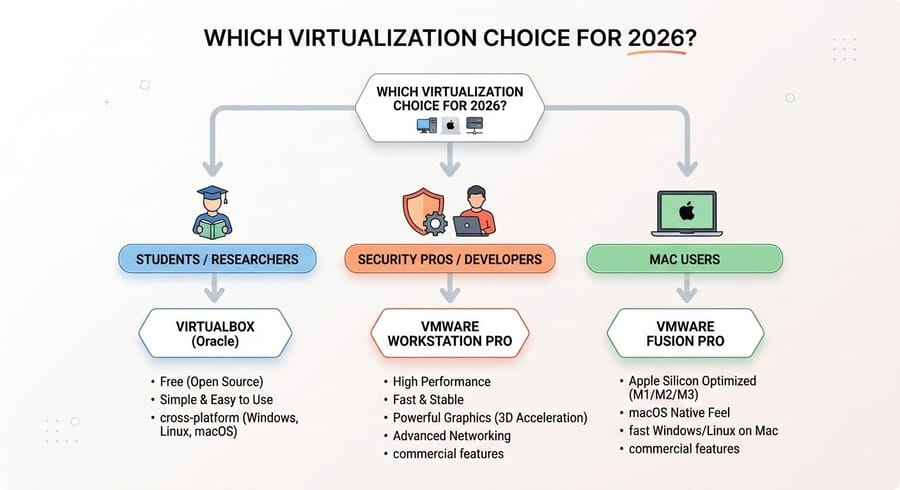
Are You a Student or Researcher?
If your budget is limited and you want a hassle free way to explore Linux and networking, Oracle VM VirtualBox remains your best companion. Its simplicity and fully free license, even for small commercial projects you may take on in the future, are major advantages.
Are You a Security Specialist or Professional Developer?
If system stability, compilation speed, and graphics performance are critical for you, do not hesitate to choose VMware Workstation Pro. Now that the Pro version is free for personal use, there is little reason to overlook its professional grade power and advanced capabilities.
Are You a Mac User?
If you use a Mac, hardware level compatibility should be your priority. VMware Fusion Pro delivers the best experience in 2026 on Apple Silicon M series chips. Although VirtualBox continues to improve, it still does not match Fusion in overall smoothness and user experience.
If you do not fall into any of these categories and still feel uncertain, ask your questions in the comments section so the experts at MonoVM can guide you.
Ready to Launch Your VM?
Virtualization gives you a power that was once unimaginable. You can carry an entire server in your pocket on a laptop, test risky environments without any danger, and blur the boundaries between operating systems. Ultimately, if you are looking to host high-quality virtual machines with 24/7 support, our MonoVM VM Hosting services offer a reliable and cost-effective solution. Leveraging advanced infrastructure based on VMware ESXi and KVM, our hosting provides a native and ultra-fast virtual server (VPS) experience across more than 40 global locations. Today, you can confidently entrust your virtual machine to the stable clouds of MonoVM.

An experienced tech and developer blog writer, specializing in VPS hosting and server technologies. Fueled by a passion for innovation, I break down complex technical concepts into digestible content, simplifying tech for everyone.