Registering a domain name takes about ten minutes and usually costs between $10 and $20 for the first year. You search for the name at a registrar, pick an extension, pay, confirm the verification email, and it's yours. That's the whole thing. The tricky part isn't the checkout. It's picking a name you won't regret, avoiding renewal-price surprises, and actually pointing the domain at a website once you own it. This guide walks through all of it.
Before diving into the steps, it's worth understanding what you're actually registering. If you're new to creating a website, deciding on your domain name is one of the first major tasks you'll face. Having the right name benefits your website from the start — so choose wisely with proper research.
📌 What Is a Domain Name?
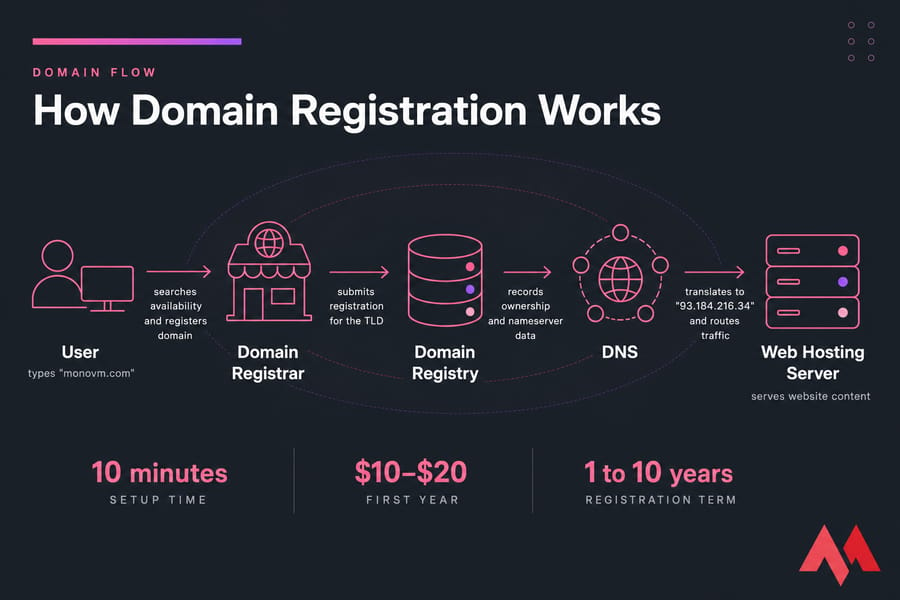
A domain name is the address people type into a browser — monovm.com, for example. Behind the scenes, servers find each other using IP addresses like 93.184.216.34. Nobody wants to memorise those, so DNS translates the friendly name into the numeric one. The domain name server (DNS) helps in converting the IP address to the domain name whenever a request is made through the browser for a specific website.
A domain name has two parts: the first part is the name of the website, and the second part is the extension — also called a TLD (Top-Level Domain). The most commonly used extension is .com, which is easily accessible from any geographical region. Domain extensions vary based on purpose: .org for nonprofits, .net as a fallback, and country-code TLDs like .co.uk or .de for local audiences.
You don't technically buy a domain forever. You lease the exclusive right to use it, one to ten years at a time, through an ICANN-accredited registrar or one of its resellers. Once you make it official, users are able to access your website using that name. If you want the deeper explanation, here's what a domain name is in more detail.
📖 History of Domain Names
The first domain name was registered in 1985 for Symbolics.com. Since then, more than 300 million websites have been registered worldwide, and this number keeps increasing. As businesses grow online and everyone wants to increase their online presence, having a registered website is the best way to come into the limelight. With a domain name, you get an address for your website that stores all the relevant data regarding your online identity.
🧭 How to Choose the Right Domain Name
Short, spellable, sayable. That's the bar. If you can't read it out over a phone call without spelling it letter by letter, it's the wrong name. Skip hyphens and numbers — best-shoes-4u.com looks like spam and gets typed wrong constantly. And please run a trademark search before you commit. I've watched a client rebrand twelve months in because they picked a name a much larger company already owned. That's an expensive lesson.
Branded names (Shopify, Monovm) travel further than keyword-stuffed ones (cheapwebhostinguk.com), though a keyword name can work for a narrow local service. As for extensions: .com still wins on trust. New gTLDs such as .io or .store are fine — just be aware that some users will still type .com out of habit. More angles on this in our guide to how to choose a domain name.
📋 What You Need Before Registering a Domain Name
Five minutes of prep saves a lot of second-guessing at checkout:
- Two or three name ideas, ranked. Your first choice is probably taken.
- Preferred extensions — .com first, then a backup like .net, .co, or your country-code TLD.
- A rough budget. Standard domains are cheap. Premium ones can run into the thousands.
- Real contact details — full name, address, phone, and a working email. ICANN requires accurate registrant contact information, and an unverified email can suspend the domain.
- A payment method and a rough idea of where the site will live.
You don't need hosting first. Plenty of people park a name for months. But knowing your host in advance means you can set nameservers the same day.
🔍 How to Check If a Domain Name Is Available
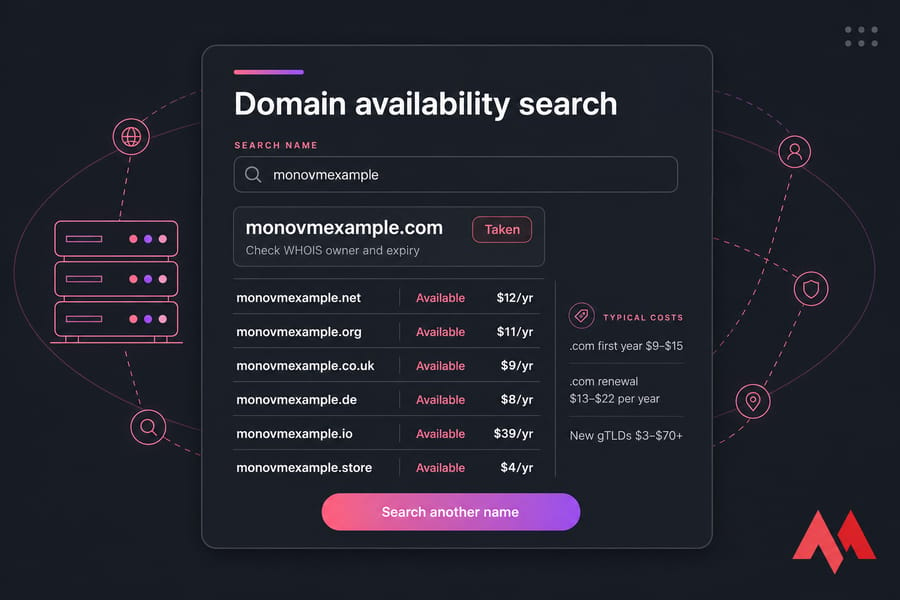
Type it into any registrar's search box. You'll get an instant available/taken answer plus suggested alternatives. You can also check domain ownership with WHOIS to see who holds a registered name and when it expires.
Taken? You've got options. Tweak the wording (add a verb, a prefix, a location). Try a different TLD. Use a name generator for brandable coinages. Or, if the domain is registered but clearly unused, send a polite purchase offer — sometimes it works, often it doesn't. Expired-domain backorders exist too, but that's a patient game.
🛒 How to Register a Domain Name Step by Step
The entire system of maintaining, managing, and creating domain names falls under a non-profit organization called the Internet Corporation for Assigned Names and Numbers (ICANN). It authorizes outside companies — domain registrars — to sell and manage domain names. To register your website, you need to find an authoritative domain registrar that will help you avoid legal problems. You can choose MonoVM for competitive prices, plans, features, and authenticity.
- Choose a registrar. Check ICANN accreditation or reseller status, published renewal prices, WHOIS privacy availability, DNS management tools, transfer lock, and support hours.
- Search your name. Enter it without "www" or "http". Use specific keywords related to your website's content to find suitable suggestions. You can also check various alternatives through the registrar's search bar.
- Pick the extension. Grab the .com if it's free; register defensive variants only if the budget allows. Choose a unique, out-of-the-box domain name that will stick with visitors and have a solid impact on them.
- Add it to the cart. Decline bundled extras you don't understand yet.
- Choose a registration term. One year is fine. Two or more locks in pricing and reduces the chance of an accidental lapse.
- Enter registrant details. Registrant, admin, and technical contacts can all be you. Use accurate data.
- Add WHOIS privacy if it isn't already included. It acts as a privacy shield protecting your personal information from hackers and spammers.
- Pay. Registration is usually confirmed within seconds. You can expect a registration fee of about $10 to $15 or more depending on your plan.
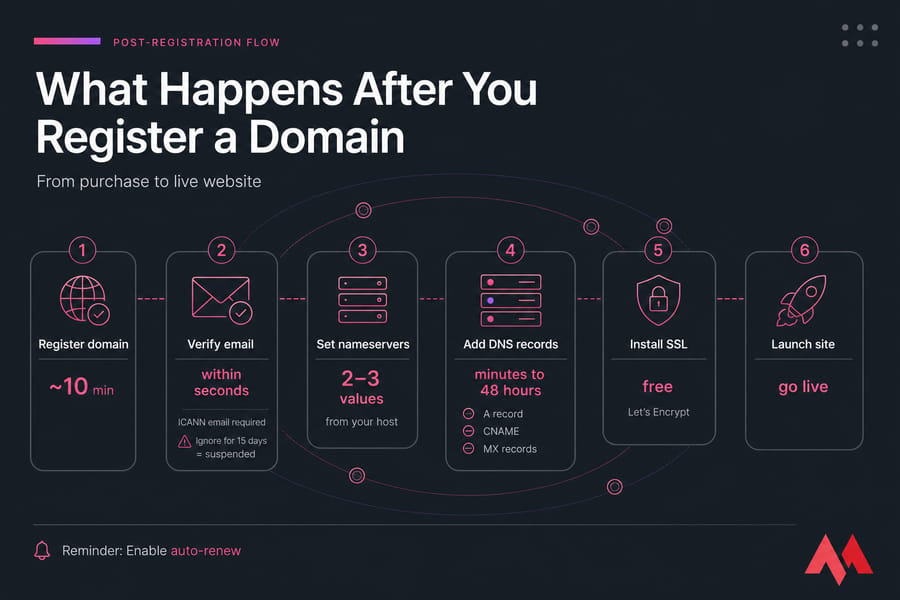
- Verify your email. ICANN mandates this. Ignore the message for 15 days and the domain gets suspended.
- Open your domain dashboard and set nameservers. Here's how to manage your domain control panel.
💰 How Much Does It Cost to Register a Domain Name?
| Item | Typical cost | Notes |
| .com first year | $9–$15 | Promo pricing is common |
| .com renewal | $13–$22 per year | Always check this before buying |
| New gTLDs (.io, .ai, .store) | $3–$70+ | Cheap year one, pricey on renewal |
| WHOIS privacy | $0–$12 per year | Free at many registrars |
| Premium domain | $100–$100,000+ | One-off resale price |
| Redemption after expiry | $60–$120 | Avoid with auto-renew |
The renewal number is the one that bites people. A $1 first-year .xyz that renews at $14 isn't a scam — it's just marketing. Read the fine print.
🛡️ What Is WHOIS Privacy and Do You Need It?
WHOIS is the public lookup database of domain registration records. Without protection, your name, postal address, phone number, and email can be queried by anyone. Privacy protection replaces those fields with the registrar's proxy details while you stay the legal owner.
Some TLDs and registrars include it free; others charge a small annual fee. GDPR already masks a lot of data for EU registrants, and .uk domains hide non-trading individuals by default. If you're registering from home, turn it on. Full breakdown here: domain privacy protection.
🚀 What Happens After You Register a Domain Name
Owning the name does nothing on its own. Four things get it live:
- Set nameservers. Paste the two or three values your host gave you into the domain dashboard. This hands DNS control to your hosting account. On a VPS, follow our guide to point your domain to a VPS.
- Configure DNS records. An
Arecord maps the root domain to your server's IP.CNAMEaliases subdomains likewww.MXrecords route email. Changes propagate in minutes to 48 hours — if something looks broken early on, this is usually why, and you can troubleshoot DNS errors from there. - Add email and SSL. Free Let's Encrypt certificates are standard with most hosting panels.
- Enable auto-renew. Do it now, not later.
Then build the thing. Here's how to create a website after registering your domain.
🆓 Can You Register a Domain Name for Free?
Not really — and the offers labelled "free" are three different things. A free subdomain like yourname.wixsite.com costs nothing but you don't own it. The platform does. A free first-year domain with hosting is genuine registration paid for by the hosting fee — you own the name and just pay full price at renewal. Then there are giveaway TLDs (.tk and friends) that can be revoked without warning.
Here are some online options that offer free domain name registration bundled with other services:
1. Wix
With this website builder option available online, you will also get to register your domain name for free. But the generated domain name will also include Wix's name in it. Suppose you are creating a domain name for your website, then it will be domain_name.wix.com. It will allow the user to get an idea that your website has been hosted on the Wix platform.
2. Weebly
Similarly to Wix, it also allows the users to register their website's domain name for free. But it also comes with a domain name like domain_name.weebly.com. You will have some limitations for building the website but you will have to pay less compared to fully-featured access. If you are developing small scale websites, it is a good option to go for.
3. Bluehost
If you are opting for its web hosting plan, then you will get its facility of registering the domain name for free for one year. It is one of the leading options that you can consider if you are looking for both website hosting and a free domain name register. You will save a lot of money with this integrated facility with a web hosting provider plan.
4. WordPress
It is another option that you can try for registering your website's domain name for free. But you will get the domain name as domain_name.wordpress.com. Also, you will get the facility to build your website with the features of WordPress. It is one of the leading CMS available in the market. Apart from this, you will be able to include its various functionalities of plugins and themes in your website.
⚠️ Common Mistakes to Avoid
- Picking a long or ambiguous name that needs spelling out loud.
- Comparing only first-year prices and ignoring renewals.
- Leaving auto-renew off and paying a redemption fee later.
- Using a trademarked term and facing a UDRP complaint.
- Skipping WHOIS privacy when registering from a home address.
- Never opening the ICANN verification email.
🏢 Domain Registrar vs Web Host
| Domain registrar | Web host | |
| What you get | Rights to the name | Server space for files |
| Analogy | Street address | The building |
| Billing | Yearly | Monthly or yearly |
| Needed to be online? | Yes | Yes |
One company can do both, which is convenient. Keeping them separate makes migrations cleaner. Either way, you can always transfer a domain to a new registrar after 60 days using the EPP authorization code, once the transfer lock is off. For a full domain transfer service, check out MonoVM domain transfer.
🎯 Final Thoughts
Pick a name people can spell, register it with a registrar that publishes its renewal prices, verify your email, and switch on auto-renew. Then point the nameservers at your host and start building.
Every website tends to have a domain name that needs to be registered in order to be available for users. A domain name is the main part of every website — it's how your brand is recognized. So choose the domain name wisely for having a huge impact on visitors and turning them into customers.
Ready to move? Compare registrars, check your name's availability, and Buy Domain the same day.


I'm fascinated by the IT world and how the 1's and 0's work. While I venture into the world of Technology, I try to share what I know in the simplest way with you. Not a fan of coffee, a travel addict, and a self-accredited 'master chef'.