Short version: VMware and Nutanix both run enterprise virtual machines, but they're built on different assumptions. VMware sells a deep, modular virtualization ecosystem. Nutanix sells an integrated hyperconverged (HCI) platform where compute, storage, and management ship as one stack. So the real VMware vs Nutanix question isn't "which is better" — it's "which operating model fits my team, workloads, and budget?"
Before you compare, it helps to be clear on what a hypervisor is and the virtualization basics underneath both platforms. And be precise about what you're pricing: vSphere with external storage, vSphere + vSAN, or Nutanix AOS with AHV. Those are three different cost stories.
VMware vs Nutanix at a glance
| Category | VMware | Nutanix | Best for |
|---|---|---|---|
| Architecture | Flexible: 3-tier or HCI via vSAN | HCI-native (compute + storage per node) | Nutanix if you want one model |
| Hypervisor | ESXi | AHV (KVM-based), or ESXi on Nutanix | ESXi for third-party depth |
| Management plane | vCenter, Aria | Prism Element / Prism Central | Prism for lean teams |
| Storage | SAN/NAS or vSAN | Built-in software-defined storage | Nutanix for simplicity |
| Hardware choice | Very broad HCL | Nutanix nodes + Dell, HPE, Lenovo, Cisco | VMware for odd hardware |
| Cost predictability | Under pressure post-Broadcom | Bundled, but negotiate carefully | Depends on contract |
| Ecosystem maturity | Deepest in the market | Strong, narrower | VMware |
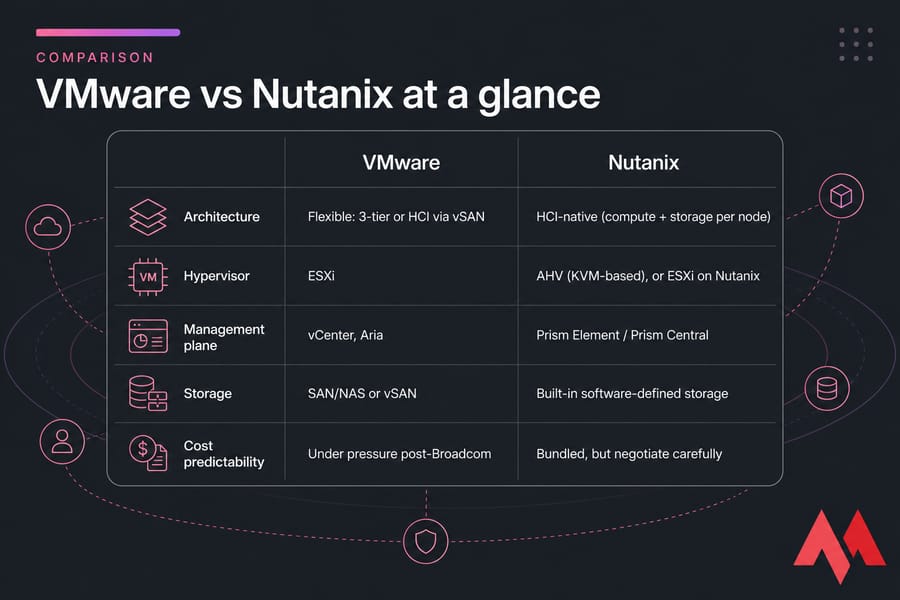
Key takeaway: VMware leads on ecosystem depth and integration breadth. Nutanix usually wins on operational simplicity and consolidated licensing. If you've already read VMware vs Proxmox or VMware vs Hyper-V, the logic here is similar — just at enterprise HCI scale.
What is the difference between VMware and Nutanix?
VMware isn't one product. It's a stack: ESXi (the hypervisor), vSphere, vCenter for management, vSAN for software-defined storage, Aria for automation, and Cloud Foundation for full private cloud. You assemble what you need. Read what VMware is if you want the full breakdown.
Nutanix ships as a platform. AOS provides the distributed storage fabric, AHV is the built-in KVM-derived hypervisor, Prism is the management plane, and Files and Flow add file services and microsegmentation. It's designed to be deployed as a unit.
Here's the nuance most comparison pages miss: Nutanix can run ESXi on top of AOS. So "Nutanix vs VMware" sometimes means "Nutanix hardware/software with VMware licensing" — which changes your cost math completely.
Pro tip: Before you build a business case, confirm whether you're comparing Nutanix with AHV or Nutanix running VMware. People conflate the two and end up with a spreadsheet that's off by six figures.
HCI architecture differences: Nutanix vs VMware
Traditional 3-tier means separate compute hosts, a storage array, and SAN fabric. It works, and for storage-heavy workloads it still works well. But it means three refresh cycles, three support contracts, and often a storage team you have to book time with.
HCI collapses that. Every node contributes CPU, RAM, and disk to a shared pool. You scale by adding nodes. Failure domains and patching become node-scoped rather than array-scoped.
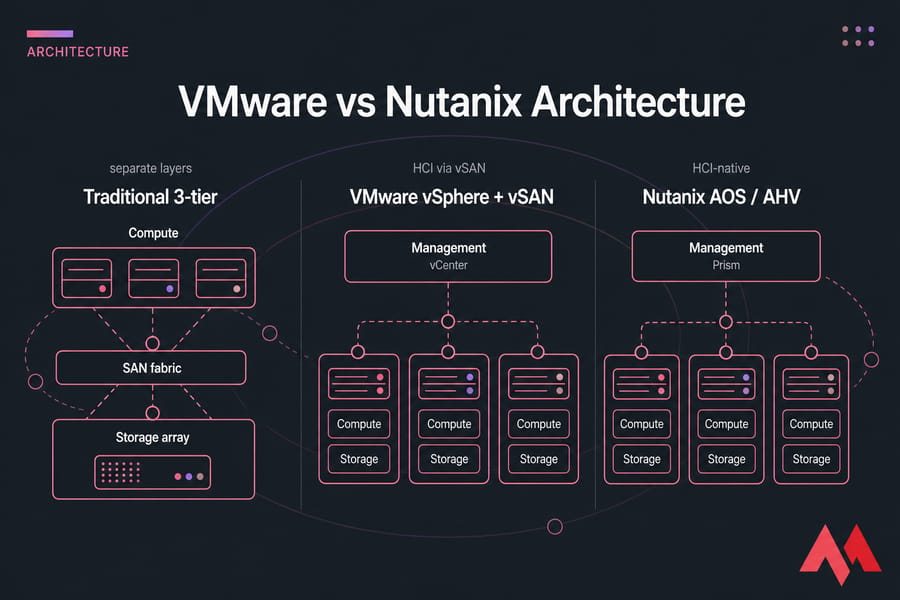
VMware gives you both options. Nutanix gives you one, done tightly. That's the trade — flexibility versus consistency. Don't assume HCI is automatically simpler; if you already have a well-run array and a storage team that knows it cold, HCI can feel like a step sideways. Related reading: open-source virtualization options if you want a third path.
Nutanix AHV vs VMware ESXi
| Capability | AHV | ESXi | Notes |
|---|---|---|---|
| Live migration | Yes | Yes (vMotion) | Feature parity for most needs |
| High availability | Yes | Yes | Both cluster-aware |
| Snapshots / clones | Native, storage-integrated | Native + array integration | Comparable |
| DR / replication | Built into AOS | SRM, third-party tools | VMware has more options |
| Third-party backup support | Good, verify per vendor | Universal | Biggest practical gap |
| Admin familiarity | Smaller talent pool | Very large | Hiring matters |
| Licensing cost | Included with AOS | Separate subscription | Main savings lever |
| API automation | REST, Terraform, Ansible | REST, PowerCLI, huge tooling | ESXi deeper |
AHV is genuinely mature now. For general enterprise VMs, file servers, app tiers, and most VDI, it's sufficient — and dropping ESXi licensing is the single biggest cost lever available. ESXi still wins when you depend on a certified appliance, a niche backup product, or vendor-specific tooling that only lists vSphere as supported. If you're weighing KVM-derived hypervisors generally, KVM vs VMware covers that ground.
Nutanix Prism vs VMware vCenter management
Prism gets praised for a reason. Cluster health, one-click upgrades, and lifecycle management sit in one console, and the learning curve is short. Small teams notice this within weeks.
vCenter is more powerful and more sprawling. Permissions, DRS tuning, distributed switches, plugin ecosystems — it's all there, and every admin you hire will already know it. Troubleshooting deep issues is well-documented. Automation via PowerCLI is unmatched.
Whichever you pick, plan your observability. Our guides on VM monitoring metrics and how to optimize VM performance apply to both platforms.
VMware vs Nutanix cost and licensing
Cost is why most people are searching this in the first place. Post-Broadcom bundling and subscription shifts pushed a lot of renewal conversations from routine to painful. I won't publish price numbers here — they vary wildly by bundle, core count, support tier, and how hard you negotiate.
| Cost driver | VMware | Nutanix | Hidden considerations |
|---|---|---|---|
| Hypervisor license | Separate subscription | Included with AHV | Core/socket metrics changed |
| Storage software | vSAN or array cost | Included in AOS | Array support renewals |
| Management | vCenter, Aria tiers | Prism Pro/Ultimate tiers | Advanced features cost extra |
| Hardware | Broad, reuse possible | Certified nodes | Refresh timing |
| Migration labor | — | Significant | Often underestimated |
| Backup / DR tooling | Existing licenses | May need re-licensing | Check vendor support first |
| Training | Team already knows it | Retraining required | Certification time |
Warning: Comparing license price alone is how projects go over budget. Migration labor, backup re-tooling, and retraining can erase two years of software savings.
Performance and scalability
Performance depends far more on your design than on the logo. Nutanix benefits from data locality — hot reads served from the node running the VM — which helps VDI and general mixed workloads. High-IOPS databases with strict latency ceilings sometimes still do better on a tuned all-flash array behind vSphere. Both scale by adding nodes; both make you over-buy compute when you really just need capacity, unless you use storage-dense nodes. Disk behaviour matters more than people expect, which is why disk speed belongs in your sizing conversation.
VMware to Nutanix migration planning
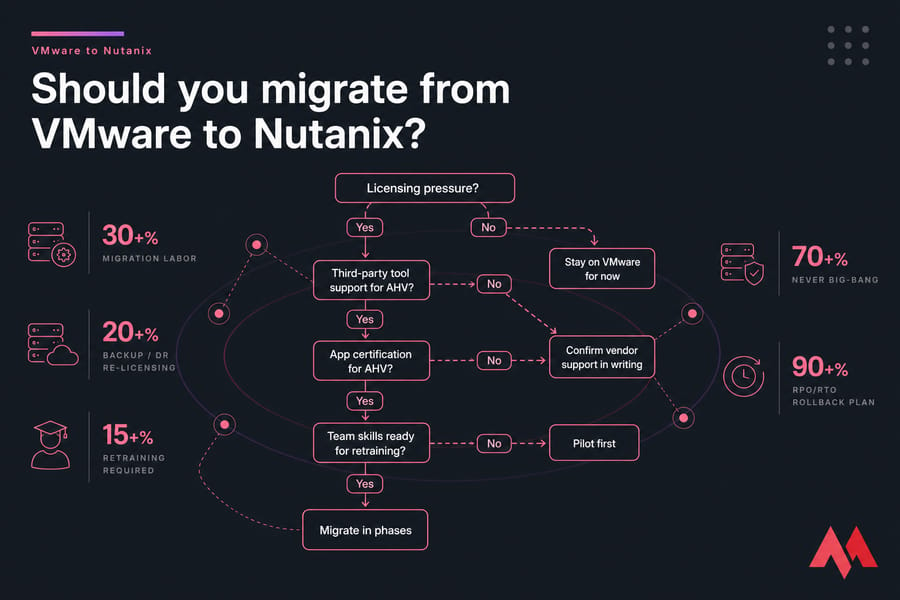
- Inventory every workload, including forgotten VMs.
- Classify apps by criticality and vendor certification status.
- Confirm backup and DR vendor support for AHV — in writing.
- Map networking changes and any appliance dependencies.
- Build a pilot cluster with three representative workloads.
- Document a rollback plan with defined RPO/RTO.
- Migrate in phases. Never big-bang.
Warning: A clean pilot doesn't guarantee production app compatibility. Vendor support statements are the gate, not your test results.
Best use cases — and when neither fits
| Scenario | Better fit | Why |
|---|---|---|
| Large legacy VMware estate | VMware | Ecosystem continuity, low disruption |
| Lean IT team, modernizing | Nutanix | Prism simplicity, one vendor |
| ROBO / edge consistency | Nutanix | Small clusters, easy lifecycle |
| VDI at scale | Either | Nutanix if reducing licensing |
| Regulated, appliance-heavy | VMware | Certification coverage |
| Under 20 VMs / single app | Neither | Hosted VPS or dedicated is cheaper |
That last row is the honest one. Plenty of teams evaluating enterprise HCI don't need it. If you're running a handful of apps, databases, or dev environments, cloud VPS hosting, KVM VPS hosting, or dedicated server hosting delivers predictable performance without a licensing negotiation.
Need a simpler infrastructure option than full enterprise HCI? MonoVM runs Cloud VPS, KVM VPS, and Dedicated Servers across 25+ global locations with 24/7 technical support — fast to deploy, no cluster to babysit. Explore MonoVM infrastructure options.
VMware or Nutanix: final decision framework
Answer these five, honestly:
- Is reducing licensing spend the actual driver, or just the loudest complaint?
- Do you need HCI simplicity, or do you already have storage expertise?
- How locked in are your runbooks, backups, and automation to vSphere?
- Which apps have vendor certification constraints?
- Is migration disruption politically and operationally acceptable this year?
Verdict: VMware stays the safer call for deep, integration-heavy estates. Nutanix is the stronger call when you want one platform, one console, and consolidated licensing — and your app vendors support AHV. Fit always depends on workload profile, negotiated licensing terms, hardware model, and migration constraints.
Pro tip: Run a POC with your three most critical workloads before signing anything. And get a real TCO model, not a license comparison.
Compare your real hosting needs before choosing a complex platform. Not every deployment needs enterprise HCI. View VPS and dedicated plans and size your infrastructure to the workload you actually have.

An experienced tech and developer blog writer, specializing in VPS hosting and server technologies. Fueled by a passion for innovation, I break down complex technical concepts into digestible content, simplifying tech for everyone.