KVM vs QEMU is usually the wrong question, because in most setups the two aren't competing. KVM is a Linux kernel module that uses your CPU's virtualization extensions to run guest code directly on the hardware. QEMU is the userspace program that emulates the rest of the machine (disks, NICs, firmware) and runs the VM itself. On most Linux hosts, QEMU runs the VM and KVM speeds it up.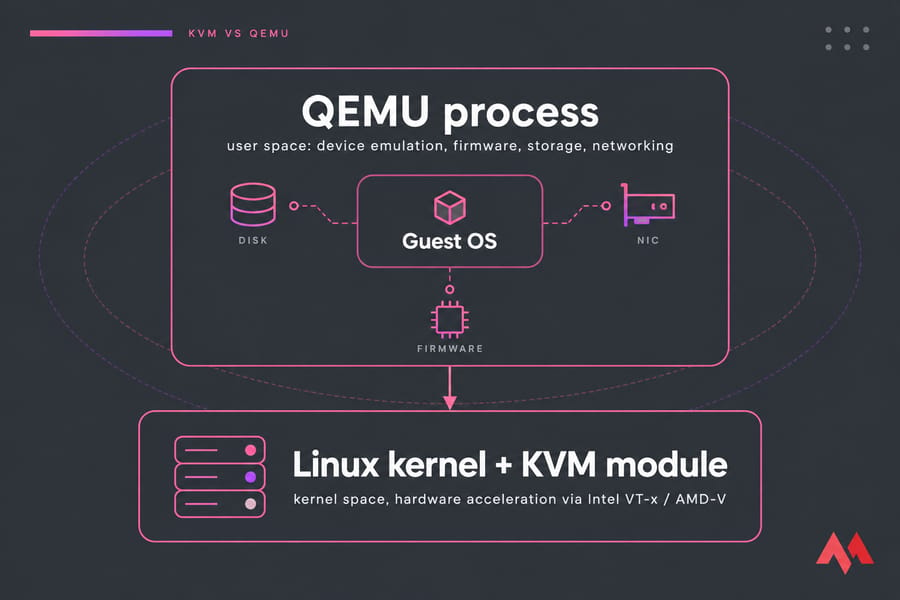
KVM vs QEMU in One Sentence
KVM speeds up the CPU, and QEMU emulates and runs everything else. So are they competitors or partners? Mostly partners. The only real choice you'll face is QEMU alone versus QEMU with KVM.
| Feature | KVM | QEMU (alone) | QEMU + KVM |
|---|---|---|---|
| Role | Hardware acceleration | Emulator + VMM | Full accelerated VM |
| Layer | Kernel space | User space | Both |
| Speed | N/A on its own | Slow (software CPU) | Near-native |
| Cross-architecture | No | Yes | No (same arch only) |
| Production use | Needs a VMM | Labs, testing | Standard choice |
What Is KVM Virtualization on Linux?
Red Hat describes KVM as a loadable kernel module that provides full virtualization through the use of the Intel VT or AMD-V hardware extensions. Once it's loaded, the Linux kernel works as a hypervisor (if that term is fuzzy, here's what a hypervisor is). Userspace programs reach it through /dev/kvm.
KVM is very good at one job: letting guest instructions run on the host CPU with little overhead. It doesn't create virtual disks, emulate network cards, or boot firmware. Its own docs are blunt about this: though KVM itself runs in kernel space, the guests running upon it run as individual QEMU processes. For a more detailed look, see our guide to KVM virtualization.
What Is QEMU and How Does QEMU Emulation Work?
The QEMU project calls itself a generic and open source machine emulator and virtualizer. In system emulation mode, the CPU may be fully emulated, or it may work with a hypervisor such as KVM, Xen or Hypervisor.Framework.
When it emulates the CPU entirely in software, QEMU uses TCG (Tiny Code Generator). TCG translates guest instructions into host instructions, so you can boot an ARM guest on an x86 laptop. QEMU also has a user-mode emulation mode that runs a single foreign-architecture binary without booting a whole OS. It's a key part of the open-source virtualization ecosystem, and it's the reason QEMU works fine on hardware that has no VT-x or AMD-V.
How QEMU + KVM Work Together in a Linux VM Stack
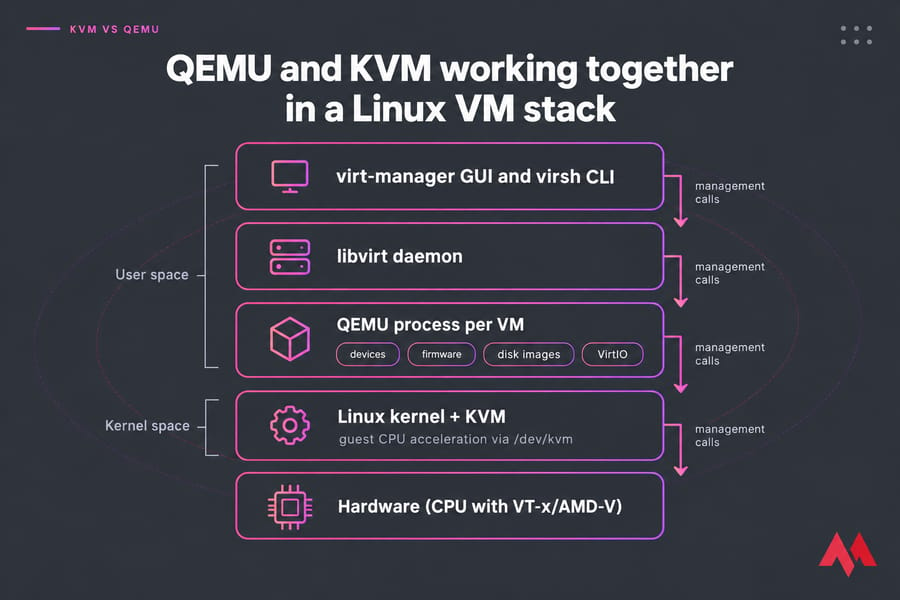
The split is clean. QEMU runs in user space and handles devices, firmware (SeaBIOS or OVMF for UEFI), qcow2 or raw disk images, and VirtIO network and storage models. KVM runs in the kernel and lets guest CPU code execute directly on the processor. Red Hat's developer team sums it up: no virtualization technology works purely on hardware-assisted virtualization, which is why QEMU stays in the stack.
The management layer sits on top. libvirt provides the API and daemon, and you drive it with virt-manager (a GUI) or virsh (the CLI). If you're building a Linux virtual machine host, this is the stack you'll almost certainly end up with. Platforms like Proxmox wrap these same pieces in their own tooling (see KVM vs Proxmox).
QEMU Alone vs QEMU with KVM Acceleration
This is the comparison that actually matters. Without KVM, QEMU falls back to TCG and translates every guest instruction in software. That's fine for running an ARM guest on an x86 host, or an x86 guest on ARM, but it's slow. With KVM, an x86 guest on an x86 host runs close to bare-metal CPU speed.
| Scenario | Use | Why |
|---|---|---|
| x86 host → x86 guest | QEMU + KVM | Same architecture, so hardware acceleration works |
| x86 host → ARM guest | QEMU (TCG) | The CPU has to be emulated |
| Host without VT-x/AMD-V | QEMU (TCG) | KVM isn't available |
| VM inside a VM | Depends | Needs nested virtualization enabled |
One trap I've seen people fall into more than once: they launch QEMU without -enable-kvm (or with no access to /dev/kvm) and then complain the VM crawls. The fix is to check the accelerator before blaming QEMU.
KVM vs QEMU Performance Comparison
For the CPU, KVM acceleration beats pure TCG by a wide margin on same-architecture workloads. I won't quote a percentage, because it varies too much with the workload to be meaningful. Instead, here's where the overhead actually comes from:
- VM exits: privileged operations still trap to the hypervisor, and every trap costs time.
- I/O: emulated devices like e1000 or IDE are slow. VirtIO drivers make a big difference.
- Configuration: the CPU model, disk cache mode, and storage backend all affect results.
"Near-native" doesn't mean identical to bare metal. For most server workloads the gap is small, but it's still there.
KVM vs QEMU Use Cases by Workload
| Workload | Best Option |
|---|---|
| Linux or Windows server VMs | QEMU + KVM |
| ARM testing and embedded/firmware development on x86 | QEMU alone |
| Homelab with GUI management | QEMU + KVM + libvirt + virt-manager |
| VPS and cloud hosting | KVM-backed stack |
Hosting providers advertise "KVM VPS" because full hardware virtualization gives each customer their own kernel and stronger isolation than container-based OpenVZ (see KVM vs OpenVZ). If you're still on an older platform, here's how to migrate from OpenVZ to a KVM VPS, or how to set up a KVM VPS for web hosting.
KVM vs QEMU vs libvirt vs virt-manager
- KVM: kernel acceleration
- QEMU: emulator and VMM
- libvirt: management API and daemon
- virt-manager / virsh: GUI and CLI frontends
On a current Ubuntu or Debian release, install qemu-system-x86 libvirt-daemon-system virt-manager. What about qemu-kvm? It was originally a fork, and it has been merged into qemu as of version 1.3. Today the name survives mostly as a compatibility wrapper, and newer Ubuntu releases dropped the virtual package.
Common KVM and QEMU Misconceptions
- "QEMU is always slow." It's only slow under TCG. With KVM, it's the engine behind most production Linux VMs.
- "KVM runs VMs by itself." It doesn't. KVM needs a userspace VMM to provide devices and firmware.
- "A KVM VPS means there's no QEMU." Most KVM hosting stacks run QEMU underneath.
How to Choose Between KVM, QEMU, and QEMU + KVM
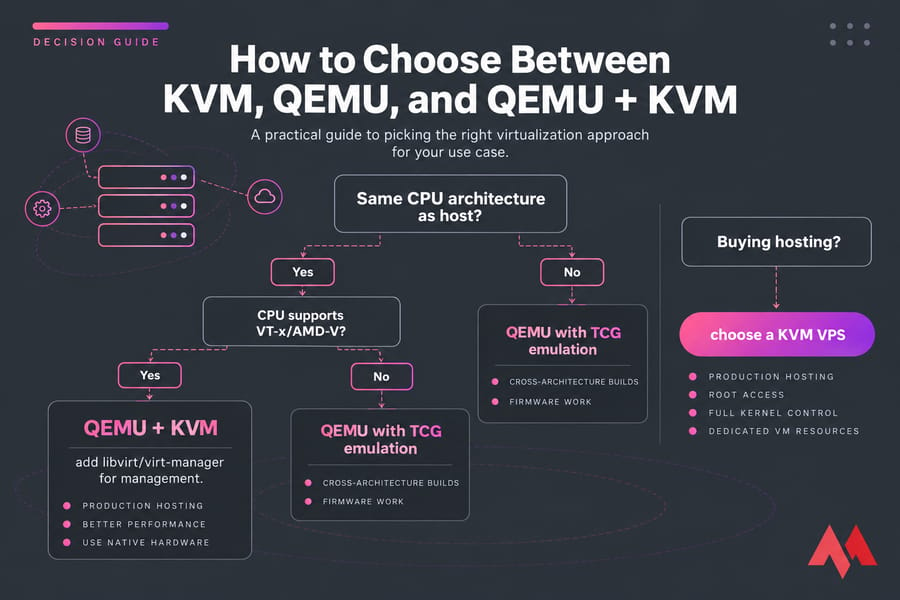
- Developers: use QEMU alone for cross-architecture builds and firmware work, and QEMU + KVM for everything else.
- Sysadmins: use QEMU + KVM + libvirt, with VirtIO drivers everywhere.
- VPS buyers: you don't install either one yourself. Pick a provider whose plans run on KVM, and check our notes on choosing VPS hosting.
If you're after production hosting rather than emulation, a KVM VPS hosting plan from MonoVM gives you root access, full kernel control, and dedicated VM resources without having to build the stack yourself. Prefer a broader choice? Browse Linux VPS plans.
Final Verdict: Which One Is Better?
Neither one wins, because they do different jobs. Use QEMU + KVM for almost any Linux or Windows VM on matching hardware. Keep plain QEMU for cross-architecture emulation and firmware work. And if you just need a server that behaves like your own machine, skip the build and get started with a MonoVM KVM VPS.

An experienced tech and developer blog writer, specializing in VPS hosting and server technologies. Fueled by a passion for innovation, I break down complex technical concepts into digestible content, simplifying tech for everyone.