
Short answer: only when they actually protect your brand, support real expansion, or stop customers getting confused. For most websites, your main domain plus 1–3 strategic backups is plenty. Buying every TLD on the market doesn't make you rank higher, and it does drain your budget year after year.
That's the honest version. Now let's break down when buying multiple domain extensions is genuinely smart and when it's just registrar revenue dressed up as "brand protection."
What "multiple domain extensions" actually means
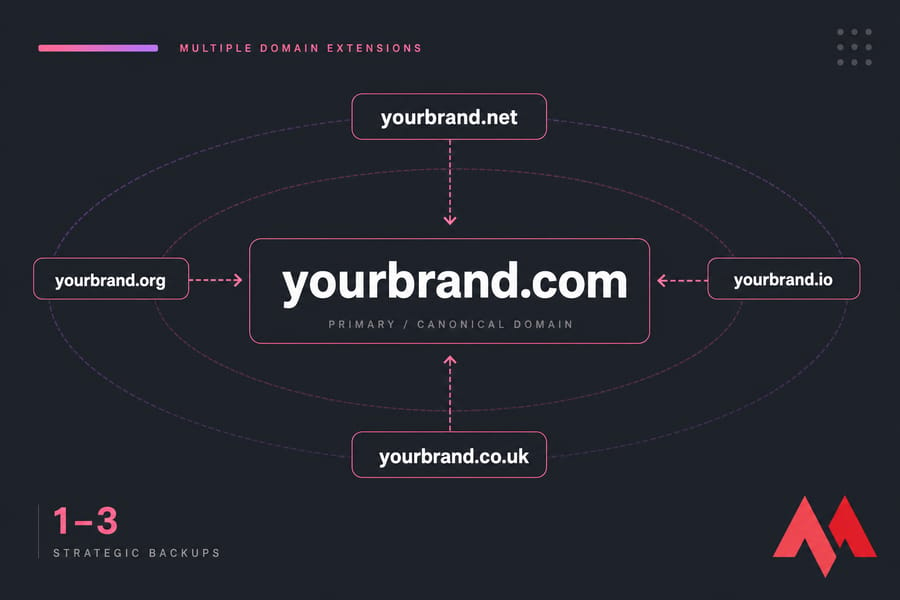
A domain extension (also called a TLD, or top-level domain) is the bit after the dot — .com, .net, .org, .io, .co.uk, and so on. Buying "multiple extensions" means registering the same brand name across several of them: yourbrand.com, yourbrand.net, yourbrand.org, and maybe yourbrand.co.uk if you sell in Britain.
One of those will be your canonical domain the public address everyone sees. The rest sit quietly in the background, redirecting to it.
If you're still figuring out the actual name, our AI domain generator and the guide on how to choose a domain name are decent starting points.
A domain extension (also called a TLD, or top-level domain) is the bit after the dot — .com, .net, .org, .io, .co.uk, and so on. Buying "multiple extensions" means registering the same brand name across several of them: yourbrand.com, yourbrand.net, yourbrand.org, and maybe yourbrand.co.uk if you sell in Britain.
One of those will be your canonical domain the public address everyone sees. The rest sit quietly in the background, redirecting to it.
If you're new to all this, our guide on what is a domain name covers the fundamentals before you start buying.
The short answer for most websites
If you're a local plumber, a freelancer, or a small SaaS with a regional audience? One solid .com usually does the job. If you're building something with real brand equity a product people will Google by name, a fintech, a known consumer brand you'll want a few defensive registrations too. The real question isn't whether to buy more domains. It's which ones are worth protecting.
When buying extra domain extensions makes sense
There are four scenarios where I'd say go ahead and buy the extra TLDs. Skip them and you might regret it later.
Brand protection and defensive registration. If your brand name is distinctive and people will type it directly, a competitor or squatter grabbing yourbrand.net can do real damage. Cybersquatters love this game. Defensive registration just means buying the obvious alternatives before someone else does — and it's cheaper than negotiating with a squatter later (trust me, I've watched a client pay five figures to recover a name they should've registered for $12).
Expanding into new countries. Country-code TLDs (ccTLDs) like .de, .uk, .fr, or .jp signal local presence. Customers in Germany trust .de more than a generic .com. If you're entering a market seriously — local team, local payments, local support buy the ccTLD. Don't bother if you're just "thinking about" expansion someday.
Customer confusion and typo traffic. High-traffic brands lose visitors to misspellings every day. If a single percent of typo traffic represents real revenue, the math on owning yuorbrand.com works out fast. For a personal blog? Not so much.
Product launches and campaigns. Launching a flagship product? Grab the matching .com and a couple of relevant variants before the announcement leaks. Two days of preparation beats two months of damage control.
You can use our WHOIS lookup to check who currently owns a name, and the ccTLDs vs gTLDs guide if you're weighing geographic options.
When buying multiple TLDs is just wasting money
Not every site needs a portfolio. Here's where I'd hold back.
- Small personal sites with no brand pressure. A photography portfolio with 200 monthly visitors doesn't need
.net,.org, and three obscure gTLDs. Skip it. - Extensions that don't fit your audience. A nonprofit buying
.iofor "completeness" is paying for nothing. Same with a local bakery owning.tech. - The renewal trap. Domains aren't a one-time purchase. Buy 15 today, you're paying for 15 every year — forever. Five obscure TLDs at $20 each is $300 annually, or $1,500 over five years, for names nobody will ever type.
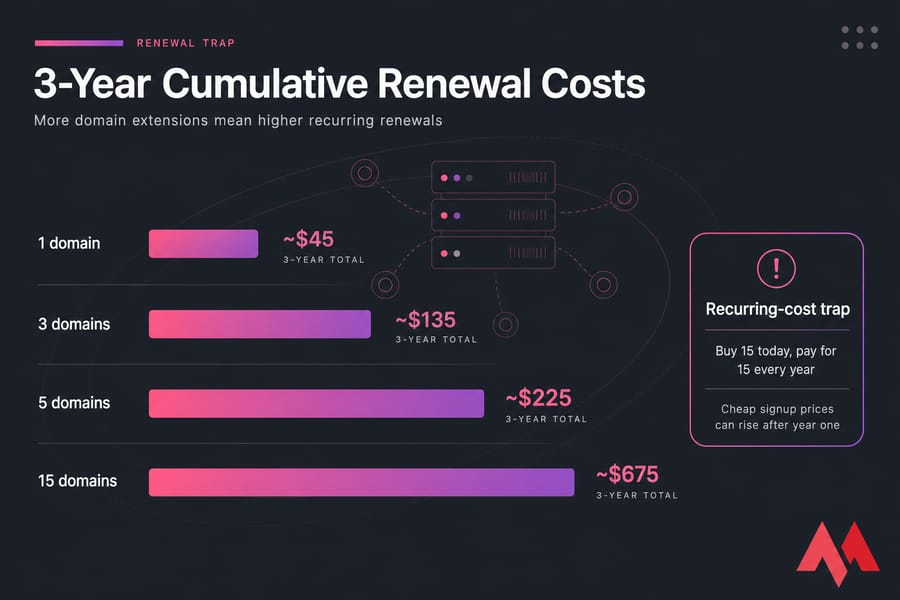
Before you start clicking "add to cart" on every extension you see, check actual domain pricing across TLDs. Renewal rates vary wildly — and the cheap signup price often doubles after year one.
Domain extensions for SEO: myth vs reality
This is where I see the most confusion. Let me be blunt: buying more TLDs does not boost your rankings. Google ranks pages based on content, links, relevance, and user signals — not how many extensions you own.
| The Claim | The Reality | What to Do Instead |
|---|---|---|
| "More TLDs = better SEO" | No direct ranking benefit | Invest in one strong site |
| "Running multiple sites on each TLD boosts traffic" | Duplicate content splits authority and hurts you | Pick one canonical site, redirect the rest |
| "ccTLDs always rank better locally" | True only for genuine geotargeting | Use ccTLDs when you actually serve that country |
| "Parked domains drive SEO juice" | Parked pages provide essentially zero SEO value | 301 redirect them to your main site |
Here's the nuance worth keeping: ccTLDs can help with local relevance because search engines treat them as a strong geographic signal. If you genuinely operate in France, yourbrand.fr with localized content can outperform a translated /fr/ folder. But that's about local trust and intent — not a generic ranking bonus.
The far more important thing is what you do after buying secondary domains: redirect them. More on that below. For a deeper comparison of the big three, check .com vs .net and .com vs .org.
Which domain extensions should you buy first?
Priority order, from "almost always" to "only if it fits":
| Tier | Extension | Buy / Consider / Skip |
|---|---|---|
| Tier 1 | .com |
Buy if available — it's still the default |
| Tier 1 | Your primary ccTLD (e.g., .de, .uk, .in) |
Buy if you serve a specific country |
| Tier 2 | .net, .org |
Consider for brand protection; required for nonprofits on .org |
| Tier 2 | .io, .co, .ai |
Consider if brand-fit (tech, startup, AI niches) |
| Tier 3 | .store, .online, .shop |
Optional — only if it strengthens positioning |
| Tier 4 | Typo variants | Skip unless you're a high-traffic brand |
Browse the full TLD list to see what's available, and use our domain availability checker to grab the ones that matter before someone else does.
How many domain extensions are enough?
There's no universal number, but here's a sensible rule of thumb based on what I've watched work for hundreds of clients:
| Business Type | Recommended Number | Examples |
|---|---|---|
| Personal site / portfolio | 1 | .com only |
| Local business | 1–2 | .com + local ccTLD |
| SaaS / startup | 2–4 | .com + .io/.co + maybe .net |
| Ecommerce brand | 3–6 | .com + key ccTLDs + typo guard |
| Multinational / regulated | 5–15+ selective | Strategic ccTLDs and defensive variants |
If you're securing several at once, bulk domain registration saves time and usually gets you better per-domain rates. Buy what makes strategic sense now. You can always add more later — but the most valuable variants tend to get taken first.
What to do after buying multiple domain extensions
This is the part most articles skip, and it's where people quietly lose money. You bought five TLDs. Now what?
1. Pick one primary domain. This is your canonical site — the address you put on business cards, ads, email signatures, everything. All marketing points here.
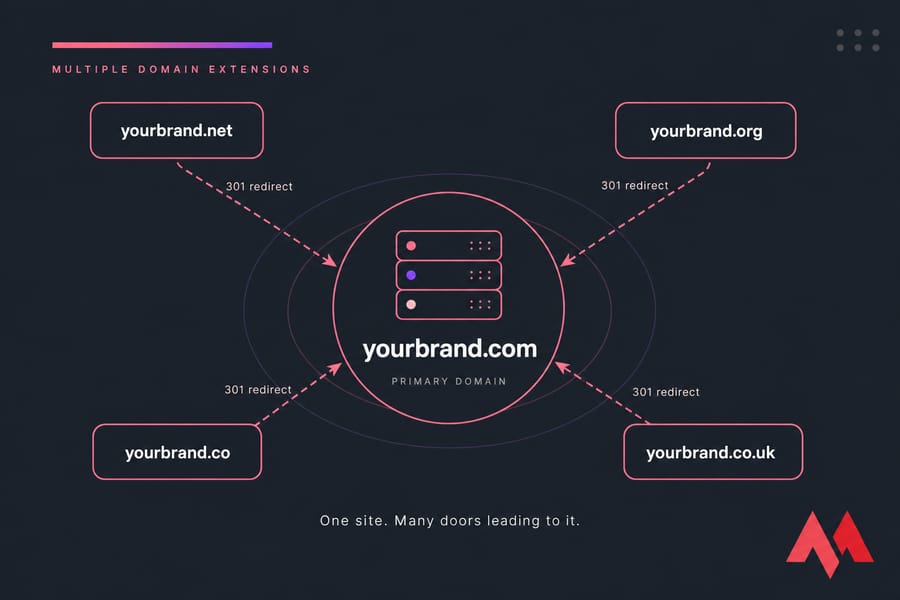
2. 301 redirect every other domain to it. A 301 is a permanent redirect. When someone types yourbrand.net, the browser instantly lands on yourbrand.com. No duplicate sites. No split SEO authority. No confusion. Most registrars (including MonoVM) let you set this up in a few clicks via domain forwarding.
3. Keep SSL active on secondary domains. Even redirected domains need a valid certificate, or browsers throw scary warnings before the redirect fires. A wildcard SSL certificate can cover subdomains, but each separate root domain typically needs its own cert.
4. Track renewals centrally. Set everything to auto-renew or keep a single spreadsheet. A defensive domain that expires is a defensive domain a competitor can grab.
5. Never build duplicate sites on each extension. Same content on yourbrand.com and yourbrand.net is a duplicate content problem. One site. Many doors leading to it.
Common mistakes when buying multiple domains
- Buying too many low-value TLDs. If you can't explain in one sentence why you bought it, don't.
- Letting defensive domains expire. The whole point was prevention. A lapsed defensive domain is worse than never owning it.
- Forgetting to redirect. An unredirected domain is just a parked page nobody sees — pure waste.
- Building duplicate websites. Splits your traffic, dilutes your SEO, doubles your maintenance.
- Skipping trademark and WHOIS checks. Make sure you're not registering something that infringes an existing mark. Run a quick WHOIS lookup before you buy.
Recommended strategy by business type
| Business Type | Must Buy | Consider | Usually Skip |
|---|---|---|---|
| Local business (plumber, café, clinic) | .com or local ccTLD |
Both, if budget allows | Niche gTLDs, typos |
| SaaS / startup | .com |
.io or .co for brand fit, .net for protection |
ccTLDs until you expand |
| Ecommerce | .com + key market ccTLDs |
Typo variants if traffic justifies it | Random gTLDs |
| Nonprofit | .org |
.com for protection |
Commercial gTLDs |
| Personal brand | Primary domain | One alternate if you monetize | Everything else |
A small SaaS I worked with bought .com, .io, and .net at launch for under $60 total. Two years later a competitor with a similar name started phishing their users on a Cyrillic lookalike — but couldn't grab the obvious English variants because they'd been smart on day one. Cheapest insurance they ever bought.
Final verdict: buy strategic extensions, not every TLD
Here's the three-step rule, simple as it gets:
- Buy your primary domain usually
.com, or your main ccTLD if you're regionally focused. - Buy 1–3 strategic backups based on brand protection, geographic expansion, and real customer confusion risk.
- Redirect them properly with 301s, keep SSL valid, and auto-renew everything.
That's it. No need to own 20 extensions. No need to chase every shiny new gTLD. Just protect what matters and move on to actually building your business.
Ready to lock in your TLDs? Check availability with our domain availability checker, or browse domain registration options to secure the extensions that actually matter for your brand. If you're newer to this, the walkthrough on how to buy a domain name covers the basics step by step.

An experienced tech and developer blog writer, specializing in VPS hosting and server technologies. Fueled by a passion for innovation, I break down complex technical concepts into digestible content, simplifying tech for everyone.