Short version: a MikroTik CHR license controls how much traffic your Cloud Hosted Router is allowed to push. The license tier sets a throughput ceiling — nothing more, nothing less. CPU, RAM, and your hypervisor handle the rest.
What Is a MikroTik CHR License?
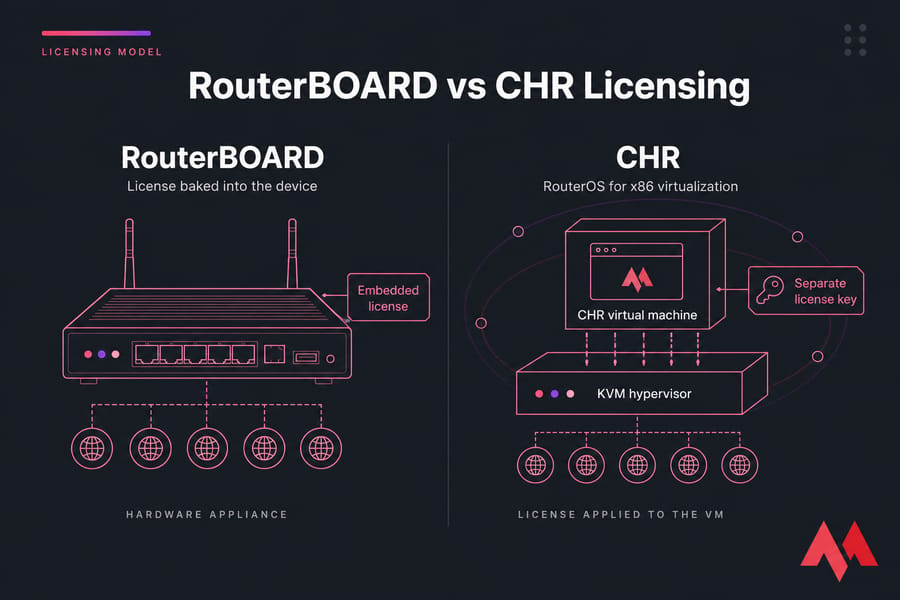
CHR is RouterOS packaged for x86 virtualization. You run it on KVM, VMware, Hyper-V, or VirtualBox usually on a MikroTik VPS when you want it reachable from anywhere. Unlike RouterBOARD hardware, where the license is baked into the device, CHR licensing is bought separately and applied to the virtual machine.
Why this matters on a VPS
If you deploy CHR without a paid license, you're capped at 1 Mbps per interface. Fine for a lab. Useless for production. That's why understanding the tier system before you spin up a VM saves headaches later.
MikroTik CHR License Levels at a Glance
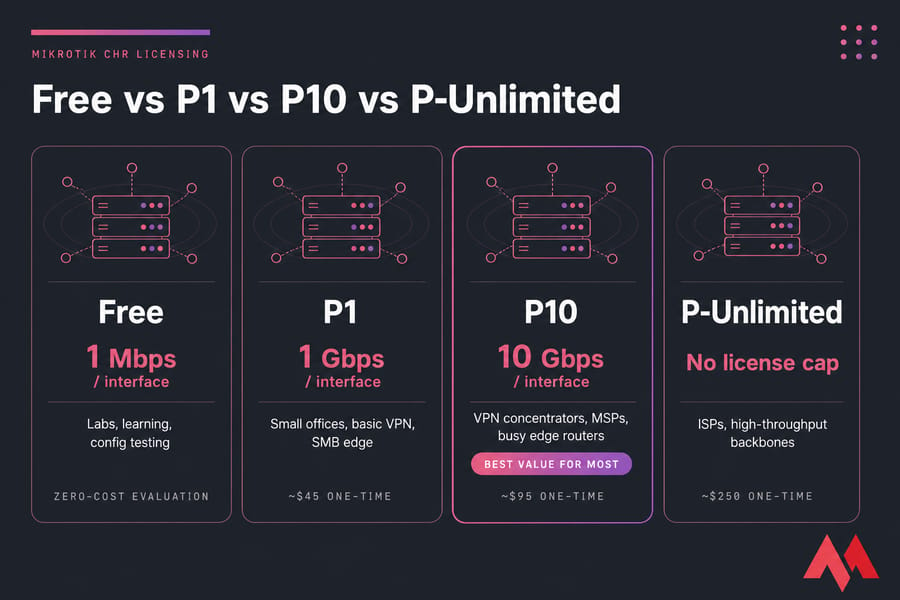
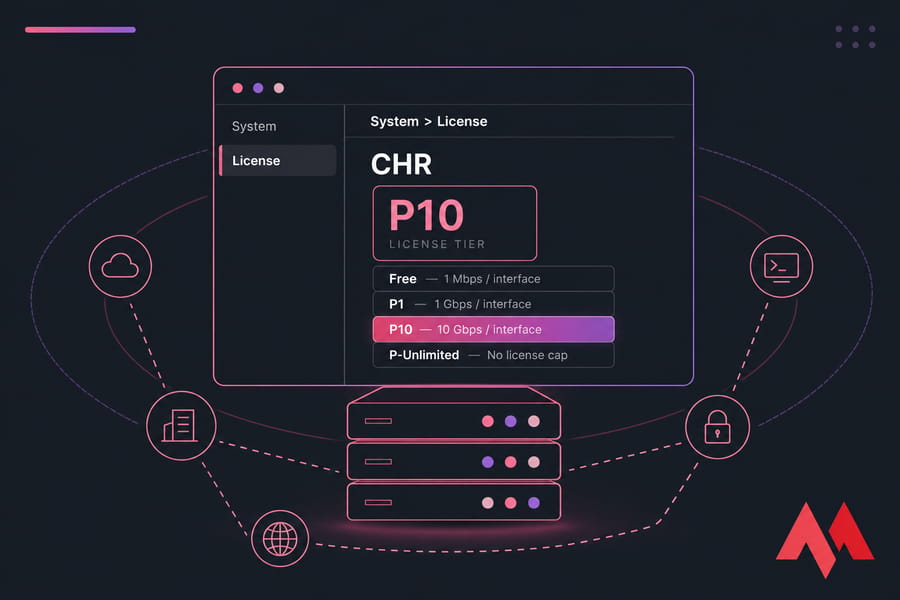
There are four tiers: Free, P1, P10, and P-Unlimited. Each lifts the per-interface throughput cap. Paid licenses are perpetual — you buy once, you keep it.
- Free — 1 Mbps per interface. Trial and lab use only.
- P1 — 1 Gbps per interface. Light production, branch routers, small VPN endpoints.
- P10 — 10 Gbps per interface. The sweet spot for most serious production work.
- P-Unlimited — no license-imposed cap. For high-throughput environments and ISPs.
Prices shift over time, so check MikroTik's official page before you commit. At the time of writing, P1 sits around $45, P10 around $95, and P-Unlimited around $250 — one-time fees.
Free vs P1 vs P10 vs P-Unlimited
Here's the comparison most buyers actually want:
| License | Throughput Cap | Best For | Avoid If | Value Verdict |
|---|---|---|---|---|
| Free | 1 Mbps / interface | Labs, learning, config testing | You expect any real traffic | Great for zero-cost evaluation |
| P1 | 1 Gbps / interface | Small offices, basic VPN, SMB edge | You'll grow past 1 Gbps soon | Cheapest entry to production |
| P10 | 10 Gbps / interface | VPN concentrators, MSPs, busy edge routers | You only push a few hundred Mbps | Best overall value for most |
| P-Unlimited | No license cap | ISPs, high-throughput backbones | Your VPS can't push 10+ Gbps anyway | Only if you genuinely need it |
Which one gives the best value?
For most readers landing on this article, P10 wins. It's roughly twice the cost of P1 but gives you ten times the headroom. I've watched too many sysadmins start on P1, hit the ceiling within six months, then buy P10 anyway. Skip that detour if you can.
P-Unlimited makes sense only when you're routing serious aggregate traffic — think ISP edge, large VPN aggregation, or multi-tenant MSP work where bursts genuinely climb past 10 Gbps.
Throughput Caps vs Real-World Performance
Here's the part most guides skip. The license cap is a ceiling — not a guarantee.
Buying P-Unlimited doesn't magically give you 40 Gbps. Your actual throughput depends on a stack of factors the license can't fix:
- vCPU performance — packet forwarding is single-threaded for many functions. Clock speed matters more than core count.
- Virtual NIC drivers — virtio NICs on KVM massively outperform emulated e1000.
- Hypervisor overhead — bare metal beats virtualization, always.
- Encryption load — IPsec, OpenVPN, and WireGuard each eat CPU differently.
- Firewall rule complexity — 500 rules with connection tracking add up fast.
- Queueing and shaping — traffic shaping is CPU-heavy.
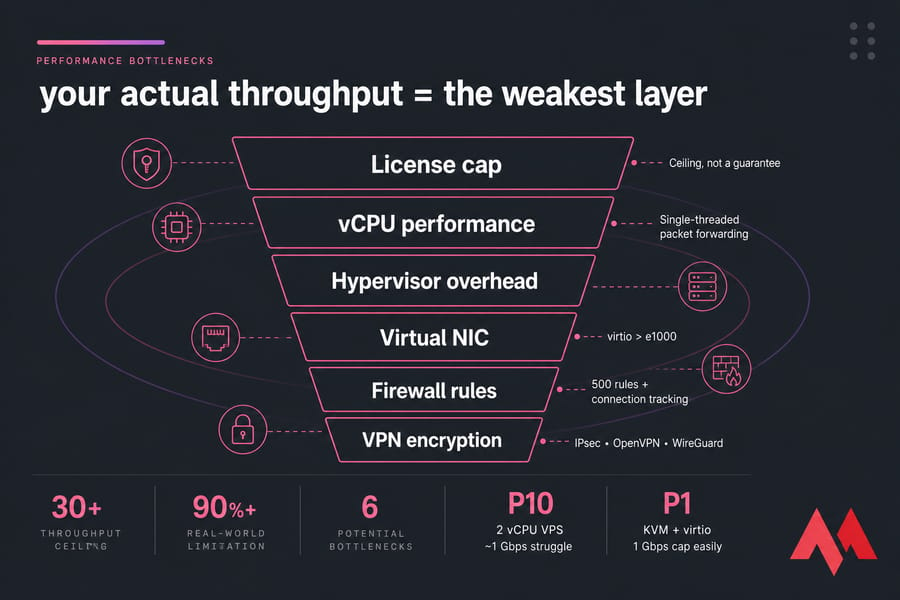
A P10 license on a 2 vCPU VPS with emulated NICs will struggle to push 1 Gbps. A P1 license on properly tuned KVM with virtio can saturate its 1 Gbps cap easily. Match infrastructure to license — not the other way around.
Want to know what your setup actually delivers? Run the MikroTik bandwidth test after deployment. Synthetic numbers beat guesswork.
How to Choose the Right CHR License
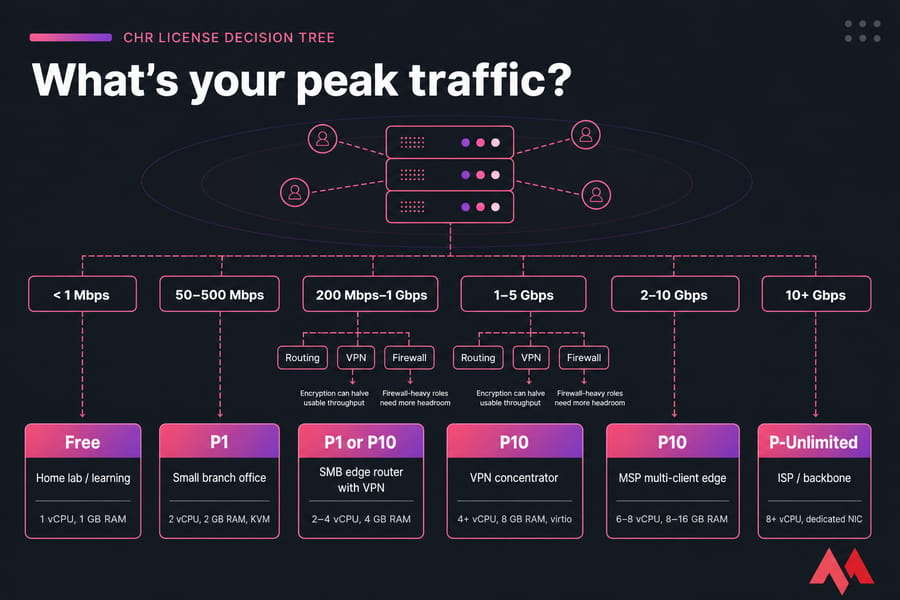
Forget "what's cheapest." Ask: what's my peak traffic, plus realistic growth over the next year?
| Use Case | Expected Traffic | Recommended License | Suggested VPS Specs |
|---|---|---|---|
| Home lab / learning | < 1 Mbps | Free | 1 vCPU, 1 GB RAM |
| Small branch office | 50–500 Mbps | P1 | 2 vCPU, 2 GB RAM, KVM |
| SMB edge router with VPN | 200 Mbps–1 Gbps | P1 or P10 | 2–4 vCPU, 4 GB RAM |
| VPN concentrator | 1–5 Gbps | P10 | 4+ vCPU, 8 GB RAM, virtio |
| MSP multi-client edge | 2–10 Gbps | P10 | 6–8 vCPU, 8–16 GB RAM |
| ISP / backbone | 10+ Gbps | P-Unlimited | 8+ vCPU, dedicated NIC |
Running VPNs? Read the MikroTik OpenVPN setup and L2TP VPN setup guides before sizing — encryption will halve your usable throughput on most setups. For firewall-heavy roles, the MikroTik firewall setup guide is worth bookmarking.
Pricing and Upgrade Considerations
CHR licenses are perpetual. Pay once, keep the key, reuse it across reinstalls of the same VM. That's a major win compared to subscription-based virtual appliances.
Upgrades work simply: buy the higher tier and apply the new key. You don't get partial credit for the old one in most cases, so overbuying early costs more than buying right the first time.
Think about total cost — not just the license:
- License (one-time)
- VPS (monthly, ongoing)
- Time to migrate if you under-license
- Downtime risk during forced upgrades
A P10 license plus a properly specced VPS costs less long-term than starting with P1 on weak hardware and re-architecting six months later.
Common CHR Licensing Mistakes
- Buying P-Unlimited "just in case." If your VPS can't physically push that traffic, you've burned money on a ceiling you'll never touch.
- Running production on Free. The 1 Mbps cap will choke you the moment a real user shows up.
- Ignoring VPN overhead. A P1 license rated at 1 Gbps will deliver 200–400 Mbps under IPsec on a typical VPS. Plan accordingly.
- Forgetting about virtual NICs. KVM with virtio drivers performs in a different league than emulated alternatives.
- Skipping the backup step. Always export your config before license changes. The MikroTik configuration backup guide covers it.
Deploying CHR on a VPS
CHR runs on the major hypervisors — KVM, VMware ESXi, Hyper-V, VirtualBox. For hosted deployments, KVM is what you want. Full virtualization, virtio NIC support, and the kind of root access CHR needs to behave properly. If hypervisors aren't your thing, this primer is a decent starting point.
What to look for in a CHR-ready VPS
- KVM virtualization with virtio NIC support
- Full root access to install the CHR disk image
- Stable, low-latency network — packet loss kills routing performance
- Resource scaling — you'll want to add vCPUs as traffic grows
- Multiple datacenter regions — proximity matters for VPN endpoints
Where to Host Your CHR
If you'd rather not source and configure all of this yourself, MonoVM's MikroTik VPS Hosting ships CHR-ready with KVM, root access, and global locations. You pick the license tier, we handle the infrastructure. Need raw KVM instead? The KVM VPS lineup works equally well if you want to install CHR manually.
Final Verdict
- Free — labs only. Don't kid yourself about production.
- P1 — entry-level production, branch offices, light VPN.
- P10 — the practical sweet spot for most real deployments.
- P-Unlimited — only if you genuinely push beyond 10 Gbps.
Match the license to your traffic, then match the VPS to the license. Get those two right and CHR will run beautifully. Get either wrong and you'll be troubleshooting bottlenecks for weeks.
People Also Read:
MikroTik Firewall
MikroTik OpenVPN Setup
How to Connect SSH on Linux via MikroTik
How to Block Websites on MikroTik

An experienced tech and developer blog writer, specializing in VPS hosting and server technologies. Fueled by a passion for innovation, I break down complex technical concepts into digestible content, simplifying tech for everyone.