KVM vs Hyper-V is one of those comparisons people argue about online as if one side clearly wins. KVM is the open-source hypervisor built into the Linux kernel. Hyper-V is Microsoft's Type 1 hypervisor, and it ships as a role in Windows Server. What decides it is how your environment already runs, not raw speed. If you need a refresher on the basics first, here's what a hypervisor is and how it works.
KVM vs Hyper-V at a Glance
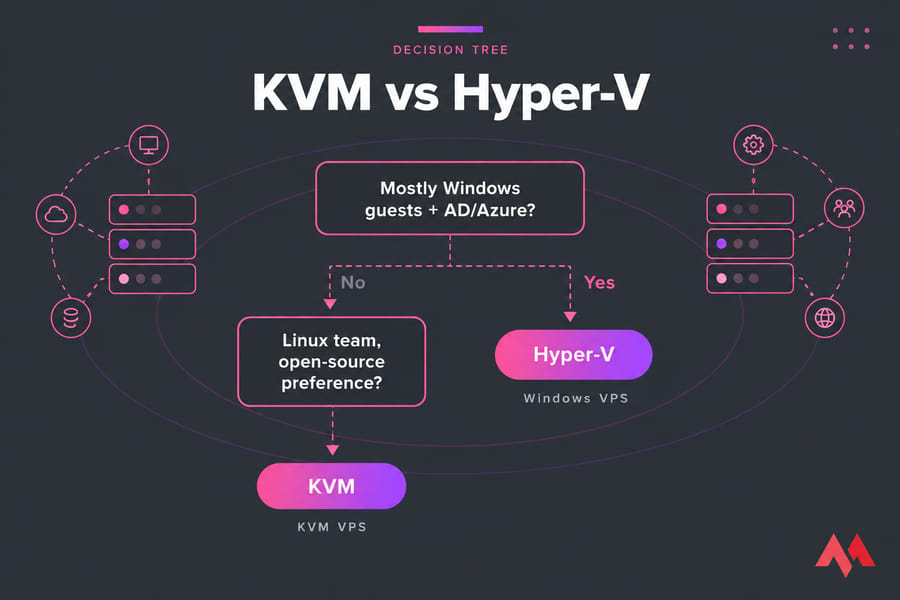
Short answer: pick KVM if your environment is mostly Linux, you care about cost, and you want open-source control. Pick Hyper-V if you're a Windows Server shop that runs Active Directory or uses Azure and wants admin tools from one vendor.
| Factor | KVM | Hyper-V |
|---|---|---|
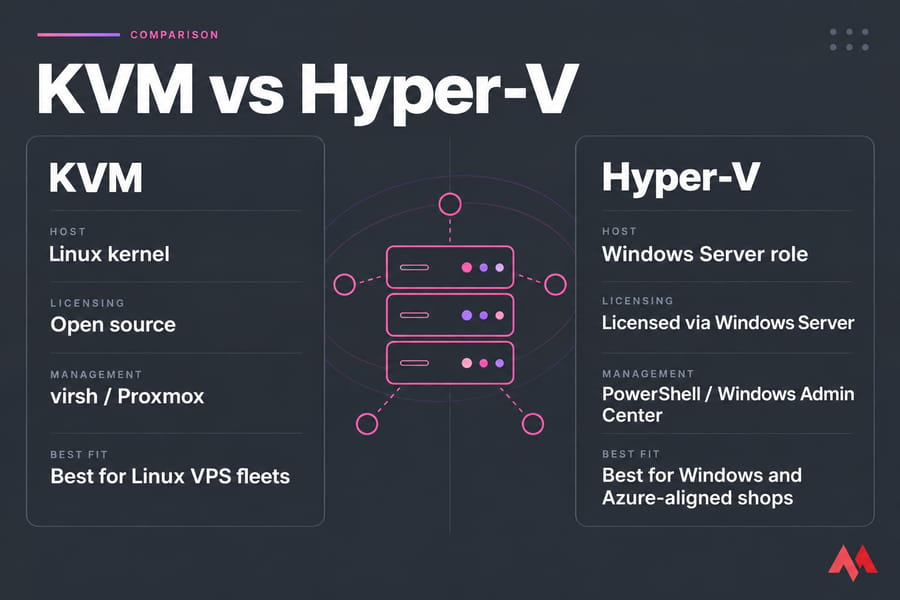
| Host base | Linux kernel module | Microsoft hypervisor with a Windows parent partition |
| Licensing | Open source, no hypervisor fee | Included with Windows Server (Standard or Datacenter) |
| Management | libvirt, virsh, virt-manager, Proxmox, OpenStack | Hyper-V Manager, PowerShell, Windows Admin Center, SCVMM |
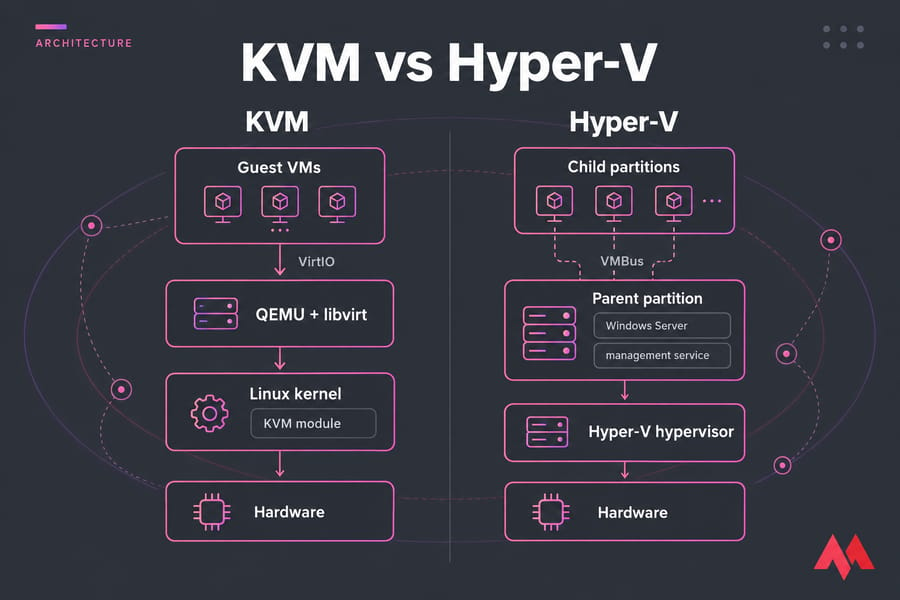
| Paravirtual drivers | VirtIO | VMBus + synthetic devices |
| Guest support | Linux, Windows, BSD, and more | Windows, Linux, FreeBSD |
| Best fit | Linux hosting, cloud-style scale, budget builds | Windows-heavy IT, AD, hybrid Azure |
What KVM and Hyper-V Actually Are
KVM inside the Linux kernel
KVM turns Linux itself into the hypervisor. The kernel module handles CPU and memory virtualization using Intel VT-x or AMD-V. QEMU emulates the devices, and libvirt gives you an API to manage it all. "Running KVM" almost always means that whole stack, as our guide to KVM virtualization explains.
Hyper-V and the parent partition
With Hyper-V, the hypervisor runs directly on the hardware. Windows Server then runs on top of it in a privileged "parent partition," which owns the device drivers and the management services. Guest VMs talk to the parent over VMBus. Hyper-V officially supports Linux and FreeBSD guests too. Our Windows Server Hyper-V walkthrough covers the full setup.
Both support nested virtualization. On KVM, though, you can't live-migrate or save a host that's running nested VMs until the nested guests stop. Our separate guide on nested virtualization goes into more detail.
KVM vs Hyper-V Performance
Here's the honest take. Once they're configured properly, both hypervisors run close to native speed for most workloads. Most "KVM is X% faster" claims you'll find online don't say what storage backend, driver versions, or CPU pinning they tested with.
- CPU: KVM uses the Linux scheduler, which helps with NUMA tuning and dense Linux hosting. Hyper-V's scheduler is mature and well tuned for Windows guests.
- Storage: VirtIO-blk/scsi on KVM and synthetic SCSI over VMBus on Hyper-V both remove the overhead of emulated devices. Your actual disks and caching mode matter more than which hypervisor you picked.
- Network: Both support SR-IOV. Windows Server 2025 also adds GPU partitioning, so several VMs can share one physical GPU.
I've watched Windows VMs on KVM crawl because nobody installed the VirtIO drivers. That's a configuration problem, not a hypervisor problem.
Management and Ecosystem
This is where the real difference is. KVM gives you building blocks: virsh for scripting, virt-manager as a GUI, and libvirt underneath. For clustering and a web UI, most teams add Proxmox VE or OpenStack on top. That's flexible, but somebody has to put it together. Our KVM vs Proxmox breakdown explains where the hypervisor ends and the platform begins.
Hyper-V has a clearer path out of the box. You use Hyper-V Manager for one-off tasks, PowerShell for automation, and Windows Admin Center for browser-based management. SCVMM handles larger fleets, and Azure Arc connects your hosts to Azure.
KVM vs Hyper-V Cost and Licensing
KVM costs nothing to license, which is part of the broader appeal of open-source virtualization. Hyper-V is "free" only because it comes with Windows Server, and you still pay for Windows Server.
| Cost factor | KVM | Hyper-V |
|---|---|---|
| Hypervisor license | None | Bundled with Windows Server |
| Windows guest rights | Licensed separately per VM/host | Standard: 2 VMs; Datacenter: unlimited per licensed host |
| Support | Optional (Red Hat, Canonical, Proxmox subscriptions) | Microsoft support agreements |
| Tooling | Mostly free; more DIY effort | Admin Center free; SCVMM costs extra |
| Staff skills | Linux admins | Windows admins |
Pro tip: if you run a lot of Windows VMs and already own Datacenter licenses, Hyper-V can come out cheaper than KVM. Windows Server 2025 is licensed per core, with a minimum of 16 cores per server.
Security and Enterprise Features
Hyper-V Generation 2 VMs support Secure Boot for both Windows and Linux guests. Hyper-V also underpins Windows virtualization-based security (VBS). It includes failover clustering, live migration, and checkpoints. KVM offers Secure Boot through OVMF/UEFI, sVirt/SELinux isolation, live migration, and snapshots, and it's proven at public-cloud scale. On either platform, how well you harden the host OS matters more than which logo is on the box. Our virtual machine security best practices cover that part.
Best Use Cases: KVM or Hyper-V?
| Scenario | Best choice | Why |
|---|---|---|
| Linux VPS fleet / hosting provider | KVM | Density, no license cost, automation-friendly |
| Homelab or small dev/test lab | KVM (via Proxmox) | Free, web UI, large community |
| 3-node Windows Server cluster with AD | Hyper-V | Native failover clustering and Datacenter rights |
| Hybrid Azure environment | Hyper-V | Azure Arc and Microsoft tooling alignment |
| Mixed guests, Linux-skilled team | KVM | Runs Windows fine with VirtIO drivers |
| Budget-constrained VMware exit | KVM | Lowest licensing exposure |
Still weighing other options? Take a look at KVM vs VMware, KVM vs Xen, or VMware vs Hyper-V.
How to Choose Between KVM and Hyper-V
- Primary guest OS: If it's mostly Linux, go with KVM. If it's mostly Windows, lean toward Hyper-V.
- Team skills: Pick the OS your admins can troubleshoot at 3 a.m.
- Existing licensing: If you already own Datacenter, the math changes.
- GUI vs CLI: Both platforms offer both, but a KVM GUI usually means Proxmox.
- Hybrid cloud direction: If you're heading toward Azure, choose Hyper-V. For open-source clouds, choose KVM.
- Scale and automation: Your options are Ansible/Terraform on libvirt or PowerShell DSC.
- Budget model: Would you rather pay upfront for licenses or pay for staff time?
Don't compare the hypervisors in isolation. You're really choosing between two ecosystems. And if you'd rather not manage a hypervisor at all, MonoVM's KVM VPS hosting suits Linux and developer workloads. Windows VPS hosting gives you native Windows administration with full admin access.
Conclusion: Pick the Ecosystem, Not the Logo
KVM gives you open-source control and low cost. Hyper-V gives you Microsoft-native management and Azure alignment. Go with the one your team already knows well.

An experienced tech and developer blog writer, specializing in VPS hosting and server technologies. Fueled by a passion for innovation, I break down complex technical concepts into digestible content, simplifying tech for everyone.