In the ever-evolving world of web development and SEO, understanding the difference between a domain vs subdomain is essential. Whether you're launching a business website, managing multiple services under one brand, or optimizing your site's structure for search engines, knowing when to use a domain and when to use a subdomain can make a major impact on your site's visibility, branding, and user experience.
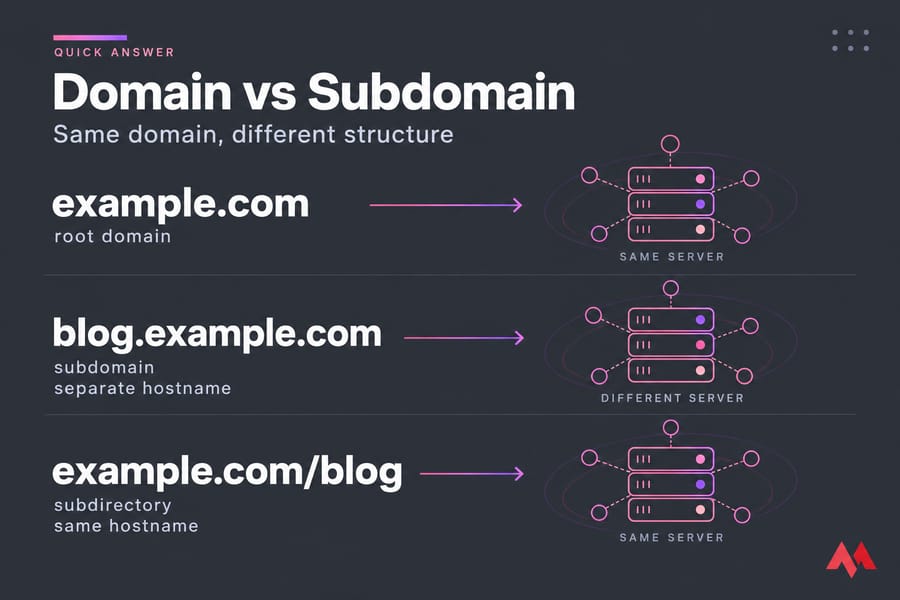
A domain is your main web address, like example.com. A subdomain is a separate hostname placed in front of it, like blog.example.com or app.example.com. You register the domain once. After that, you can create as many subdomains as you like, and each one can point to a different server.
So which is better for SEO? Google says it has no inherent preference between subdomains and subdirectories (example.com/blog). Use whichever is easiest to organize and maintain. In this guide, we'll break down everything you need to know about root domain vs subdomain, addon domain vs subdomain, and how to choose for 2026.
📖 What is a Domain?
Definition & Structure (Root Domain / Top-Level Domain)
A domain is the core digital address that identifies your website on the internet. It translates complex IP addresses into a readable format using the Domain Name System (DNS).
Read example.com from right to left. .com is the top-level domain (TLD). Country sites use a ccTLD like .de instead. example is the second-level domain (SLD). Put them together and you get the root domain, also called the zone apex. That's the part you actually buy and renew every year.
A standard domain consists of:
- Second-Level Domain (SLD): The unique name you choose, like
monovm - Top-Level Domain (TLD): The extension, such as
.com,.org, or.net. Choosing between them depends on your goals: our comparisons of .com vs .org and .com vs .net walk through the trade-offs.
Together, they form your root domain, e.g., monovm.com. You can learn more about how domain structures work in our detailed guide on Different Types of Domains.
This is the primary domain for your site — the address that users type into their browser and search engines index as your main web identity. If you want a deeper breakdown of the concept, see our guide on what is a domain name.
Why Domains Matter for Branding & Authority
Your domain name is the face of your brand. A concise and relevant domain improves:
- Brand recognition: Visitors remember it easily.
- SEO performance: Including keywords can help rank better.
- Credibility: Professional domains (like
.comor.net) enhance trust.
For example, owning monovm.com signals reliability and authority whereas a subdomain like monovm.hostingprovider.com may appear secondary.
Domains also form the base for creating subdomains, email accounts (like info@monovm.com), and online services. Without a root domain, no subdomain can exist — making it the essential first step in your online presence.
If you're setting up your first website, you can buy a domain name directly through MonoVM's domain services, which offer affordable pricing, global coverage, and 24/7 technical support.
🌿 What is a Subdomain?
Definition & Structure (Subdomain Prefix + Parent Domain)
A subdomain is a label added to the left of the root, as in support.example.com. The full string is called a fully qualified domain name (FQDN), and DNS treats it as its own hostname. In practice, it can sit on a completely different server, run a different CMS and have its own robots.txt.
It appears before the main domain name and is separated by a dot:
Example:
blog.monovm.com → where blog is the subdomain and monovm.com is the parent domain.
Subdomains act as child domains, meaning they belong to the root domain but operate independently in terms of content and often hosting setup.
Common Use-Cases of Subdomains
Subdomains are especially useful when you want to isolate content or features from your main site. Common scenarios include:
- Blogs:
blog.monovm.com - Support Centers:
support.monovm.com - Online Stores:
shop.monovm.com - Learning Platforms:
academy.monovm.com - Staging/Testing:
staging.monovm.com
They are flexible, cost-effective, and perfect for managing multiple sections without purchasing a new domain.
Child Domain vs Subdomain (Clarifying Terminology)
A child domain is simply another term for a subdomain. Both refer to the same concept — an extension of your primary domain that can host distinct content.
For example, elearning.monovm.com = both describe a subsection of the parent domain monovm.com.
Some people say "child domain," which means the same thing. Don't mix it up with an addon domain, though. An addon domain is a separate registered domain that happens to be hosted on the same cPanel account.
⚖️ Domain vs Subdomain: Key Differences
| Factor | Root domain | Subdomain |
| Cost | Registered and renewed every year | Free. You create it in your DNS zone |
| DNS record | A/AAAA at the apex (standard DNS doesn't allow a CNAME there) | A, AAAA or CNAME |
| Hosting | Your main server | The same server or a different one |
| SSL/TLS | Certificate for example.com and usually www |
Has to be on the certificate: its own cert, a SAN entry, or a wildcard *.example.com |
| Analytics | GA4 tag | The same GA4 tag works. Cross-domain setup is only needed for different domains |
| Search Console | A Domain property covers every subdomain | Add a URL-prefix property if you want separate reports |
| SEO identity | The main site | Treated as its own host in some situations |
One gotcha people miss: a wildcard certificate covers only one level. *.example.com protects shop.example.com but not eu.shop.example.com.
URL Structure Comparison (Domain.com vs Sub.Domain.com)
When you compare domain vs subdomain URLs, the difference becomes obvious:
- Domain URL:
https://monovm.com/ - Subdomain URL:
https://blog.monovm.com/
The subdomain always precedes the root domain. For the full anatomy of a web address, our guide on domain vs URL covers every component, and if you want the URL side on its own, see what is a URL.
Brand Perception & User Experience
Domains represent your main brand identity — think of them as your company's flagship. Subdomains, meanwhile, act as supporting branches.
For example:
monovm.com→ Your core brandblog.monovm.com→ Your resource hubclients.monovm.com→ Your customer portal
Technical / Tracking / Security Considerations
From a technical perspective:
- Subdomains require separate DNS records (A or CNAME).
- Analytics tools like Google Analytics may treat subdomains as separate properties.
- Each subdomain often needs its own SSL certificate unless you use a wildcard SSL.
- Security policies, cookies, and cross-domain tracking must be configured carefully. On the registration side, WHOIS privacy protection keeps your contact details off public records — worth enabling for every domain you register.
🔍 How Google Treats Domains, Subdomains, and Subdirectories
Google's official stance
According to Google Search Central's crawling and indexing FAQ, Google has no indexing or ranking preference between subdomains and subdirectories. Its advice is to choose whatever structure makes your site easiest to manage.
Where hostnames still matter
Google does treat hostnames as separate in a few places. Site names are supported at the domain or subdomain level, but not for subdirectories. Search Console can report on each host separately. Site moves between hostnames also follow Google's migration process.
So why do so many case studies show traffic going up after a move to a subfolder? Ahrefs calls the subfolder advantage a myth and points to implementation instead. In most of those cases, the old subdomain was poorly linked from the main site, and the move fixed the linking.
SEO Implications (Authority, Backlinks, Search Engine Treatment)
Search engines treat subdomains as separate entities. That means the authority, backlinks, and ranking power of your main domain don't automatically transfer to subdomains. However, when linked correctly, subdomains can still benefit indirectly from your root domain's authority.
Example:
If monovm.com has strong backlinks and domain authority, your blog.monovm.com can gain ranking power when properly interlinked.
Still, it's important to choose wisely between domain vs subdomain vs subdirectory. Subdirectories (like monovm.com/blog) share SEO power more directly than subdomains. You can learn more about this in our related guide: Subdomains vs Subdirectories.
🌐 Domain vs Subdomain vs Subdirectory
What's a Subdirectory (domain.com/blog)
A subdirectory (also called a subfolder) is a path within your main domain, like:
https://monovm.com/blog
Here, /blog is a subdirectory of the root domain monovm.com. It doesn't require separate DNS configuration like a subdomain does — it's simply part of your main site's structure.
Subdomain vs Subdirectory: Which Should You Use?
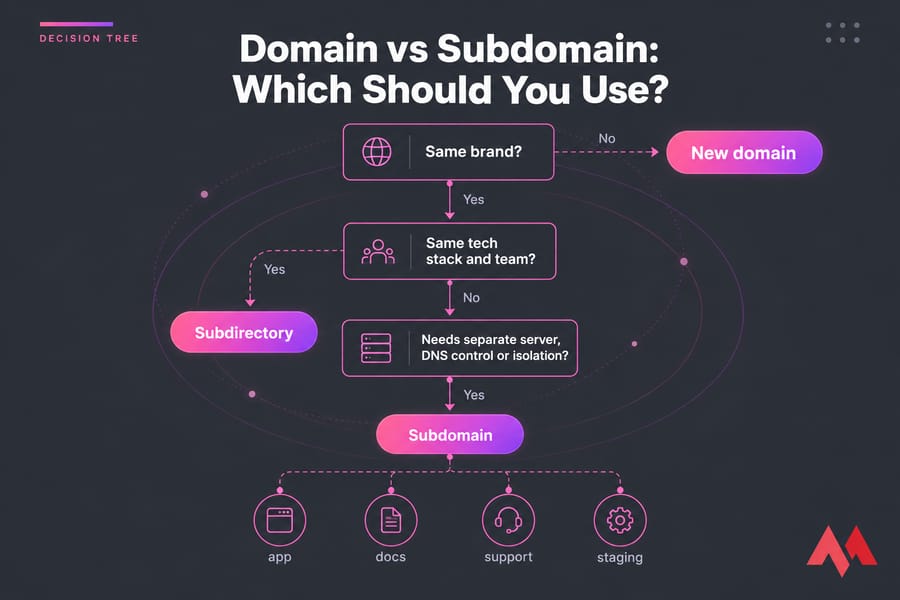
Choose a subdirectory when...
- The content runs on the same CMS and stack as your main site
- It's meant to support your core pages, as a blog or resource library does
- You want one sitemap, one property and simple internal linking
Choose a subdomain when...
- It runs on different infrastructure (a SaaS app, a hosted help desk, a headless frontend)
- Another team or vendor manages it and needs its own DNS control
- You need isolation for staging, client portals or different security rules
Choose a new domain when...
The project is a separate brand or targets a different market, or you might sell it someday. A subdomain still carries your main brand, which is a problem if you want real distance.
When to Use Subdomain vs Subdirectory vs New Domain
Choosing between a domain, subdomain, or subdirectory depends on your goals:
| Use Case | Best Option | Why |
| New brand or service | New Domain | Builds separate identity (e.g., newbrand.com) |
| Blog or internal resources | Subdirectory | Shares SEO authority with main site |
| Store, forum, or e-learning portal | Subdomain | Keeps functions separate without new domain |
| Regional websites | Subdomain or new ccTLD | Allows localized content |
| Testing/Staging | Subdomain | Keeps experiments isolated from live site |
In short:
- Use a domain for distinct brands.
- Use a subdomain for specialized or independent sections.
- Use a subdirectory when you want SEO strength to flow seamlessly.
For more guidance on this, check out MonoVM's detailed comparison guide: Subdomains vs Subdirectories.
Choosing by Use Case
| Use case | Usual pick | Why |
| Blog / content marketing | example.com/blog |
Easy to link to product pages from day one |
| Ecommerce store | Subdirectory if it's one platform, shop. if it's a separate stack |
Depends on whether checkout runs on another platform |
| Docs / help center | docs. or support. |
Hosted tools like Zendesk usually need a CNAME |
| SaaS app / client portal | app.example.com |
Keeps the app separate from marketing pages |
| International | ccTLD, subdomain or subdirectory | Depends on your budget and local teams |
| Staging | staging. (password-protected) |
Keeps test builds out of the index |
Example Scenarios
Here's a quick Domain vs Subdomain example to illustrate the structure:
- Domain:
monovm.com→ main website - Subdomain:
support.monovm.com→ customer support area - Subdirectory:
monovm.com/blog→ articles within main site
This difference between domain and subdomain with example shows that subdomains act as independent sections, while subdirectories remain under the same roof.
📝 Other Keyword Variations Explained
This section clarifies common variations like root domain vs subdomain and addon domain vs subdomain, which often confuse new website owners.
Root Domain vs Subdomain
Your root domain (or primary domain) is the highest level of your web address for example, monovm.com. A subdomain like blog.monovm.com branches off from it. So, in the root domain vs subdomain debate, the root domain always represents your main brand presence, while the subdomain supports specific functions.
Addon Domain vs Subdomain
An addon domain is a completely different domain hosted under the same control panel as your main site. It's like owning multiple separate websites in one account. A subdomain, on the other hand, shares the same primary domain but functions as an independent section.
Top Level Domain vs Subdomain
The top-level domain (TLD) is the extension at the end of your address — .com, .org, .net, etc. A subdomain appears before the main domain and doesn't affect your TLD.
For example:
academy.monovm.com → academy is the subdomain; .com is the top-level domain.
This shows that top level domain vs subdomain comparisons refer to completely different parts of the address structure.
You can learn more about TLDs in MonoVM's detailed guide on Different Types of Domains.
URL Domain vs Subdomain
The URL domain is your site's main address, such as monovm.com. A subdomain modifies the URL by adding a prefix — like help.monovm.com. This structure makes it easy to organize content logically and maintain separate areas for visitors or products.
Primary Domain vs Subdomain
Your primary domain is the main website assigned to your hosting account — everything else (subdomains or addon domains) builds around it. The primary domain vs subdomain difference lies in purpose: the former is your website's foundation, while subdomains are extensions or special-purpose branches.
What is a Domain vs a Subdomain?
To summarize simply:
A domain is the main website address people use to reach your site. A subdomain is a subdivision of that domain used to organize or separate content.
This distinction "what is a domain vs a subdomain" is key to understanding how internet navigation and SEO hierarchy work together.
🏢 Domain vs Subdomain: Real-World Examples
Now that we've covered the theory, let's look at some practical domain vs subdomain examples used by major websites.
Example 1: blog.example.com
Many companies host their blogs on subdomains — for instance, blog.hubspot.com or blog.monovm.com. This allows them to manage blog content separately from their main site, with its own analytics and potential for unique SEO targeting.
Example 2: shop.example.com
E-commerce sites often use a dedicated subdomain for online stores, like shop.monovm.com. This keeps the shopping experience distinct and allows for specialized tracking, plugins, and security.
Email/DDD/Domain vs Subdomain Context
Email services rely heavily on domain configurations. For instance, info@monovm.com uses the main domain for branding consistency.
However, organizations might also set up emails tied to subdomains (e.g., support@help.monovm.com) for departmental use. This forms part of the domain vs subdomain email conversation — both serve valid but different communication needs.
🛠️ How to Create a Subdomain
- Add a DNS record. In your DNS provider or registrar panel, create an A record (IPv4), an AAAA record (IPv6) or a CNAME pointing to another hostname. Cloudflare's subdomain guide follows exactly this pattern.
- Point it to your hosting. Add a virtual host (Apache) or server block (Nginx) for the new hostname, or create the subdomain in cPanel/Plesk, which handles this step for you. If you're doing this through MonoVM, our guide on using the domain control panel covers the DNS section. Setting up on a VPS? See how to set up a domain on a VPS, and if you're using a third-party DNS host, setting up custom nameservers is the first step.
- Enable SSL/TLS. Let's Encrypt can issue a certificate for the subdomain in seconds. Wildcard certificates require DNS-01 validation.
- Set up tracking. Add your GA4 tag. If you already use a Search Console Domain property, the subdomain is included automatically.
; Example zone entries
blog.example.com.     3600  IN  A      203.0.113.10
support.example.com.  3600  IN  CNAME  example.zendesk.com.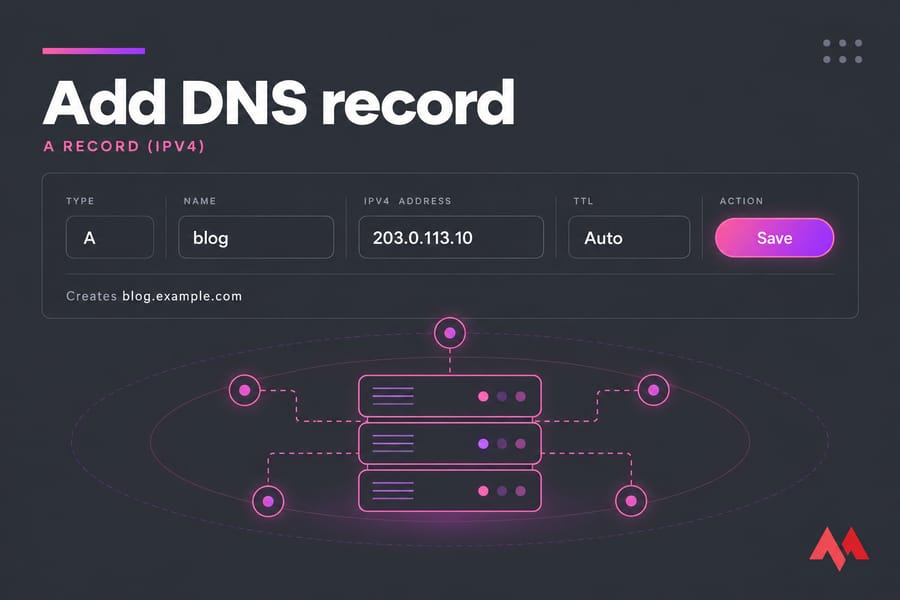
🔄 Moving From a Subdomain to a Subdirectory
A migration is worth it when the subdomain was cut off from the main site or is costing you extra maintenance. If it's well linked and working fine, leave it alone. Google's site move guidelines cover the full process. Here's the short version:
- Map every old URL to its new URL, one to one.
- Set up server-side 301 redirects and keep them in place for at least a year.
- Update internal links, canonical tags and hreflang so they point straight to the new URLs.
- Submit the new XML sitemap in Search Console.
- Watch indexing and performance for several weeks, and expect some ups and downs.
Note that the Change of Address tool is meant for moving to a new domain or subdomain. It doesn't apply to moves into a folder, so for those, your redirects do all the work.
⚠️ Common Mistakes to Avoid
- Using a subdomain by default when a folder would work and be simpler to manage.
- Splitting related content across several hostnames, such as
blog.,news.and/resources, all competing for the same keywords. - Not linking to the subdomain. If your main navigation never links to it, it won't get much traffic or visibility.
- Duplicate content on both hosts without canonical tags.
- Missing SSL coverage on a new subdomain, which causes browser warnings.
✨ SEO Best Practices & Recommendations for 2026
Optimizing the use of domain vs subdomain structures is crucial in 2026 as search algorithms grow smarter and more user-centric. Here are key insights and recommendations.
Pros & Cons of Using Subdomains (2026)
Pros:
- Easy separation of content and management
- Can host multiple projects on one domain
- Ideal for international or multilingual sites
- Prevents technical conflicts between site sections
Cons:
- Treated as a separate site in Google Search
- Requires extra SEO and analytics effort
- Can split link equity and authority
- SSL and DNS need separate configurations
Comparison Table: Domain vs Subdomain for SEO / Branding / Maintenance
| Factor | Domain | Subdomain |
| SEO Authority Sharing | Direct and unified | Partial; treated as separate |
| Brand Consistency | Strong central brand | Can diversify branding |
| Maintenance | Single-site maintenance | Multiple-site management |
| Analytics Setup | Unified reporting | Separate tracking needed |
| Flexibility | Less flexible (one focus) | Highly flexible (multiple purposes) |
🎯 Conclusion
Understanding the difference between domain and subdomain along with structures like subdirectories is vital for designing a scalable, SEO-friendly online presence in 2026.
If you're still working out how a domain relates to the server behind it, our guide on domain vs hosting clears up the split. And if budget is your main concern, check our cheap domain options.
If you're ready to register a domain or build a reliable online infrastructure, MonoVM has you covered. You can easily Buy Domain Name with instant setup, 24/7 support, and competitive pricing.
For even more control, consider upgrading to MonoVM's VPS Hosting or Dedicated Servers.

An experienced tech and developer blog writer, specializing in VPS hosting and server technologies. Fueled by a passion for innovation, I break down complex technical concepts into digestible content, simplifying tech for everyone.