






















 18 Jun 2026 / 0 comments
How to Pay for a VPS with NOWPayments 💳
Learn how to pay for a VPS using NOWPayments and cryptocurrency. Follow this step-by-step guide to complete secure crypto payments and activate your VPS quickly.

Don't Just Store Your Data. Make It Recoverable.
Don't leave your business data to chance. With MonoVM Cloud Backup for VPS, you can keep backup copies of your VPS data in S3 Object Storage and choose a backup plan that fits your needs.
Compare the available features and select the level of backup protection that suits your VPS.
Rated 5 from 1 votes
Geekbench 6 multi-core benchmarks measured on production hardware in Amsterdam, Netherlands
You can reach out to the MonoVM support team at any time of the day for service-related queries.
Choose the level of backup protection you need (pricing from 20%, 30%, or 40% of the VPS server price according to the plan).
Evaluate the features, how many backups are created, and how you can restore before selecting a plan. The comparison table will allow you to compare the different options easily.

Note: Latency values are approximate averages measured from Central Europe under normal network conditions and are updated regularly to reflect current routing performance. Actual latency may vary depending on your ISP, network congestion, and geographic location.
Cloud Backup for VPS stores backup copies in S3 Object Storage rather than on your VPS's primary storage. The options available to you depend on your selected plan.
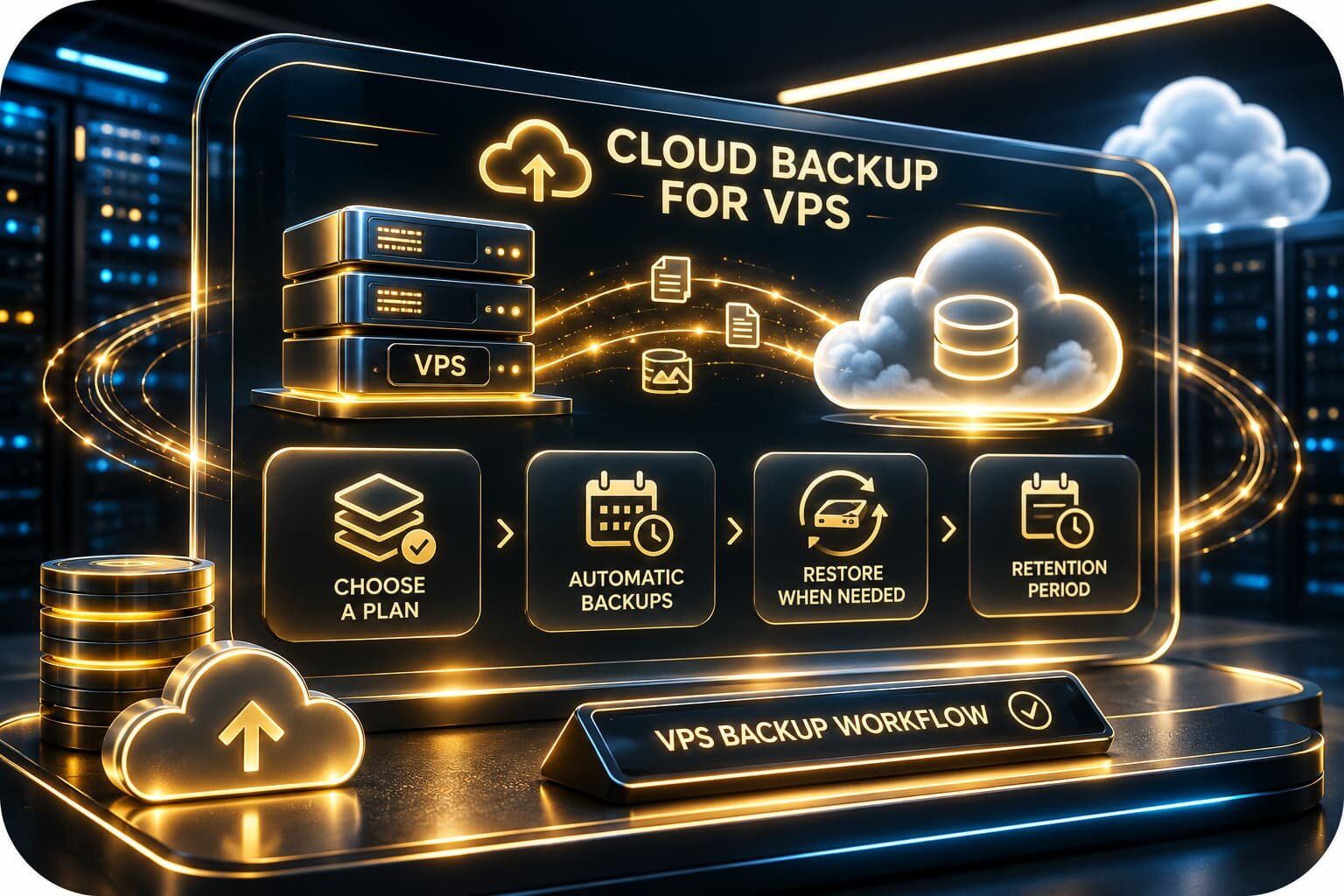
Create regular backups by saving copies of your VPS data. In case your data is accidentally modified or deleted, you will have a copy of it. The frequency of backups depends on the plan you choose.
Each plan has you set up with S3 Object Storage as your backup destination. Storing backup copies in cloud storage apart from the primary storage of your VPS helps prevent the common mistake of using the same storage for the original data and the backup.
Professional and Premium have backup selection; help with this process is available through support if the user opts for it.
You can also create a manual backup besides the automatic backup schedule. This feature is available with the Premium plan.
Choices for restoration will depend on the plan you select. Standard provides help for restoration, while Professional and Premium include a set number of control-panel restores.
Backups are kept for three days after permanent deletion of a VPS under the current setup of the service. This setting is global, and all three plans have the same setting.
Purchase your VPS securely and deploy a high-performance Windows or Linux server shortly after payment confirmation.
Your honest review is the best proof of an excellent customer experience. Leave your comments on the customer dashboard and help other users with your sincere opinion.

Most companies don’t accept Bitcoin, and that’s the main reason I prefer to choose Monovm.
AlexI'm new here and ordered a starter site. They’ve been in contact with me every day, and my site is now online. So far, I’m really satisfied with their service and support.
It’s great to have access to experts who can guide me through live chat, which is why I’ve been registering my domains and emails with Monovm for several years.
Cloud Backup for VPS is a backup service designed to keep copies of VPS data in S3 Object Storage. The available plans differ in backup frequency, manual backup availability, backup selection, and restoration options.
Backups are retained for three days after permanent VPS deletion. This retention period is configured globally rather than separately for each plan. If you plan to delete your VPS, make sure you understand this retention period before proceeding.
Cloud storage provides a place to store files, whereas cloud backup focuses on maintaining copies of data that can be restored when needed. Some storage solutions offer versioning, but this depends on the specific service and configuration.
The security of a cloud backup setup depends on factors such as encryption, access control, separation from the production environment, and recovery testing. The available service information confirms S3 Object Storage as the backup destination, but does not specify whether the plans include AES-256 encryption, immutable backups, or particular compliance certifications. These features should not be assumed unless confirmed by MonoVM.
Yes. A VPS can be used to store backup copies or run backup software, depending on its configuration. However, purchasing a regular VPS does not automatically include a pre-configured backup workflow. Cloud Backup for VPS is a separate service with its own plans and features.
Website files, databases, application configurations, shared files, and other server data may be backed up, depending on the service's supported backup scope. For active databases, use a consistent backup method to avoid creating an unusable or incomplete copy. The precise data and system components covered by MonoVM Cloud Backup for VPS should be confirmed with the service team.
The appropriate backup frequency depends on how much data you can afford to lose and how often that data changes. This is commonly described by the Recovery Point Objective (RPO). MonoVM's plans offer different automatic backup frequencies, so consider your data's importance and update frequency when choosing a plan.
A backup preserves data for recovery. Disaster recovery is a broader plan for restoring a service, including its Recovery Time Objective (RTO), assigned responsibilities, and restoration sequence. Backups are one component of a disaster recovery strategy.
No. Synchronization propagates changes, including deletions and overwrites, between locations. A backup may preserve independent historical versions of data, depending on the backup system and its retention settings.
If you need the Cloud Backup for VPS service, compare the Standard, Professional, and Premium plans above. A Storage VPS or Cloud VPS may serve different infrastructure purposes, such as providing a storage repository or running self-managed backup software, but those products should not be confused with the dedicated Cloud Backup for VPS service.
The assistance available depends on the service and the task involved. For Cloud Backup for VPS, certain backup-selection and restoration requests require support assistance under the Standard plan. Contact MonoVM support if you need clarification about the assistance available for your chosen plan.
The required storage depends on the amount of data being backed up, how frequently it changes, how many backup versions are retained, and the backup method used. Compression and deduplication may reduce storage requirements when supported. Contact MonoVM if you need confirmation of storage capacity or backup limits for this service.
The restoration process depends on the options included in your plan. Professional and Premium include a defined number of control-panel restores, while Standard requires support assistance. Before relying on a backup for recovery, confirm the restoration procedure and any applicable limits with MonoVM support.
Learn how cryptocurrency VPS payments work, how to verify payment details, and how to avoid common mistakes when completing a crypto checkout.
18 Jun 2026 / 0 commentsLearn how to pay for a VPS using NOWPayments and cryptocurrency. Follow this step-by-step guide to complete secure crypto payments and activate your VPS quickly.
 29 Jun 2026 / 0 comments
Learn how to pay for your VPS with Cryptomus in just a few simple steps. Follow this guide to complete your crypto payment securely and activate your VPS without delays.
 09 Jul 2026 / 0 comments
Learn how to pay for a VPS with CoinPayments using Bitcoin, USDT, Litecoin, and other cryptocurrencies. Follow this simple 2026 step-by-step guide for fast, secure, and hassle-free VPS payments.