
Imagine you've found the ideal trading opportunity in the ever-changing Forex market. Your analysis is solid, your strategy is flawless. But just when you're about to execute, your internet drops or your computer decides to restart. Lag and downtime don't just annoy — they cost real money. A Forex VPS removes that risk by keeping your platform running 24/7 in a data center, independent of your local machine. This guide compares the best Forex VPS providers for 2025, ranked on latency, uptime, hardware, MetaTrader support, and refund terms. Disclosure first: MonoVM publishes this article and also sells Forex VPS hosting. It's included and judged on the same criteria as everyone else.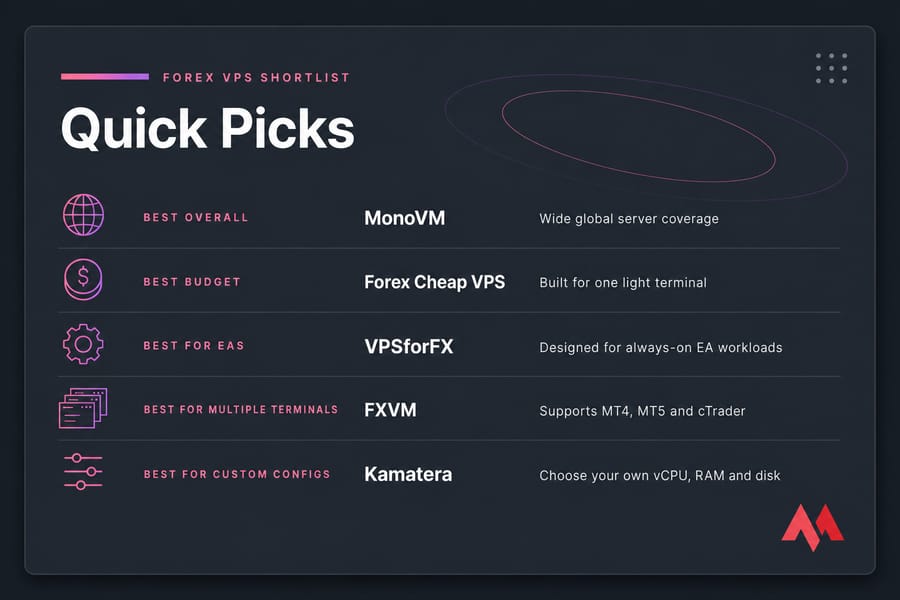
- Best for global server coverage: MonoVM — wide location list, useful when your broker sits outside the usual hubs.
- Best budget option: Forex Cheap VPS — entry plans built for a single light terminal.
- Best for custom configurations: Kamatera — pick your own vCPU, RAM and disk instead of fixed tiers.
- Best for Expert Advisors: VPSforFX — plans marketed around always-on EA workloads.
- Best for resource-heavy trading: VPSForexTrader — higher RAM tiers for chart-heavy setups.
- Best for multiple platforms: FXVM — MT4, MT5 and cTrader all supported.
What Is Forex VPS Hosting?
Before identifying the best Forex VPS providers, let's look at what a Forex VPS is. The term VPS stands for Virtual Private Servers, which means a virtual dedicated server. VPS has many use cases, but the most important one is websites. Today, the use of VPS in Forex has become very common and popular. Certainly, no one understands the value of milliseconds in placing or closing an order as much as a trader! Therefore, low and intermittent internet speed can be a big problem for traders. One of the ways that professional traders use to better manage their trades and also prevent unwanted losses is to use a Forex VPS!
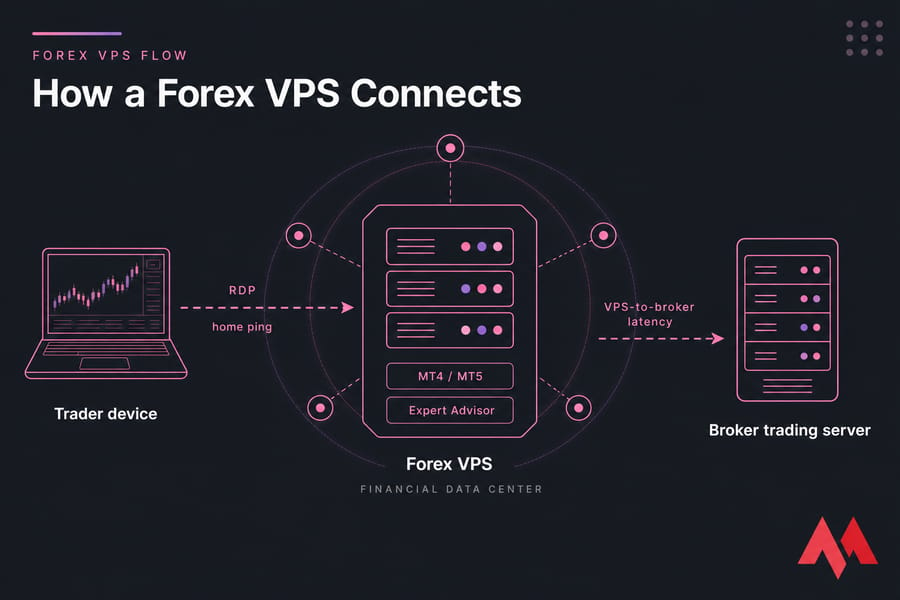
In simple terms, Forex VPS allows you to trade without the need for your computer to be turned on or the need for an Internet connection. Trading robots can trade 24 hours a day, 7 days a week. But here's what a Forex VPS actually does: it's an isolated virtual server in a data center where your trading platform lives instead of on your laptop. You connect over Remote Desktop, launch MT4 or MT5, and leave it running. Your machine can be shut down, asleep or on fire — the terminal keeps ticking.
One correction worth making, because a lot of articles get this wrong: a VPS keeps your Expert Advisor running when your home connection drops, but you still need internet access to log in and manage the server. Automation continues; supervision doesn't. And no, hosting doesn't produce profits. It removes one category of failure — power cuts, Windows updates, flaky Wi-Fi. Market risk, broker execution quality and your strategy are all untouched by it.
Why Should Traders Use a Forex VPS?
Here are some significant explanations why Forex traders should use a Forex VPS:
- Trade without interruption: A Forex VPS works 24 hours a day, seven days a week in a faraway data center. This ensures that your trading program continues to function even if your machine reboots, encounters internet outages, or requires repair. You will not miss important trade chances due to downtime.
- Speed is king: Forex markets move quickly, and even minor delays can affect your trades. Forex VPS services frequently provide high-speed connections near important financial centers. This lowers latency (delay) in order execution, potentially providing you an advantage in fast-paced scenarios.
- Better security: Reputable Forex VPS providers include strong security features such as firewalls and intrusion detection to protect your trading data from cyberattacks. This is especially important because you will be providing sensitive financial information to the system.
- Run automated methods: Many Forex traders use automated trading methods, such as Expert Advisors (EAs). A VPS allows these EAs to operate indefinitely without being stopped by your personal computer's operations.
- Accessibility from any location: As long as you have an internet connection, you can use any device to access your VPS-based trading platform. This provides additional flexibility and eliminates geographical limitations when handling your deals.
How We Compared Forex VPS Providers
This is a researched and compared roundup, built from official provider pages, published SLAs and documented specifications. Where a provider doesn't publish a number, the table says "Not disclosed" rather than guessing. Weighting, so you can argue with it:
- Latency and location coverage — 25%
- Uptime terms and reliability — 20%
- Hardware and scalability — 15%
- MT4, MT5, cTrader and EA support — 15%
- Security and DDoS protection — 10%
- Customer support — 10%
- Pricing, trials and refund terms — 5%
Uptime figures are provider-reported unless the provider publishes an actual service-level agreement with credits attached. Those two things are not the same, and plenty of marketing pages blur the line.
Recommended Forex VPS Specifications
Ignore any "one terminal equals 2 GB" rule. Real usage swings hard depending on indicator count, open charts, EA logging and how bloated your broker's custom MT4 build is. Treat these as starting points, then watch Task Manager for a week.
- One light MT4/MT5 terminal: 1–2 GB RAM, 1 vCPU, 30 GB NVMe SSD.
- Two to four terminals: 4 GB RAM, 2 vCPU. Multiple broker accounts add up faster than people expect.
- EA-heavy or chart-heavy setups: 6–8 GB RAM, 2–4 dedicated vCPU. Backtesting is CPU-bound, not RAM-bound.
- cTrader or NinjaTrader: budget more — .NET-based platforms are hungrier than MT4.
Scale up only after you've seen sustained memory pressure. Over-provisioning is just a donation to your host.
How Server Location Affects Latency
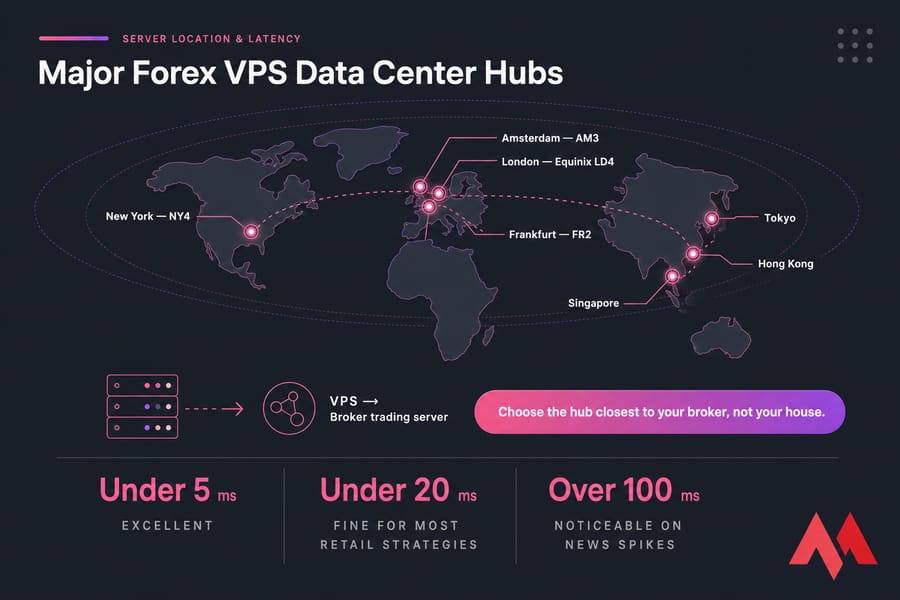
Here's what most beginners get backwards. Your ping from home to the VPS barely matters once the platform is running — it only affects how snappy the desktop feels. What matters is the hop from your VPS to your broker's trading server.
Under 5 ms is excellent. Under 20 ms is fine for almost every retail strategy. Over 100 ms and you'll notice it on news spikes. Find where your broker's MT4/MT5 server is actually hosted — Equinix LD4 in London, NY4 in New York, FR2 in Frankfurt, AM3 in Amsterdam, plus Tokyo, Singapore and Hong Kong — then pick the closest data center to that, not to your house. Latency is one input into slippage. Liquidity, spread widening and broker execution model contribute more than a few milliseconds ever will.
Forex VPS Comparison Table
| Provider | Entry RAM | Windows Included | MT4/MT5 | Best For |
| MonoVM | 2 GB | Yes, on Windows plans | Yes | Global server coverage |
| NextPointHost | 2 GB | Yes | Yes | European broker proximity |
| AccuWeb Hosting | 1 GB | Yes | Yes | Wide US location choice |
| ForexVPS.net | 2 GB | Yes | Yes | Trading-only specialisation |
| Forex Cheap VPS | 1 GB | Yes | Yes | Lowest entry price |
| Kamatera | Configurable | Licence add-on | Yes | Custom configurations |
| JavaPipe | 2 GB | Yes | Yes | DDoS-protected hosting |
| FXVM | 2 GB | Yes | Yes, plus cTrader | Multiple platforms |
| Cloudzy | 1 GB | Yes | Yes | Simple RDP setups |
| MyForexVPS | 2 GB | Yes | Yes | Managed hand-holding |
| VPSforFX | 2 GB | Yes | Yes | Expert Advisor users |
| VPSForexTrader | 4 GB | Yes | Yes | Resource-intensive trading |
Specifications above are provider-reported and were verified against public documentation in early 2026. Confirm the current plan page before you buy — Forex hosts change tiers often.
15 Best Forex VPS Providers
While technical knowledge is essential in Forex, your computer setup might determine your success. These firms provide virtual servers designed exclusively for Forex trading, minimizing the possibility of downtime due to personal computer issues or unstable internet. This translates to 24-hour access, faster transaction execution due to high-speed connections, and strong security — all critical components for optimizing your Forex trading potential.
1- MonoVM
MonoVM is a powerful competitor in the Forex VPS market, focusing on dependability and performance for seamless trading. We offer low downtime, strategically positioned data centers for faster connection speeds, and superior security procedures to protect your financial information. Also, our 24/7 expert assistance assures that you have a dependable partner for any technical difficulties you may have during your Forex trading trip. Strategically placed data centers in 35 locations around the world reduce latency, potentially providing your transactions a speed advantage. Plus, MonoVM provides the best security features such as firewalls and DDoS protection servers to protect your essential financial information.
What we like:
- Minimal downtime keeps your trading uninterrupted.
- Strategically located data centers minimize latency.
- Robust security measures protect your financial data.
- 24/7 support ensures a smooth trading experience.
- 99.99% Uptime.
What we don't like:
- If you have any drawbacks, mention them in the comments and we'll try to fix them.
Price:
- $42.99 for 2048 MB
- $67.99 for 4096 MB
- $89.99 for 6144 MB
- $107.99 for 8192 MB
2- NextPointHost
NextPointHost provides Forex traders with servers in crucial cities such as New York, London, and Singapore. However, they lack versatility by only providing a single VPS package with 3GB RAM and 40GB storage. While they offer 24/7 assistance and a 30-day money-back guarantee, similar to other budget providers, their uptime claim may be unrealistic. They also don't include pre-installed MT4/MT5 trading platforms.
✅ Ensure your trades never sleep! Learn how to install MT4 on VPS and take your trading to the next level!
What we like:
- Servers in key locations (New York, London, Singapore).
- 24/7 support system.
- 30-day money-back guarantee.
What we don't like:
- Unrealistic uptime value.
- No pre-installed MT4/MT5.
- One VPS plan only (limited flexibility).
Price:
- No information.
| Provider | MonoVM | NextPointHost |
| Available Locations | 35 locations worldwide | 3 locations |
| 24/7 Support | Yes | Yes |
| Service Offer | 7 days money-back guarantee | 30 days money-back guarantee |
| Uptime | 99.99% | 100% |
| Pre-Installed MT4/MT5 | Yes | No |
| Payment Methods | Credit Card, PayPal, Bitcoin, WebMoney, Perfect Money, Payza, Skrill, Neteller, Payeer, Western Union, Bank Transfer | Credit Cards, PayPal, Perfect Money |
3- AccuWeb Hosting
AccuWeb Hosting has a diverse choice of server locations (13 in the United States, Europe, and Asia) that are compatible with multiple Windows Server versions (2012, 2016, and 2019). However, their Forex VPS services are not geared for trading and are expensive, beginning at $30 per month. Furthermore, they do not pre-install the MT4/MT5 trading platforms and do not provide a money-back guarantee.
What we like:
- Wide range of server locations (13 including US, Europe, and Asia).
- Compatibility with various Windows Server versions (2012, 2016, and 2019).
What we don't like:
- Expensive prices.
- No pre-installed MT4/MT5.
- No money-back guarantee.
Price:
- $30 for 2 GB
- $47 for 4 GB
- $91 for 8 GB
| Provider | MonoVM | AccuWeb Hosting |
| Available Locations | 35 locations worldwide | 13 locations |
| 24/7 Support | Yes | Yes |
| Service Offer | 7 days money-back guarantee | No |
| Uptime | 99.99% | 99.9% |
| Pre-Installed MT4/MT5 | Yes | No |
| Payment Methods | Credit Card, PayPal, Bitcoin, WebMoney, Perfect Money, Payza, Skrill, Neteller, Payeer, Western Union, Bank Transfer | Mastercard, Visa, PayPal, American Express |
4- ForexVPS.net
ForexVPS.net offers 24-hour support and a 14-day money-back guarantee, but their services come at a cost. While they provide seasonal deals, their standard pricing of $36 for 1GB RAM is exorbitant given that you'll need to install trading systems such as MT4/MT5, and the servers aren't specifically designed for Forex trading.
What we like:
- 24/7 support system.
- 14-day money-back guarantee.
What we don't like:
- Expensive prices (especially for non-optimized servers).
- No pre-installed MT4/MT5.
Price:
- $36 for 2 GB
- $41 for 4 GB
| Provider | MonoVM | ForexVPS.net |
| Available Locations | 35 locations worldwide | 5 locations |
| 24/7 Support | Yes | Yes |
| Service Offer | 7 days money-back guarantee | 14 days money-back guarantee |
| Uptime | 99.99% | No information |
| Pre-Installed MT4/MT5 | Yes | No |
| Payment Methods | Credit Card, PayPal, Bitcoin, WebMoney, Perfect Money, Payza, Skrill, Neteller, Payeer, Western Union, Bank Transfer | Credit Cards, Visa, PayPal, Skrill, Bitcoin |
5- Forex Cheap VPS
Forex Cheap VPS provides affordable VPS plans with a 3-day money-back guarantee, but be aware of the limitations. Their servers are not optimized for trading, therefore the promised uptime may not be accurate. Furthermore, they do not pre-install the common trading platforms MT4/MT5, and you will not know where the server is until after signing up.
What we like:
- Affordable prices.
- 3-day money-back guarantee.
- 100% uptime.
What we don't like:
- Unrealistic uptime value.
- No pre-installed MT4/MT5.
- Unclear locations.
Price:
- $5.99 for 2 GB
- $10.99 for 4 GB
- $19.99 for 8 GB
| Provider | MonoVM | Forex Cheap VPS |
| Available Locations | 35 locations worldwide | No information |
| 24/7 Support | Yes | Yes |
| Service Offer | 7 days money-back guarantee | 3 days money-back guarantee |
| Uptime | 99.99% | 100% |
| Pre-Installed MT4/MT5 | Yes | No |
| Payment Methods | Credit Card, PayPal, Bitcoin, WebMoney, Perfect Money, Payza, Skrill, Neteller, Payeer, Western Union, Bank Transfer | Credit Cards, PayPal, Skrill, Bitcoin |
6- Kamatera
Kamatera provides VPS hosting with servers in multiple locations throughout the world, including the United States, Europe, the Middle East, and Asia. They are open about their uptime, promising 99.95%, which is a good sign compared to others who claim unachievable 100%. Kamatera also allows you to customize your plans. However, despite their reputation for cost, the starting price for a low-spec VPS in the United States is $25, which isn't very low, and their servers do not come pre-installed with the popular MT4/MT5 trading platforms.
What we like:
- Transparent uptime guarantee (99.95%).
- Customizable plans.
What we don't like:
- Not as affordable as advertised (minimum specs VPS costs $25 per month).
- No pre-installed MT4/MT5 trading platforms.
Price:
- $25 for 2 GB
- $31 for 4 GB
- $43 for 8 GB
- $67 for 16 GB
| Provider | MonoVM | Kamatera |
| Available Locations | 35 locations worldwide | 10 locations |
| 24/7 Support | Yes | Yes |
| Service Offer | 7 days money-back guarantee | 30 days free trial |
| Uptime | 99.99% | 99.95% |
| Pre-Installed MT4/MT5 | Yes | No |
| Payment Methods | Credit Card, PayPal, Bitcoin, WebMoney, Perfect Money, Payza, Skrill, Neteller, Payeer, Western Union, Bank Transfer | No information |
7- JavaPipe
JavaPipe provides VPS hosting with several Windows versions to select from. They offer low latency and DDoS protection for secure trading, however their Forex support material is false. For example, they claim that a 2GB RAM VPS can support 8 terminals, which is ludicrous given that each terminal normally requires 2GB RAM. Other disadvantages include an additional charge for Windows setup, limited server locations, and no pre-installed MT4/MT5 trading platforms.
What we like:
- Multiple Windows versions.
- Low latency.
- DDoS protection.
What we don't like:
- Unclear information on Forex support (unrealistic RAM capacity claims).
- Additional Windows setup fee.
- Limited server locations.
- No pre-installed MT4/MT5 trading platforms.
Price:
- $21 for 2 GB
- $32 for 4 GB
- $42 for 8 GB
| Provider | MonoVM | JavaPipe |
| Available Locations | 35 locations worldwide | 3 locations |
| 24/7 Support | Yes | Yes |
| Service Offer | 7 days money-back guarantee | No |
| Uptime | 99.99% | No information |
| Pre-Installed MT4/MT5 | Yes | No |
| Payment Methods | Credit Card, PayPal, Bitcoin, WebMoney, Perfect Money, Payza, Skrill, Neteller, Payeer, Western Union, Bank Transfer | No information |
8- FXVM
FXVM provides professional Forex traders with high-quality VPS that support major platforms such as MT4, MT5, and NinjaTrader. They offer a variety of server locations for maximum connectivity. However, FXVM's pricing reflects its premium service, which can be rather expensive. Additionally, their promised uptime guarantee may be unrealistic, and they do not provide a money-back guarantee.
What we like:
- Compatible with MT4/MT5/NinjaTrader.
- Variety of server locations.
What we don't like:
- Expensive prices.
- Unrealistic uptime value.
- No money-back guarantee.
- Limited terminals on VPS (max 6).
Price:
- $29 for 2 GB
- $50 for 4 GB
| Provider | MonoVM | FXVM |
| Available Locations | 35 locations worldwide | 9 locations |
| 24/7 Support | Yes | Yes |
| Service Offer | 7 days money-back guarantee | No |
| Uptime | 99.99% | 100% |
| Pre-Installed MT4/MT5 | Yes | No |
| Payment Methods | Credit Card, PayPal, Bitcoin, WebMoney, Perfect Money, Payza, Skrill, Neteller, Payeer, Western Union, Bank Transfer | PayPal, Skrill, Stripe, Bitcoin |
9- Cloudzy
For Forex trading, Cloudzy is a dependable option, especially for people who just started trading. It's a good choice if you want to start trading Forex as a side gig because it comes pre-installed with well-known trading platforms like MetaTrader 4 (MT4) and MetaTrader 5 (MT5). Some of its features include DDoS protection and low-latency connections from more than 15 worldwide data centers, including prominent hubs like New York, London, and Singapore. Cloudzy offers a safe and effective trading environment. It also guarantees traders seamless and lag-free performance with its strong infrastructure and support for auto-trading bots.
What we like:
- Lag-free performance reduces slippage.
- Supports auto-trading with trading bots.
- Excellent bandwidth across all plans.
- Strategically located data centers for low latency.
- Pre-installed MT4/MT5 platforms for beginner traders.
What we don't like:
- Latency figures are not advertised directly.
- A limited number of locations for network testing tools.
Price:
- Supersonic Basic: $7.96/month – 2 GB RAM, 1 vCPU, 60 GB NVMe storage, 3 TB bandwidth, up to 10 Gbps connection.
- Supersonic Advanced: $15.96/month – 4 GB RAM, 2 vCPU, 120 GB NVMe storage, 5 TB bandwidth, up to 10 Gbps connection.
- Supersonic Professional: $29.56/month – 8 GB RAM, 4 vCPU, 240 GB NVMe storage, 7 TB bandwidth, up to 10 Gbps connection.
- Supersonic/Hypersonic Enterprise: $55.96/month – 16 GB RAM, 8 vCPU, 350 GB NVMe storage, 10 TB bandwidth, up to 10 Gbps connection.
| Provider | MonoVM | Cloudzy |
| Available Locations | 35 locations worldwide | 15+ global data centers |
| 24/7 Support | Yes | Yes |
| Service Offer | 7 days money-back guarantee | 7-day money-back guarantee |
| Uptime | 99.99% | 99.95% |
| Pre-Installed MT4/MT5 | Yes | Yes |
| Payment Methods | Credit Card, PayPal, Bitcoin, WebMoney, Perfect Money, Payza, Skrill, Neteller, Payeer, Western Union, Bank Transfer | Credit/debit cards, PayPal, and cryptocurrencies |
It's good to know what managed Forex VPS and its benefits are.
10- MyForexVPS
One of the other best Forex VPS providers is MyForexVPS. For traders interested in algorithmic (Algo) trading, MyForexVPS is a highly specialized platform. Its ultra-low latency, which ranges from 0.3 to 1.5 ms, is intended to guarantee uninterrupted communication to brokers. Featuring enterprise-grade SSDs, root access, and a 99.99% uptime guarantee, this VPS provides strong performance and dependability. If you're a trader whose brokers are near Amsterdam, London, or New York, it is a good choice for you despite having few location possibilities.
What we like:
- Ultra-low latency ensures quick trade execution.
- Built-in support for MT4/MT5 trading platforms.
- Offers unlimited traffic for seamless trading.
- Quick activation to start trading immediately.
What we don't like:
- Limited to three server locations (Amsterdam, London, New York).
- Pricing may not suit traders looking for budget-friendly plans.
Price:
- Solo VPS: $13.99/month – 3 GB RAM, 1 core CPU, 30 GB SSD, Windows Server 2016/2019.
- Pro VPS: $18.99/month – 3 GB RAM, 3 core CPU, 35 GB SSD, Windows Server 2016/2019.
- Xpert VPS: $29.99/month – 4 GB RAM, 4 core CPU, 40 GB SSD, Windows Server 2016/2019.
- Guru VPS: $53.99/month – 6 GB RAM, 3 core CPU, 50 GB storage, Windows Server 2016/2019.
| Provider | MonoVM | MyForexVPS |
| Available Locations | 35 locations worldwide | Amsterdam, London, and New York |
| 24/7 Support | Yes | Yes |
| Service Offer | 7 days money-back guarantee | 5-day money-back guarantee |
| Uptime | 99.99% | 99.99% |
| Pre-Installed MT4/MT5 | Yes | Yes |
| Payment Methods | Credit Card, PayPal, Bitcoin, WebMoney, Perfect Money, Payza, Skrill, Neteller, Payeer, Western Union, Bank Transfer | Credit/debit cards, PayPal, and cryptocurrencies |
11- VPSforFX
VPSforFX is a Forex VPS service made especially for traders who use Expert Advisors (EAs) or automated systems on platforms such as cTrader and MetaTrader (MT4/MT5). VPSforFX is the best option for traders looking for dependable and effective VPS solutions because of its numerous global data centers, sturdy hardware, and reasonable prices. It guarantees minimal latency and great stability. Along with a 14-day money-back guarantee that lets consumers test the service risk-free, the site also offers professional customer support to help with any trading-related problems.
What we like:
- Multiple global data centers (New York, Hong Kong, Amsterdam, London) to minimize latency.
- High-performance hardware with AMD EPYC processors and NVMe SSD storage.
- 14-day money-back guarantee for risk-free testing.
- Scalable pricing plans to suit beginner and advanced traders.
- Responsive support team with Forex trading expertise.
What we don't like:
- Plans start at $19.99, which may not cater to budget-conscious traders.
- No mention of pre-installed trading platforms like MT4/MT5 or cTrader.
Price:
Starting from $19.99/month for beginners.
| Provider | MonoVM | VPSforFX |
| Available Locations | 35 locations worldwide | New York, Hong Kong, Amsterdam, and London |
| 24/7 Support | Yes | Yes |
| Service Offer | 7 days money-back guarantee | 14 days money-back guarantee |
| Uptime | 99.99% | 99.99% |
| Pre-Installed MT4/MT5 | Yes | Not pre-installed, but supports them |
| Payment Methods | Credit Card, PayPal, Bitcoin, WebMoney, Perfect Money, Payza, Skrill, Neteller, Payeer, Western Union, Bank Transfer | PayPal, credit and debit cards, and cryptocurrency payments |
12- VPSForexTrader
As a trader, you need high-performance resources and low-latency connections to support demanding trading environments. So, VPSForexTrader provides these features for you. If you're an advanced trader who needs to run multiple accounts or complex trading algorithms, this provider can support you. They have flexible plans that you can choose from. The platform also offers a 40% discount for annual plans. Their 24/7 expert support helps you to bypass possible issues.
What we like:
- High-performance hardware with AMD EPYC CPUs, ECC RAM, and NVMe SSDs for stability and speed.
- 40% discount for annual plan subscriptions.
What we don't like:
- A starting price of $29.99/month may not suit budget-conscious traders.
- Better suited for advanced traders rather than beginners.
Price:
$29.99/month
| Provider | MonoVM | VPSForexTrader |
| Available Locations | 35 locations worldwide | London, Amsterdam, New York, and Vilnius |
| 24/7 Support | Yes | Yes |
| Service Offer | 7 days money-back guarantee | 14 days money-back guarantee |
| Uptime | 99.99% | 99.99% |
| Pre-Installed MT4/MT5 | Yes | Not pre-installed, but supports them |
| Payment Methods | Credit Card, PayPal, Bitcoin, WebMoney, Perfect Money, Payza, Skrill, Neteller, Payeer, Western Union, Bank Transfer | Credit/debit cards and cryptocurrencies |
If you have chosen your provider, now you need to know how to set up VPS for Forex trading.
How to Test a Forex VPS Before Committing
- Ask support for a test IP in the data center you're considering. Most reputable hosts hand one over without fuss.
- Ping it from your machine for a rough network health check.
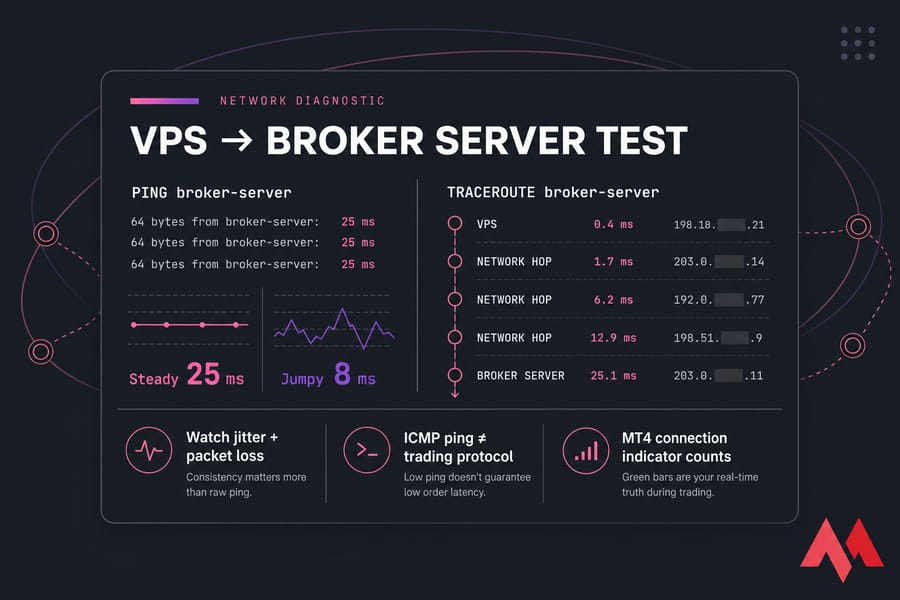
- Better: buy the cheapest plan under a refund window, log in, and measure from the VPS to your broker's server address.
- Watch jitter and packet loss, not just the average. A steady 25 ms beats a jumpy 8 ms.
- Remember ICMP ping isn't the trading protocol. MT4's own connection indicator is the number that counts.
Forex VPS Security Checklist
- Unique administrator password — never reuse your broker password.
- Enable multi-factor authentication on the hosting control panel.
- Restrict RDP to your own IP range, change the default port, or put it behind a VPN.
- Keep the Windows firewall on and close every port you don't use.
- Apply Windows Server updates on a schedule you control, not mid-session.
- Take snapshots before installing anything new.
- Run malware protection and confirm the host offers DDoS mitigation.
- Use least-privilege accounts — don't trade from Administrator daily.
- Never install a cracked or unverified EA. That's how credentials walk out the door.
How to Choose the Best Forex VPS Provider
To buy a Forex virtual server, you must first determine your needs and budget. But there are also factors that you can consider to meet your needs optimally. Some of the factors you should consider are:
- Server geographical location: This factor has a great impact on your ping and Forex VPS latency. In general, it is better to choose your Forex virtual server in the same country or close to the country of your broker or exchange. The hop from VPS to broker is what matters — not the hop from your home to the VPS.
- Server technical specifications: This factor has a great impact on the performance and stability of your server. In general, you should pay attention to the number of processor cores, RAM size, storage space, and server bandwidth. Ignore any "one terminal equals 2 GB" rule — real usage depends on indicators, charts and EA logging.
- Server customization: This factor has a great impact on your comfort and security. In general, you should be sure that you can install and configure the software and robots you want on the server.
- Strong support: Sometimes when using the server, you may encounter a problem that requires the guidance of an expert. So, it is better to choose a company that you are sure is ready to answer your questions and advise you at different times of the day and day of the week.
- Continuous Uptime: For example, an uptime of 99.99% indicates that your chosen server may be unavailable only 0.01% of the time of your chosen subscription, and this means constant access to the server! In Forex trading, high uptime is critical. However, verify whether the provider publishes an actual SLA with credits attached, not just a marketing number.
Final Verdict
Now, you know the top Forex VPS providers. Working in the Forex market has become one of the most common ways to earn and generate profits. To enter this market with power and achieve huge profits, in addition to trading knowledge and observing important points in this field, you must also have a suitable server that can change your IP address and has significant stability. For this purpose, you can use a Forex virtual server.
There's no universal winner, and anyone claiming otherwise is selling something. If your broker runs out of London or Frankfurt, pick a European host with a verified presence there. Trading a single pair with one EA? A 2 GB plan for a few dollars a month covers it. Running eight terminals with heavy indicators? Budget 8 GB and dedicated cores.
Shortlist two providers with the right location, test both inside their refund window, and keep the one with lower jitter. That's the whole method. When you're ready to compare specs and locations, take a look at MonoVM's Forex VPS hosting plans — and hold them to the same checklist as everyone else on this list.

Hello, everyone, my name is Lisa. I'm a passionate electrical engineering student with a keen interest in technology. I'm fascinated by the intersection of engineering principles and technological advancements, and I'm eager to contribute to the field by applying my knowledge and skills to solve real-world problems.