Picking a forex trading app in 2026 isn't really about finding "the best one" — it's about matching the right app to how you trade. Some are broker-operated, some are third-party platforms, and the difference matters more than most beginners realize. You can easily install these apps on a mobile phone or desktop, and you'll have all the information necessary to earn money from Forex. After studying the best Forex trading apps, you can easily decide which software to use so that you can make the best trades with the help of your Forex strategies.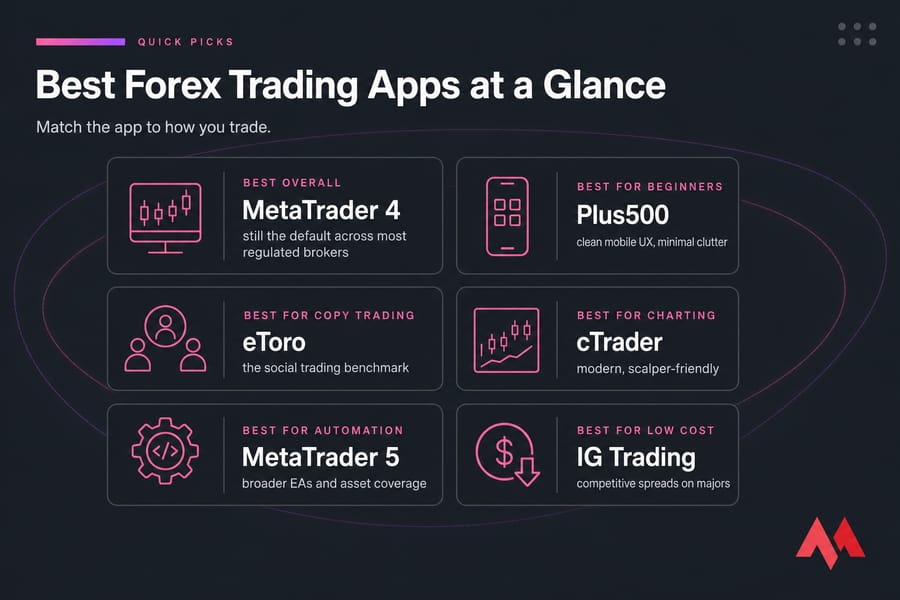
Quick picks at a glance:
- Best overall: MetaTrader 4 — still the default across most regulated brokers
- Best for beginners: Plus500 — clean mobile UX, minimal clutter
- Best for copy trading: eToro — the social trading benchmark
- Best for charting: cTrader — modern, scalper-friendly
- Best for automation: MetaTrader 5 — broader EAs and asset coverage
- Best for low-cost trading: IG Trading — competitive spreads on majors
A quick reality check before we go further: apps don't make you profitable. They give you access. Leverage cuts both ways, and most retail forex traders lose money. Treat the app as a tool, not a slot machine.
| App | Best For | Devices | Demo | Fees Summary |
| MetaTrader 4 | Broad broker support | iOS, Android, Web, Desktop | Yes | Set by broker; mostly spread-based |
| MetaTrader 5 | Multi-asset, advanced | iOS, Android, Web, Desktop | Yes | Spread or commission, broker-dependent |
| eToro | Copy trading | iOS, Android, Web | Yes | Spread-only; withdrawal fee applies |
| cTrader | Scalping, charting | iOS, Android, Web, Desktop | Yes | Often commission + raw spread |
| NinjaTrader | Analysis, backtesting | iOS, Android, Desktop | Yes | Tiered; platform fee or commissions |
| IG Trading | Education, research | iOS, Android, Web | Yes | Spread-based; inactivity fee |
| Plus500 | Simple mobile UX | iOS, Android, Web | Yes | Spread-only; overnight + inactivity fees |
Last reviewed: 2026. App availability varies by country and broker entity.
What Is a Forex Trading App?
Forex apps are computer programs and mobile applications that can be used to trade in the Forex market. These apps also have other uses, the most important of which are chart viewing, technical analysis tools, programming, and more. These applications allow you to view charts of various assets, analyze them, and then buy or sell them. They come in many forms — some are designed for specific purposes, such as providing economic news or tracking asset prices, while others provide a range of services to their users.
Here's the catch — there are actually three flavors people lump together:
- Broker apps: built and operated by a specific broker (Plus500, IG, eToro). One account, one app.
- Third-party trading platforms: MT4, MT5, and cTrader. The same platform runs across hundreds of brokers — you pick the broker, then connect.
- Charting and analysis apps: TradingView and similar. Strong on analysis, weak or absent on order execution unless paired with a broker.
Most beginners don't realize this. They download MT4, get confused that it asks for a broker login, and bounce. Don't be that person. To understand the fundamentals of the market itself, refer to our guide on Forex trading.
What Makes a Good Forex Trading App?
The following factors make a Forex trading app good:
- Trust and Regulation: The foundation of any good trading app is the trust you place in the broker behind it. Always choose a broker regulated by top-tier financial authorities. If the broker behind the app isn't regulated by an authority you can verify on a public register (FCA, ASIC, CySEC, CFTC/NFA), walk away. No exceptions.
- Reliability: A well-designed trading platform enhances your ability to execute trades efficiently. Whether you prefer web-based, desktop, or mobile apps, make sure the platform fits your trading style and device preferences.
- Advanced Trading Tools: The best Forex trading apps come equipped with comprehensive tools for analysis, research, and education. Look for apps that offer advanced charting capabilities, technical indicators, real-time news updates, and educational resources.
- Wide Range of Tradeable Markets: A diverse selection of markets and instruments can expand your trading potential. Some brokers may offer only a limited number of currency pairs.
- Demo Accounts for Practice: A good Forex trading app should offer a free demo account. This feature allows you to practice trading with virtual funds, helping you get familiar with the platform's features before committing real money.
- Ease of Use: It's simpler to manage trades effectively without being overwhelmed thanks to customized dashboards, clear menus, and simple order placing.
- Security: To safeguard your money and personal data from online attacks, look for apps that have two-factor authentication (2FA), robust encryption, and secure login procedures.
- Real-Time Data: To enable you to respond promptly to market moves, a top-tier trading app offers live price quotations, real-time news updates, and fast notifications.
- Advanced Charting Tools: To assist you in accurately analyzing trends and planning your trades, the top applications provide a large selection of indicators, drawing tools, numerous periods, and customization choices.
- Order Execution Speed: Slippage on a slow connection can erase a winning setup. For scalpers especially, fast execution is non-negotiable and a well-located Forex VPS can shave milliseconds off every trade.
If you want to enhance your trading performance, using a Forex VPS is recommended for faster execution and improved stability.
How We Ranked the Best Forex Trading Apps
This isn't a "we tested every app for 200 hours" piece. What I've done is evaluate each app against criteria that actually matter for retail forex traders, based on broker documentation, platform specifications, and patterns seen across trading communities over the years. The core ranking criteria are weighted around regulation, trading costs, mobile usability, charting depth, and execution speed.
Top Forex Trading Apps for 2026
Using Forex apps allows you to access all the information and tools you need to earn money from Forex in a comprehensive platform. Currently, the amount of software available for trading Forex is very large. However, only a few of them have been able to attract the attention of professional traders, which we're going to discuss here. It's also worth exploring the Best Forex VPS providers in 2026 for faster Forex trading.
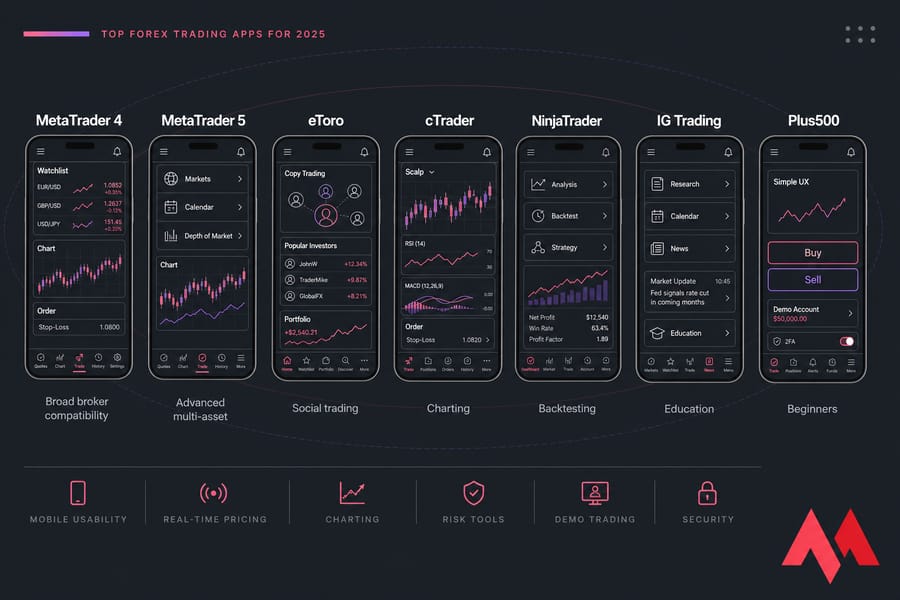
| Platform | Supported Devices | Trading Tools | Supported Currencies | Fees | Pros | Cons |
| MetaTrader 4 | Desktop, Mobile | Customizable charts, Automated trading, 50+ indicators | Forex, CFDs, Commodities | Low trading fees, Broker-dependent charges | Customizable charts, Automated trading, Mobile-friendly | Limited market access, Lack of advanced charting |
| MetaTrader 5 | Desktop, Mobile, Web | Advanced charts, 38+ indicators, Market depth | Forex, Stocks, Futures, Commodities | Low trading fees, Broker-dependent charges | Multi-market support, Advanced trading tools | Steep learning curve, Limited language options |
| eToro | Desktop, Mobile, Web | ProCharts, CopyTrader, Smart Portfolios | Over 3,000 assets (Forex, Stocks, etc.) | Spread fees, Currency conversion fees | User-friendly, Copy trading, Demo account | Limited customer service, Regional restrictions |
| cTrader | Desktop, Mobile, Web | Advanced order types, 26 time frames, Chart analysis | Forex, CFDs | Low trading fees | Fast execution, Stunning UI, Advanced tools | Limited programming options, Steep learning curve |
| NinjaTrader | Desktop, Mobile | 100+ indicators, Advanced charting, Strategy builder | Forex, Stocks, Futures, Commodities | Paid plans for full features, Free for simulation | Free testing, Advanced charting, Customization | Requires programming, Extra cost for third-party tools |
| IG Trading | Desktop, Mobile | Educational tools, Research tools, Trading platform | Forex, CFDs, Stocks, Options | High CFD fees, Currency conversion fees | Great educational tools, User-friendly platform | High fees for stock CFDs, Slow customer support |
| Plus500 | Desktop, Mobile, Web | CFDs, Share trading, Instructional materials | Forex, CFDs, Stocks, Commodities | High CFD and currency conversion fees | Easy account opening, Quick support | High CFD fees, Limited market research |
1. MetaTrader 4 — Best for broad broker compatibility
If you have recently become interested in the Forex market, one of the first names you've likely heard is MetaTrader. MT4 has been around since 2005 and somehow refuses to die. The reason? Almost every retail forex broker offers it. You can switch brokers without learning a new platform, and the Expert Advisor (EA) ecosystem is unmatched in volume — thousands of automated strategies, indicators, and scripts, many free. Using MetaTrader 4, you can access all the features you need to analyze the market and trade on various assets — from asset price charts to technical analysis indicators, price alerts, programming capabilities, and placing buy or sell orders. Another notable advantage is that it is supported by almost all reputable Forex brokers.
Standout features: EA support, deep MQL4 community, low resource usage, one-click trading, customizable charts, 50+ indicators.
Pros:
- Customizable charts (including one-click trading)
- Automated trading using EAs
- Excellent mobile trading software
- Advanced technical analysis tools (50 indicators)
Cons:
- Limited market access (e.g., stock market)
- Lack of advanced charting capabilities in all areas
- Limited range of trading tools
- Lack of depth of market (DoM)
Who should choose it: traders who want maximum broker flexibility or run existing MT4 EAs. For a better experience, learn the MetaTrader optimization guide for Forex VPS.
2. MetaTrader 5 — Best for advanced multi-asset trading
MetaTrader 5 is a newer and more advanced version of MetaTrader 4, launched in 2010 as a more modern alternative to its predecessor. Perhaps the most important difference between MetaTrader 5 and MetaTrader 4 is the programming languages of these two platforms, which differ from each other. The programming language used in the fifth version offers more features and better performance. Therefore, traders seeking advanced functionalities, such as trading robots, should choose MetaTrader 5. Faster trading speed, more indicators, improved data management performance, and the "Netting" feature are other advantages of MetaTrader 5 over MetaTrader 4.
MT5 isn't just "MT4 plus one." It's a different platform with more timeframes (21 vs 9), more order types, an economic calendar built in, and native support for stocks, futures, and bonds depending on the broker. Backtesting is faster and supports multi-currency strategies. MetaTrader 5 is also available for free, just like its predecessor, and you can download and install it on your PC or smartphone.
Pros:
- Multiple financial markets
- Advanced trading tools
- A wider range of indicators and charts
- Automated trading capabilities
- Powerful mobile app
Cons:
- Steep learning curve
- Limited customization options
- Limited language options
- Expert Advisors are not backward compatible (e.g., if created with MT4)
Who should choose it: traders who want more than just forex, or who are starting fresh in 2026 without legacy MT4 EAs.
3. eToro — Best for copy trading
eToro is a unique broker specializing in copy and social trading. eToro platforms are user-friendly and offer multiple asset classes (over 3,000) along with a wide range of copy trading features and advanced trading tools. A standout feature is the highly useful ProCharts tool — a professional charting tool not offered by other brokers. The CopyTrader and Smart Portfolios social trading platforms are unique and available only through eToro. The CopyTrader platform enables you to see what assets traders are trading in real time, then find your favorite investors and replicate their investment strategies.
Pros:
- Intuitive and user-friendly platforms that are suitable for all skill levels
- Top-tier security protocols and robust data protection
- Offers $100,000 demo account to practice strategies
- Copy trading technology for an easy start
- Offers advanced charting and analysis tools
Cons:
- Not available in some regions
- Limited customer service
Who should choose it: newer traders who want to learn by observing, or anyone wanting passive exposure tied to other traders' strategies. Past performance of copied traders is never a guarantee.
4. cTrader — Best for charting and execution
cTrader is newer than MetaTrader and NinjaTrader, but its unique features have led some Forex traders to prefer this software over other available options. cTrader was first launched in 2011 by the software company Spotware Systems LTD. This trading software has significant features such as high transaction execution speed, a modern and eye-catching user interface, various types of order entry, and advanced chart analysis tools, making it a worthy competitor to MetaTrader. cTrader is what MT4 would look like if it were built today.
Pros:
- Provides 26 time frames for scalping traders who trade in lower time frames
- Offering multiple assets with rich charting tools
- Advanced order types, pricing, and fast trade entry and execution
- Stunning user interface
- Available on desktop, web, and mobile
Cons:
- Traders who are not familiar with programming languages lack access to a large portion of cTrader's capabilities
- The ability to create cBots using online tools is available, but tools like MT4 and EAs are not supported
Who should choose it: scalpers, chart-heavy discretionary traders, and anyone tired of MT4's dated feel.
5. NinjaTrader — Best for advanced analysis and testing
NinjaTrader is another Forex trading app, first released in 2003. Interestingly, NinjaTrader was released two years before MetaTrader 4, making it older than this popular software. One downside of NinjaTrader is that you need to pay a monthly subscription to access all its features. However, NinjaTrader also offers a free plan. NinjaTrader provides Forex traders with an environment to design, test, and simulate trading systems for Forex, assets, and futures before using real money in the market. Using NinjaTrader for testing, chart review, and trade simulation is completely free, but some third-party indicators will cost you. Its charting and backtesting depth is hard to beat, especially strong for futures traders who also dabble in FX.
Pros:
- Free simulation and testing
- 100+ technical indicators
- Integrates with major brokers
- Advanced charting and research tools
- API support for flexibility
Cons:
- Paid plan for full features
- Requires programming for full customization
- Extra cost for third-party indicators
- Steep learning curve
Who should choose it: serious analytical traders, futures crossover traders, and developers who want deep customization.
6. IG Trading — Best for education and market research
With an extensive range of tradable markets, industry-leading teaching materials, and excellent trading and research tools, IG Trading offers a comprehensive trading package. Globally regulated and publicly traded, IG is a reputable multi-asset broker. A well-known CFD and forex broker, IG is renowned for its excellent training materials, deposit and withdrawal options, and a well-designed, user-friendly trading platform. IG is one of the oldest and most heavily regulated names in the business (FCA, ASIC, and others). Their app pairs solid execution with genuinely useful research — daily analyst notes, an academy with free courses, and IG TV.
Pros:
- Top-tier web trading platform
- Excellent educational tools
- Great deposit and withdrawal options
Cons:
- High stock CFD fees
- Limited product range
- Slow customer support
Who should choose it: beginners who want to learn within the same app they trade in, and traders who want broad market access. Note: US availability is limited.
7. Plus500 — Best for simple mobile usability
A reputable international brand, Plus500 provides a user-friendly Forex trading platform that includes access to futures in the U.S. market, share trading through the Plus500 Invest platform, and a wide variety of CFDs through its own Plus500 CFD platform. Beginners looking for an easy-to-use trading experience are drawn to the platform's simplicity, and their learning is aided by an expanding library of instructional materials. Plus500 strips trading down to the essentials — it's a CFD broker with a proprietary app that prioritizes simplicity over depth. Plus500 won Best in Class in the Trust Score, Ease of Use, and Beginners categories at the 2024 Annual Awards. Active traders, however, might not be satisfied with its scant market research.
Pros:
- Well-designed platform
- Easy account opening
- Quick and helpful customer support
Cons:
- High CFD fees
- High currency conversion fee
Who should choose it: complete beginners who want a frictionless start without platform overwhelm.
MT4 vs MT5 vs cTrader: Which Forex Platform Is Best?
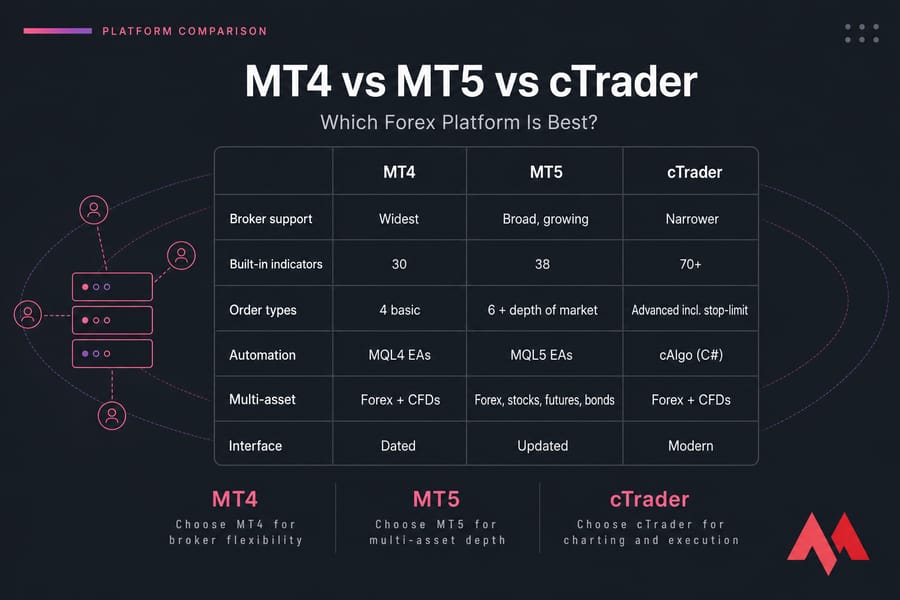
| Feature | MT4 | MT5 | cTrader |
| Broker support | Widest | Broad, growing | Narrower |
| Built-in indicators | 30 | 38 | 70+ |
| Timeframes | 9 | 21 | 54 |
| Automation | MQL4 EAs | MQL5 EAs | cAlgo (C#) |
| Multi-asset | Forex + CFDs | Forex, stocks, futures, bonds | Forex + CFDs |
| Order types | 4 basic | 6 + depth of market | Advanced incl. stop-limit |
| Interface | Dated | Updated | Modern |
Choose MT4 if you want broker flexibility or already use MQL4 EAs.
Choose MT5 if you're starting fresh, want multi-asset access, or need faster backtesting.
Choose cTrader if charting and execution quality matter more than broker variety.
Best Forex Trading Apps by Use Case
Best forex app for beginners
Plus500 wins on simplicity. eToro is a close second if you want to learn by copying others. IG Trading also stands out with its industry-leading educational tools. All three have generous demo accounts and don't drown you in features you can't use yet.
Best forex app for advanced traders
MT5 or cTrader, depending on whether you want multi-asset depth or pure execution quality. NinjaTrader if your edge is in analysis.
Best forex app for Android
MT4 and MT5 are rock solid on Android. cTrader's Android build is arguably the most polished — fluid charting, fast order tickets.
Best forex app for iPhone
eToro and Plus500 feel the most native on iOS. MT5 works fine but doesn't take advantage of iOS design conventions.
Best forex app for copy trading
eToro, no contest.
Best forex app for low fees
For tight spreads on majors, IG and brokers offering raw-spread accounts on cTrader (with commission) often work out cheapest for active traders.
Best forex app for demo trading
MT4 and MT5 demos can run indefinitely with most brokers. eToro's demo gives you a virtual $100,000 to play with — generous and unrestricted.
Read: Difference Between Metatrader 4 and 5 (MT4 VS MT5)
Forex Trading Apps for Beginners
Are you a beginner Forex trader? If yes, you should choose the best Forex trading apps for beginners as they offer features suitable for beginners including user-friendly interfaces, educational resources, and simple tools to help them understand the market and make informed decisions. Here are the best choices:
| Platform | Why suitable for beginners |
| MetaTrader 4 | Customizable charts for better visualization and trading, easy-to-use mobile app, automated trading with Expert Advisors (EAs), advanced technical analysis tools for simple market analysis |
| IG Trading | User-friendly platform ideal for beginners, industry-leading educational tools to guide traders, extensive range of trading and research tools, well-designed interface for an accessible trading experience |
| eToro | Highly intuitive and user-friendly platform for all skill levels, copy trading feature to follow experienced traders, ProCharts tool for professional charting made simple, demo account for practice without risking real money |
| Plus500 | Simplified trading platform for easy navigation, expanding educational resources to support learning, easy account setup and intuitive user experience, helpful customer support for quick assistance |
Forex Trading App Fees Explained
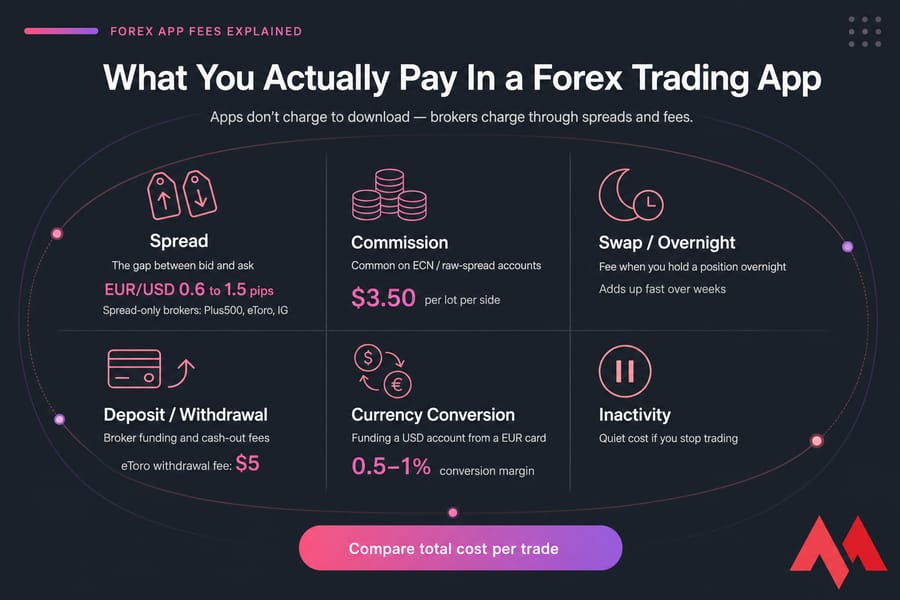
"Commission-free" is one of the most misleading phrases in trading. Here's what you're actually paying.
Spreads
The gap between bid and ask. On EUR/USD you might see 0.6 to 1.5 pips. This is how spread-only brokers (Plus500, eToro, IG) make most of their money.
Commissions
Common on ECN/raw-spread accounts (often via cTrader). Spreads are tiny but you pay, say, $3.50 per lot per side.
Swap/overnight fees
Hold a position overnight and you pay (or rarely receive) interest based on the rate differential. Hold for weeks and this adds up fast.
Deposit and withdrawal fees
eToro charges a flat $5 withdrawal fee. Some brokers absorb deposit costs, others don't.
Currency conversion fees
Funding a USD account from a EUR card? You'll pay a conversion margin, sometimes 0.5–1%.
Why "free" apps still cost money
Apps don't charge you to download. The broker behind them charges through spreads and fees. Always compare total cost per trade, not just one line item.
Regulation and Safety: How to Verify a Forex Trading App
Tier-1 regulators to look for
FCA (UK), ASIC (Australia), CySEC (Cyprus, EU), CFTC and NFA (US), FINMA (Switzerland), MAS (Singapore). Each maintains a public register — search the broker's name there before you deposit a cent.
Negative balance protection
With leverage, you can technically lose more than you deposit. Negative balance protection means you can't. Required under EU/UK rules for retail clients; check elsewhere.
Two-factor authentication and encryption
Non-negotiable in 2026. If an app doesn't offer 2FA, find another one.
Segregated client funds
Your money should sit in a separate bank account from the broker's operational funds. Tier-1 regulators require this.
Red flags to avoid
- Promises of guaranteed returns or "no-risk" strategies
- No regulator listed, or one nobody's heard of
- Forum complaints about withdrawal delays
- Pressure to deposit more after losses
- Bonus offers with absurd trading volume requirements
How to Start Trading Forex on an App
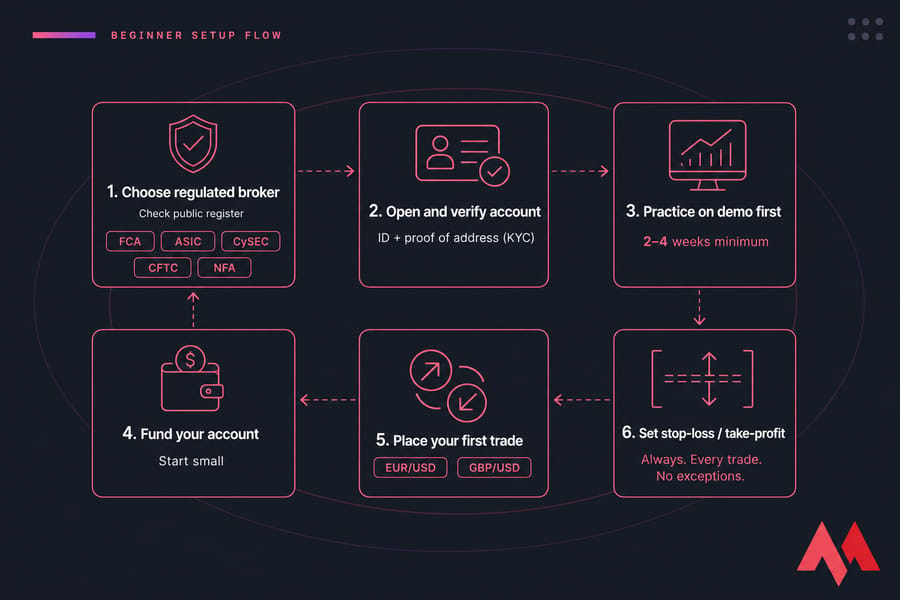
- Choose a regulated broker. Verify their license on the regulator's public register.
- Open and verify your account. You'll provide ID and proof of address (KYC). Takes anywhere from minutes to a few days.
- Practice on demo first. Two to four weeks minimum. If you can't be consistent on demo, you won't be on live.
- Fund your account. Start small. The amount you'd be genuinely okay losing.
- Place your first trade. Pick a major pair (EUR/USD, GBP/USD). Tiny position size.
- Set stop-loss and take-profit. Always. Every trade. No exceptions. Leverage without stops is how accounts blow up.
Benefits of Using Forex Trading Apps
The benefits of using Forex trading apps include:
- Trade Forex Anytime, Anywhere: With trading apps, you can bypass geographical restrictions and trade from anywhere in the world with internet access. For lower latency, choose the best Forex server location.
- Real-Time Forex Market Data: Features like real-time quotes, price alerts, and market news help you stay up-to-date. These apps provide live data, helping you make better decisions fast.
- User-Friendly Interface: As Forex trading apps offer simplicity and efficiency with their user interface, it will be easy for even beginners to navigate them.
- Instant Order Execution: Trading apps make it possible to execute market orders, limit orders, and stop orders instantly, which lowers the chance of slippage and allows you to react swiftly to market moves.
- Advanced Tools for Research & Analysis: These applications have technical analysis features, such as real-time charts, indicators, and forex-specific trend analysis.
- Effective Risk Management: Stop-loss and take-profit orders are among the risk management tools available in forex trading apps. These techniques aid in automatically securing gains and limiting any losses.
- Automated Forex Trading: By setting trading conditions, you can automate your forex methods. When these criteria are satisfied, the app will automatically carry out purchase or sell orders.
- Practice with Forex Demo Accounts: You can practice trading with virtual money using the demo accounts that are available on the majority of Forex apps. With the help of this tool, you can test methods, understand market dynamics, and gain confidence without having to risk actual money.
- Reduced Transaction Costs: Forex trading apps can offer lower spreads and fees. These cost reductions have the potential to increase your total profitability over time.
- Safe Forex Transactions: Multi-factor authentication and sophisticated encryption are used in Forex apps to safeguard your trading account and private data. This guarantees a secure Forex trading environment.
Challenges of Trading on Apps and How to Overcome Them
Trading apps have some challenges too. Before using them, it's good to be familiar with the challenges of Forex trading apps:
- Security: Apps handle sensitive data, making them vulnerable to cyberattacks. Solution: Use apps with strong security (encryption, 2FA) and practice safe online habits.
- Volatility: The forex market's volatility can lead to impulsive trading. Solution: Use risk management tools and stick to your strategy.
- Reliability: App glitches can disrupt trades. Solution: Choose stable apps and keep them updated.
- Limited Guidance: Apps offer little personal advice. Solution: Seek educational resources and mentorship.
- Regulation: Not all apps are regulated. Solution: Use only apps regulated by reputable authorities.
- Hidden Fees: Hidden costs can impact profitability. Solution: Review fee structures carefully.
- Data Accuracy: Inaccurate data can lead to bad decisions. Solution: Choose apps with reliable, real-time data.
- Customer Support: Poor support can be problematic. Solution: Choose apps with responsive 24/7 support.
- Small screens encourage rushed decisions. Fix: Use mobile for monitoring, desktop for entries when possible.
- Mobile networks drop. Fix: Serious traders use a Forex VPS to keep EAs and order management running on a stable, low-latency connection.
- Overtrading from constant access. Fix: Define trading hours and stick to them. Turn off notifications outside those windows.
- Leverage misuse. Fix: Position-size based on stop-loss distance, not on "how much margin can I use."
Final Verdict: Which Forex Trading App Should You Choose?
There is no single best app — only the best app for you. Here's how to shortlist:
- MT4 if you want maximum broker flexibility or run existing EAs.
- MT5 if you're starting fresh and want multi-asset, modern features.
- eToro if copy trading is the point.
- cTrader if execution quality and charting matter most.
- IG if you want learning baked into the trading experience.
- Plus500 if you want the simplest possible mobile-first start.
- NinjaTrader if your edge is in deep analysis and backtesting.
And whatever you pick practice on demo, start small, and remember that the app is just a tool. The trader using it is the variable that matters. In a large financial market like Forex, where volatility is high and a small fluctuation can wipe out your capital at any moment, using tools such as a Forex VPS can increase the speed and quality of your performance, making it a vital asset in your trading strategy.