In today's digital age, websites are an integral part of our lives. They are ubiquitous and have become an essential tool for businesses, organizations, and individuals. But what is a website? In simple terms, it's a collection of related web pages and digital content that people access on the internet through a browser — a place online under one domain name where you can share information, sell products, publish articles, offer services, or help people contact you. In this article, we'll explore the meaning, significance, and inner workings of websites.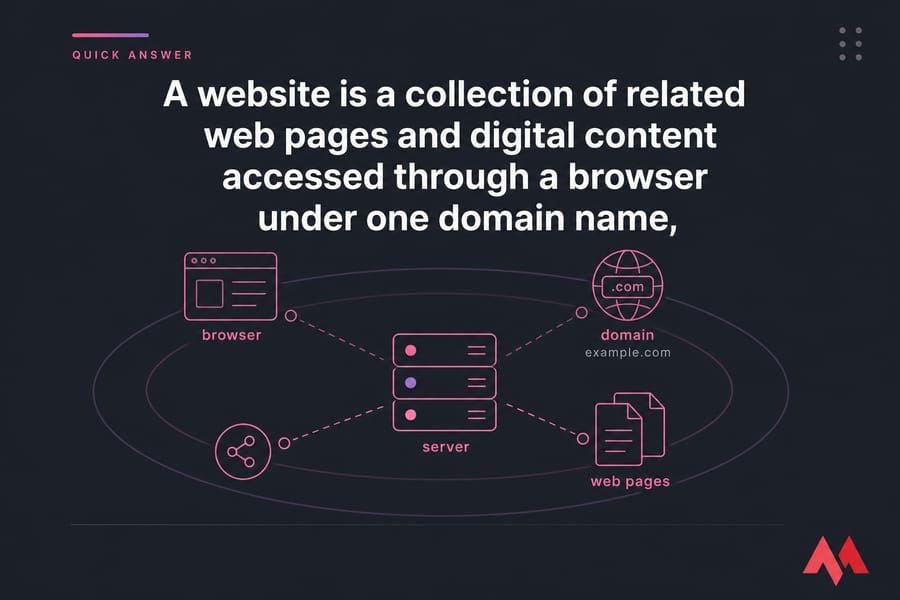
🌐 What is a Website?
A website is a related collection of web pages that are publicly accessible and share a single domain name. These publicly accessible websites collectively constitute the World Wide Web (www). A website is less frequently also termed as 'web presence' or 'site.' Tim Berners-Lee, a British physicist, built the first website at CERN that was launched on August 6, 1991. There are billions of websites created by billions of different people.
If you've ever opened an online store, read a blog post, checked a company's hours, or logged into a web app, you've used a website. Some are tiny — maybe just a homepage and contact page. Others have thousands of pages, user accounts, search tools, and payment systems. Most websites are built from linked pages under a single domain, such as example.com. That domain acts like the public address. Inside it, you might have a homepage, product pages, blog posts, support pages, and a footer with legal links.
Why do websites matter? Because they're still the internet's home base. Social media accounts come and go, algorithms change, and platforms can limit your reach overnight. But a website is yours to control. For a business, that control is a big deal.
Website definition in simple words
If you need the plainest possible website definition, here it is: a website is an online location made up of one or more pages, usually under one domain name. That's the short version most beginners are really looking for.
🆚 Website vs Web Page: What's the Difference?
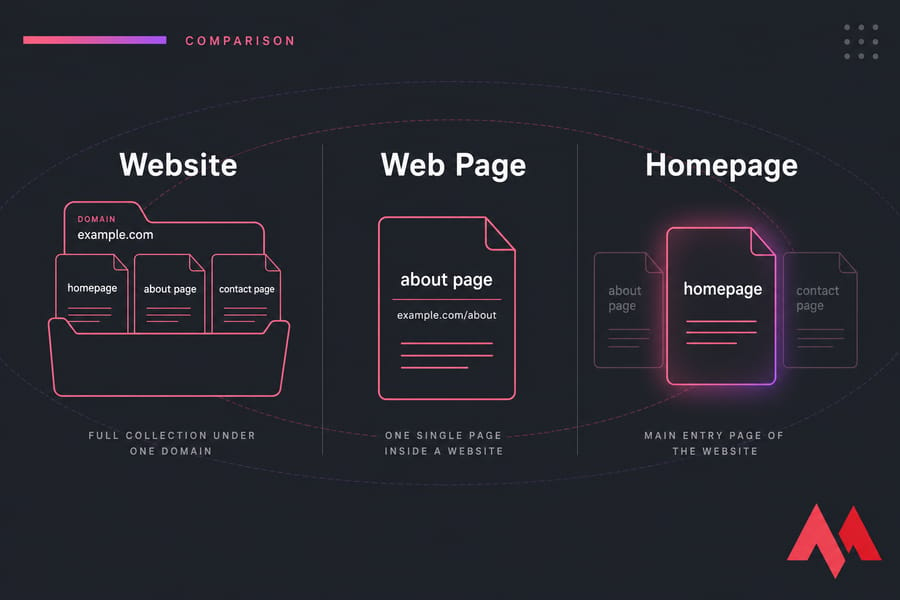
People mix these up all the time. A website is the full collection. A web page is one single document inside that collection. And the homepage? That's usually the main entry page of the website.
What is a web page?
A web page is one page you view in a browser, like an About page, a blog post, or a product page. It has its own URL and its own content. If a website is a book, a web page is one chapter.
| Term | Meaning | Example |
| Website | A collection of related pages and files under one domain | example.com with home, blog, and contact pages |
| Web Page | A single page within a website | example.com/about |
| Homepage | The main entry page of a website | example.com |
| Domain | The address people type to reach the website | example.com |
If you want a deeper breakdown, a dedicated guide on website vs web page is worth reading. And if you're still fuzzy on the page-level side of things, see what is a web page.
🧩 What Are the Main Parts of a Website?
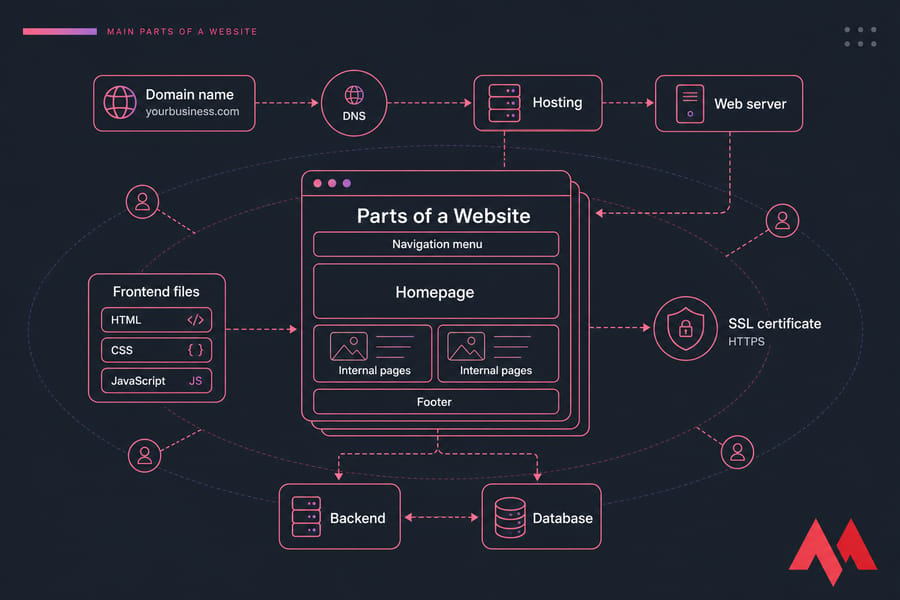
Every website has a few core pieces working together. Some are visible to visitors. Others run quietly in the background. Once you understand these parts of a website, the whole topic gets much less mysterious.
Domain name
The domain name is the website's address on the internet, like yourbusiness.com. It's what users type into the URL bar. Without a domain, people would have to remember a server IP address.
Web hosting and server
Web hosting is the service that stores your website files and makes them available online. The server is the actual machine — physical or virtual — that responds when someone visits the site. If you're comparing options, MonoVM's web hosting, VPS hosting, and dedicated server hosting fit different stages of growth.
Frontend: HTML, CSS, and JavaScript
The frontend is what visitors see and interact with. HTML provides the structure, CSS controls the design, and JavaScript adds interactivity. Menus, buttons, sliders, forms, product galleries — that's frontend territory. If you're new to this stack, check out what is HTML. Most websites employ CSS (cascading style sheets) to ensure uniform style throughout the website. CSS is an in-built shortcut that allows developers to automatically update the whole website when a change is made to one page. For example, if you want to change the colors on a company's website, all you need to do with CSS is to change the color palette on one page, and the color on the rest of the pages will also automatically change.
Backend and database
The backend handles the behind-the-scenes logic. It processes logins, saves form data, manages orders, pulls blog posts, and talks to the database. The database stores changing content such as users, products, article text, and settings. This is what makes a site dynamic.
Homepage, navigation, pages, and footer
These are the structural elements users interact with every day. The homepage introduces the site. The navigation menu helps people move around. Internal pages hold the actual content. And the footer usually contains contact details, policies, social links, and secondary navigation. Another critical section of most websites is the footer, found at the bottom of every page, comprising external links indicating analogous websites and other external resources, along with important information, privacy policy, disclaimers, links to the terms of service, contact pages, and the physical address of the company that owns the site.
SSL certificate and website security
An SSL certificate encrypts the connection between the browser and the server. That's what gives you HTTPS instead of plain HTTP. It protects data in transit and builds trust — especially for login pages, forms, and online payments. MonoVM also offers domain hosting and server-focused services like managed server solutions for when your site stops being a toy project.
⚙️ How Does a Website Work?
A website works by receiving a request from your browser, finding the correct server, sending back files or data, and then displaying the result on your screen. That's the simple version. Here's the step-by-step version beginners usually need.
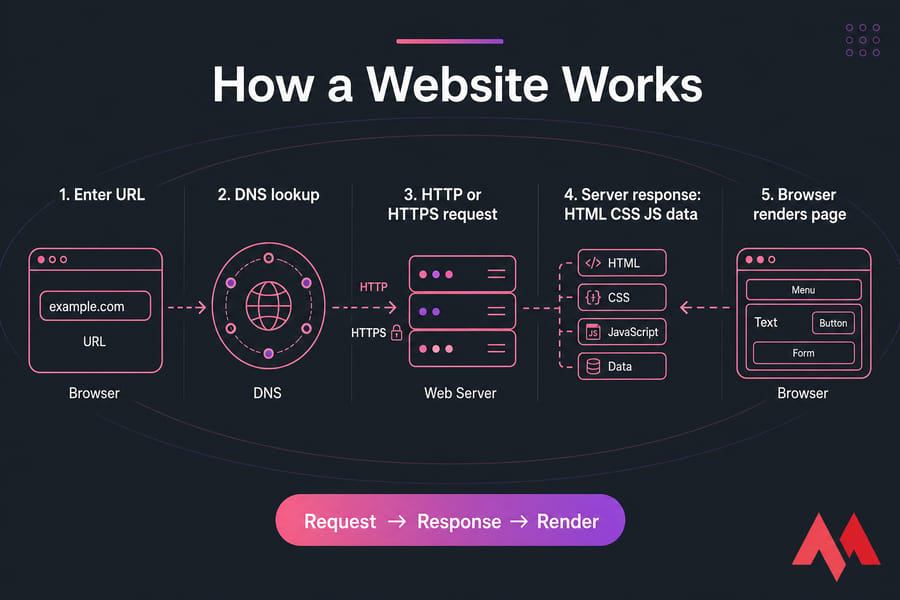
1. You enter a URL
You type a URL into a browser like Chrome, Firefox, Safari, or Edge. Or you click a link. The browser then tries to reach that website address. If you're curious about the software side, here's a useful guide on types of web browsers.
2. DNS finds the website server
DNS, or Domain Name System, translates the domain name into the server's IP address. Think of it like the web's phonebook. You ask for example.com; DNS tells your browser where that site actually lives.
3. The browser requests the page
Once the server is found, the browser sends an HTTP or HTTPS request. That request asks for a specific page or resource. It may also send cookies, headers, and form data, depending on what you're doing.
4. The server sends files and data
The server responds with the page resources. That can include HTML files, CSS stylesheets, JavaScript files, images, and database-driven content. If the site uses WordPress or another CMS, the page may be assembled on the fly before it's sent back.
5. The browser displays the website
The browser renders the page, which means it reads the code and turns it into what you see on screen. Text, layout, fonts, menus, buttons, forms — all of it gets assembled locally.
🎯 Purpose of Websites
The purpose of websites can generally be categorized into these main areas:
- Providing information: Websites can be used to provide information about a variety of topics, such as news, education, healthcare, entertainment, and more. They can serve as a platform for sharing knowledge and insights with others.
- Promoting products or services: Websites are often used by businesses to promote and sell their products or services. They can be used to showcase products, offer discounts, and provide customer support.
- Facilitating communication: Websites can also be used to facilitate communication between individuals or groups. For example, social networking sites allow people to connect with others who share similar interests, while forums and chat rooms allow people to discuss specific topics.
- E-commerce transactions: Websites can be used to buy and sell goods and services online. E-commerce sites can include online marketplaces, online stores, and auction sites.
- Building trust and brand presence: People expect real businesses to have a website. No matter how active you are on social media, many buyers still check your domain before they trust you.
📊 Types of Websites

There are several different kinds of websites, depending on the audience they cater to. Let us take a look at the broad categories:
📝 Blog Websites
The purpose of blogs is to keep a website updated with current and trending ideas, typically run by an individual or a group. Blogs can be information-centric written in an informal or conversational style, or they may be personal recounts, professional blogs that may give an insight into a person's experience. Blogs can be started online using free services such as Wordpress.com.
🛒 Ecommerce Websites
These websites promote business activities like buying and selling products or services. Amazon is an example of an e-commerce website. An affiliate or an auction website (e.g., eBay) or a classified ads website (e.g., Craigslist) can all be classified under the e-Commerce website. A flourishing e-Commerce website should have a smooth purchasing and checkout process, attractive and mobile-friendly features, and proper payment methods.
💼 Business Websites
A business website promotes a company, explains services, shows reviews, and helps visitors get in touch. A local law office, plumbing company, SaaS startup, or agency all fall into this group. The main goal is trust and lead generation.
🎨 Portfolio Websites
A portfolio website showcases work samples, case studies, testimonials, and contact details. Designers, photographers, developers, writers, and architects use them all the time. The goal is to win clients or job offers.
📚 Educational and Government Websites
Educational websites share lessons, courses, schedules, resources, or training platforms. Government websites publish official services, notices, forms, and public information. In both cases, clarity and accessibility matter a lot. Initially, websites were classified by their top-level domains — .edu for educational institutions, .gov for government agencies, .org for non-profit organizations.
🎮 Entertainment and Media Websites
As the name suggests, these websites may compromise gaming websites, celebrity news, online magazines, sports coverage, movies and their reviews, arts, humorous content, etc. To keep the viewers engaged, videos, slideshows, and podcasts can be uploaded regularly.
👥 Social Media and Community Websites
Communication, whether business or personal, has become fast and easy due to social networking websites. Within seconds, personal information, interests, preferences, photos, and videos can be shared with friends, family, acquaintances, or business personnel. A website may also be a Forum where people's queries are answered — Quora, webmail website — Gmail, search engine website — Google, social networking website — Facebook, Twitter, media sharing website — YouTube, SoundCloud, Flickr.
🔄 Static vs Dynamic Websites
This is one of those basic concepts that tells you a lot about how a site is built. Static and dynamic websites can look similar on the front end, but they work very differently underneath.
What is a static website?
A static website delivers mostly fixed files. Each page is usually prebuilt and shown to visitors as-is. Static sites are often faster, simpler, and cheaper to host. They're a good fit for landing pages, small company sites, event sites, and documentation.
What is a dynamic website?
A dynamic website generates content based on user actions, stored data, or application logic. Blogs, online stores, dashboards, membership sites, and social platforms are usually dynamic. They often rely on a backend, a database, and a CMS such as WordPress.
| Factor | Static Website | Dynamic Website |
| Content | Mostly fixed | Changes based on data or users |
| Speed | Usually very fast | Can be fast, but needs more tuning |
| Complexity | Lower | Higher |
| Cost | Lower starting cost | Higher setup and maintenance cost |
| Best for | Simple sites, landing pages, docs | Blogs, ecommerce, web apps, portals |
If you're a beginner building a simple brochure site, static can be a smart choice. If you need logins, orders, search, comments, or frequent content changes, dynamic is the better fit. Most business sites today land somewhere in the dynamic camp.
💻 How to Open a Website?
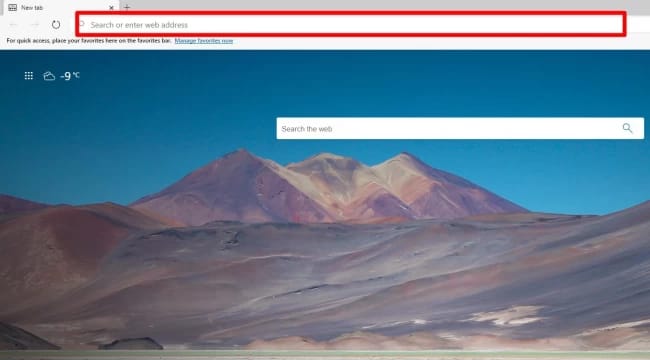
You can visit a website's homepage by entering its URL address on a browser such as Chrome, Internet Explorer, Safari, or Firefox. The URL address for a site is usually "https://www.(Name of the website).com," which will open the homepage. If you don't know the URL of the website, you can use a search engine such as Bing or Google.
The 'homepage' is the website's main page; this is the first page you usually see when visiting a website. From here, you can access all other pages of the website. Each page is a single HTML document that is connected through hyperlinks, combined in a navigation bar that allows the user to move across the main website's structure.
👥 Who Can Create Websites on the Internet?
Websites can be created by an individual or a group of individuals for personal, business, or other purposes. Initially, websites were classified by their top-level domains. For example, educational institutions sites — .edu, government agency sites — .gov, non-profit organizations' websites — .org, information sites — .info, and so on and so forth. Though these extensions still exist, the "com" extension has become more popular, and many other country-specific extensions like .co.uk, .de, .fr, etc.
🌟 Benefits of Having a Website

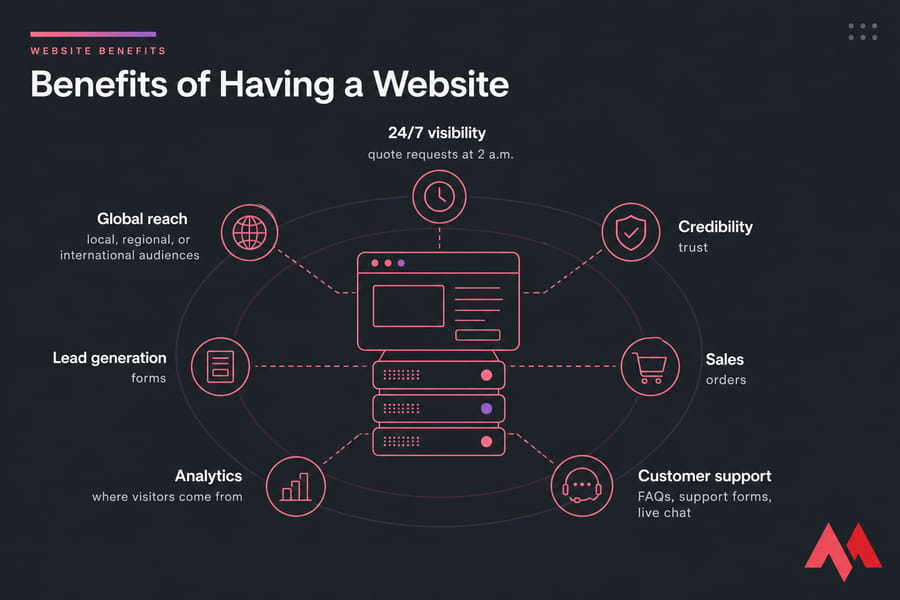
In recent times, having a website is crucial, especially if you run an online business or want to earn money online. You never know how many people you may attract by your online presence 24/7.
- 24/7 visibility: Your site doesn't close. Owning a website means your customers can find you online anytime, anywhere, which can help you find and secure new customers conveniently.
- Global reach: Since your store is online, it is not limited to any geographical boundaries, and you could essentially sell your products worldwide.
- Credibility: Having a website also builds credibility for your business. In today's modern world, it is expected from every credible brand to have an online presence. People tend to trust businesses less that do not have an email or website.
- Lead generation and sales: Your website can act as a means to communicate basic information about your services to your potential customers. A well-made, user-friendly website encourages users to opt for a product or service.
- Better marketing and analytics: Your website gives you measurable data: where visitors come from, which pages they read, what they click, and where they drop off. For performance tuning, see how to check website speed. For discoverability, learn how to submit website URL to Google.
✅ What Makes a Good Website?
A good website is easy to use, fast to load, clear in its message, and safe to browse. Fancy design helps, sure. But usability wins more often than clever visuals.
- Fast loading speed: Speed affects user experience, conversions, and search engine optimization. Slow sites lose people fast, especially on mobile.
- Mobile-friendly design: Responsive design means the site adapts to different screens. That includes phones, tablets, and desktops.
- Clear navigation: People should know where to click next without thinking too hard. Simple menus, readable labels, and logical page structure make a website feel usable.
- Accessibility: Add alt text to meaningful images, maintain good color contrast, support keyboard navigation, and use readable typography.
- SEO-friendly structure: Search engines need to crawl and understand your pages. Clear headings, internal links, useful title tags, solid metadata, and logical page architecture help. If your audience spans languages, you may also need a plan for how to translate a website properly.
- Strong security: Security basics include HTTPS, updates, backups, access control, and malware protection. For stronger protection at the application layer, a web application firewall can block common attacks before they hit your app.
🛠️ How to Create a Website
You don't always need coding knowledge to create a website. These days, you've got three practical paths: a website builder, a CMS like WordPress, or a custom-built site from a developer.
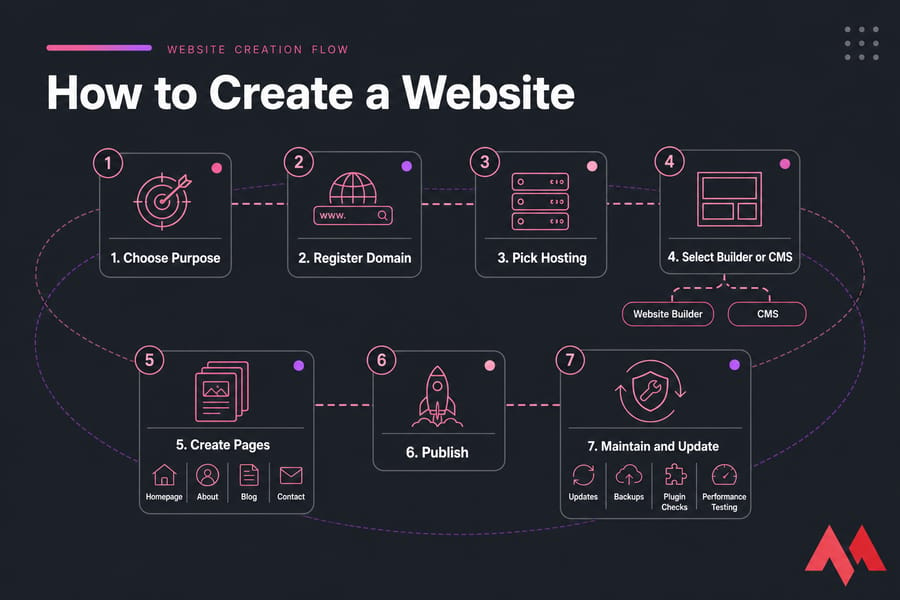
- Use a website builder: Website builders are the easiest option for beginners. You choose a template, edit text and images, and publish.
- Use a CMS like WordPress: WordPress gives you more flexibility than most builders. You can add themes, plugins, blogs, ecommerce features, and custom layouts.
- Hire a web developer: If you need custom functionality, a unique design, or serious scaling plans, hiring a developer can make sense.
- Buy a domain and hosting: No matter which route you choose, you still need a domain and a place to host the site.
- Launch, maintain, and update your site: Publishing isn't the end. You'll need updates, backups, plugin checks, performance testing, and occasional redesign work. Please don't skip backups — use a proper routine, and if needed, follow a guide on how to backup a website.
💲 How Much Does a Website Cost?
The cost of a website ranges from almost free to many thousands of dollars. It depends on the toolset, design complexity, content needs, and whether you build it yourself or hire help. A domain usually costs around $10 to $20 per year. Entry-level hosting might start around a few dollars per month, while VPS or dedicated solutions cost more because you get stronger resources and control. Premium themes may cost $30 to $100 or more. Plugins, ecommerce tools, email services, and security add-ons can increase the monthly bill.
🎯 Conclusion
In the end, a website is a place on the Internet where people can go to find information, products, or services. It's an important tool for businesses, groups, and individuals. So, what is a website? It's your online home base — a collection of web pages under one domain that can inform, sell, support, and connect. Once you understand the difference between a website and a web page, the main parts of a website, and how websites work, the rest starts to click.
If you're planning to build one, keep it simple at first. Choose the right domain, pick hosting that matches your goals, make it mobile-friendly, secure it with HTTPS, and keep it maintained. That alone puts you ahead of a surprising number of sites on the web. With the ever-increasing importance of the internet, websites will continue to play a vital role in our lives. And if you're ready for the next step, explore the hosting options that fit your project size — from basic web hosting to VPS hosting and dedicated server hosting