![35 Best Websites to Learn Coding for Free [2026] 💻](/wp-content/uploads/2022/11/sites-to-learn-coding-for-free759-main.webp)
Learning how to code has grown dramatically over the years. While it was not readily accessible in the early years, it's easier than ever to learn for FREE. Even if you have no desire to become a developer, learning to code has many benefits, like managing your websites more efficiently and reducing outside developers for your project. If you're just starting and want to understand the fundamentals first, our guide on what programming is covers the basics before you dive into any language.
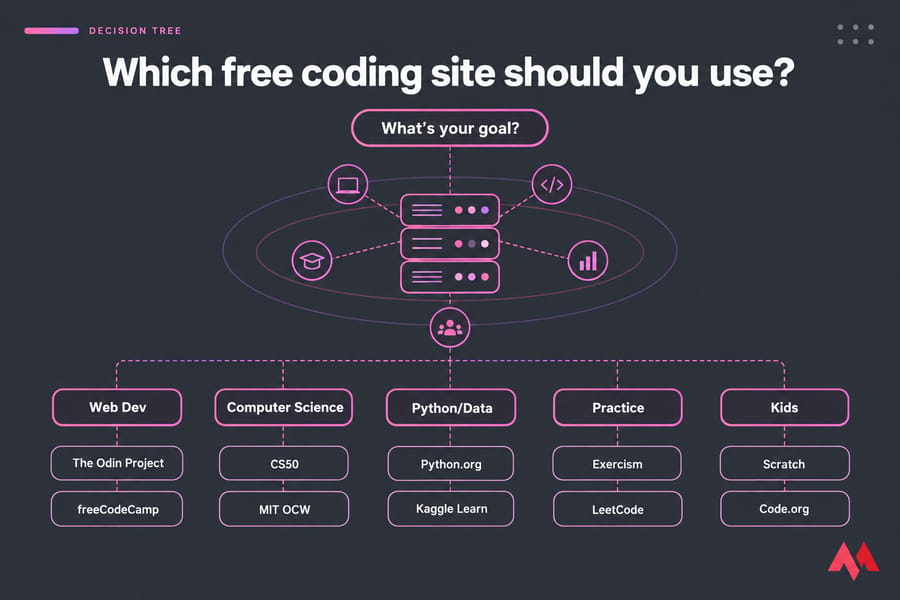
Want the short answer? If you're starting from zero, begin with freeCodeCamp or The Odin Project for web development and Harvard's CS50 for computer science basics. Once you know the fundamentals, move to Exercism or LeetCode for practice. The other 30 sites below are there for specific goals like Python, data science, mobile apps, or security.
One caveat before the list. "Free" doesn't mean the same thing on every platform. Some sites are free from start to finish. Others are freemium, and a few only let you preview the course before asking for money. We label each one so you know which kind you're getting. Editor's note: Reviewed and updated September 26, 2026. We rechecked that every platform is still running, how its free access works, and who it suits best.
⚡ Quick Answer: The Best Free Coding Sites at a Glance
| Platform | Best for | Free model | Certificate |
| freeCodeCamp | Best overall for beginners | Fully free | Free |
| The Odin Project | Web development (projects) | Fully free | None |
| CS50 (Harvard) | University-style learning | Fully free | Free via CS50; paid via edX |
| Python.org Tutorial + Kaggle Learn | Python and data | Fully free | Kaggle: free |
| Exercism | Coding practice with feedback | Fully free | None |
| Codecademy | Interactive basics | Freemium | Pro only |
| Coursera | Structured courses | Preview only (mostly) | Paid |
| MDN Web Docs | HTML, CSS, JavaScript reference | Fully free | None |
🎯 How We Chose These Free Coding Websites
Every site had to pass four checks. It had to be actively maintained in 2026, and you had to be able to learn something real without paying. It also needed to be usable for a beginner, and it had to lead to practical skills rather than trivia. Wherever we could, we checked free-access claims against the platforms' own pages.
It's also worth knowing where Coursera stands now. In mid-2025 it replaced its old free audit mode with a Preview Mode, which only unlocks the first module of most courses. A lot of older listicles still call Coursera "free to audit," and that's no longer accurate.
🧭 How to Choose the Right Coding Platform
Most beginners stall because they keep switching between platforms, not because they picked a bad one. So choose one and stick with it for at least a month. Here's how I'd decide:
- You want a job-ready web path: The Odin Project or freeCodeCamp.
- You want guided, bite-sized lessons in the browser: Codecademy's free tier or W3Schools.
- You want academic depth: CS50, MIT OpenCourseWare, or edX.
- You already know the basics and need reps: Codewars, HackerRank, or LeetCode.
Your learning style matters too. Interactive lessons are good for building early confidence. Project-based curricula like Odin feel slower, but you'll remember more because you actually build things. If you need a lot of structure, pick a full curriculum instead of a documentation site. Starting with structured writing is also a good idea — our guide on how to learn HTML is a natural first step if you're heading toward web development.
🏆 The Full List: 35 Best Free Websites to Learn Coding in 2026
Best for Beginners
- freeCodeCamp: a huge free curriculum with certifications, including a new Python certification added in December 2025.
- Codecademy: interactive lessons in the browser. The free tier covers the basics, and Pro costs about $40/month.
- The Odin Project: an open-source, project-heavy web curriculum (JavaScript or Ruby on Rails) with an active Discord community.
- W3Schools: quick tutorials with a "Try it yourself" editor. Some premium extras are paid. A good companion reference is our HTML codes list if you want to look up tags quickly.
- Khan Academy: gentle intro courses in JavaScript and SQL.
- Scrimba: interactive video lessons, with a solid free front-end track.
- Sololearn: short, mobile-friendly lessons (freemium).
Structured Courses and Certificates
- CS50 (Harvard): the best free intro to computer science I know of. The CS50 certificate is free, while the edX verified one is paid.
- MIT OpenCourseWare: real MIT course materials, but no grading or support.
- edX: university courses. You can audit many for free, and credentials cost extra.
- Coursera: good production quality, though these days it's mostly preview-only unless you pay.
- Microsoft Learn: free, hands-on modules for C#, Azure, and Python.
- Google for Developers: codelabs and courses, including Android Basics with Compose.
Coding Practice and Interview Prep
- Exercism: 70+ language tracks, with free human mentoring.
- Codewars: community "kata" challenges that get harder as you level up.
- HackerRank: skill tracks, and a platform some employers use for screening.
- LeetCode: the go-to for data structures and algorithms interview prep (freemium).
- CodinGame: puzzles you solve by writing code for games.
- Frontend Mentor: real design briefs you build as portfolio projects.
Web Development References
- MDN Web Docs: the standard reference for HTML, CSS, and JavaScript. Pair it with our HTML cheat sheet for a faster lookup when you're building.
- web.dev: Google's guides on performance, accessibility, and modern CSS.
- JavaScript.info: the clearest free JavaScript book online.
- GitHub Skills: interactive courses on Git and GitHub, run inside real repos.
- Linux Journey: command-line and Linux basics that every developer needs eventually.
Python, Data Science, and AI
- Python.org Tutorial: the official tutorial. It's dry but accurate. If you'd rather learn Python from a structured guide, our how to learn Python walkthrough is a good starting point.
- Kaggle Learn: short, free data science and machine learning courses with certificates.
- Real Python: excellent articles, some of them paywalled.
- Machine Learning Mastery: practical ML tutorials, many of them free.
- fast.ai: free, top-down deep learning courses.
Mobile, Security, and Kids
- Apple Swift Playgrounds / Develop in Swift: free iOS learning from Apple.
- Flutter documentation and codelabs: cross-platform app development.
- TryHackMe: browser-based cybersecurity labs (freemium).
- OverTheWire: free "wargames" that teach the shell and security basics.
- Scratch: block-based coding from MIT, great for kids under 13.
- Code.org: classroom-friendly courses for K–12 students.
🎓 The Classic Sites Worth Knowing About
Some platforms from the original 2021 list are still worth knowing about, even if the newer options above have largely replaced them. Here are the most relevant ones:
- Udemy: thousands of courses across programming, game development, mobile apps, web development, and cybersecurity. Mostly paid, but frequent discounts and some free courses. Development courses are here.
- edX: open-source platform governed by Harvard and MIT. Free audit available on many courses.
- Coursera: university courses with top production quality. Free access is now mostly limited to preview mode.
- BitDegree: gamified courses with blockchain-based rewards.
- Codeconquest: free tutorials, cheat sheets, and quizzes for beginners.
- Khan Academy: courses for all ages, taught by experts.
- Codewars: martial-arts-themed challenges (kata) with rank progression.
- Code.org: K-12 focused courses and tutorials.
- MIT OpenCourseWare: full MIT course materials for free.
- hackr.io: curated course lists with filters. Roadmaps help you plan a career path.
- bento.io: 200+ technology topics organized into learning tracks.
- Dash General Assembly: project-based web development basics.
- Upskill: free bootcamp covering HTML, CSS, JavaScript, Ruby on Rails, and Git.
Shell Programming
- Command-line Power user: free video series by Wes Bos for beginners learning shell programming.
- Conquering the command line: free ebook by Mark Bates with in-depth command-line coverage.
- Learn enough command line: free tutorial for complete Unix beginners.
Cybersecurity
- Cybrary: free crowd-sourced cybersecurity and IT training videos covering forensics, cryptography, penetration testing, and threat intelligence.
- US Department of Homeland Security: free online courses by US government security experts.
- Open Security Training: beginner to advanced security courses including network forensics and vulnerability assessment.
Data Science and Analysis
- Springboard: free data analysis, data science, and ML course material.
- DataQuest: hands-on coding courses for data scientists, analysts, and engineers.
- EliteDataScience: tutorials, mini-courses, and checklists focused on practical data science career skills.
Mobile Development
- Android Developers: official Android documentation and tutorials.
- Google Developers Tool: self-paced Android training from Google and Udacity.
- Swift: official Swift documentation and tutorials for iOS development.
UI and UX Design
- Encyclopedia of Human-Computer Interaction: 53-chapter in-depth guide on UI/UX and interaction design.
- UXPin: free UX ebooks, guides, and white papers.
- UXBEGINNER: weekly design training, blog articles, and curated UX resources.
Artificial Intelligence and Machine Learning
- Machine Learning Mastery: free tutorials and a free ML course with cheat sheets.
- Google AI: free courses, tutorials, videos, and exercises for AI and ML from Google experts.
🆓 Free vs Freemium: Which Platforms Are Actually Free?
| Access type | Platforms |
| Fully free | freeCodeCamp, The Odin Project, CS50, MIT OCW, MDN, web.dev, Exercism, Kaggle Learn, Khan Academy, Scratch, Code.org |
| Freemium | Codecademy, W3Schools, Sololearn, LeetCode, TryHackMe, Scrimba, Real Python |
| Free to audit/preview, certificates paid | Coursera, edX |
My take: fully free platforms are enough to get you job-ready. Pay for something only when it solves a problem you actually have, like needing mentorship or a credential an employer asks for.
🗺️ A Beginner Roadmap to Learn Coding for Free
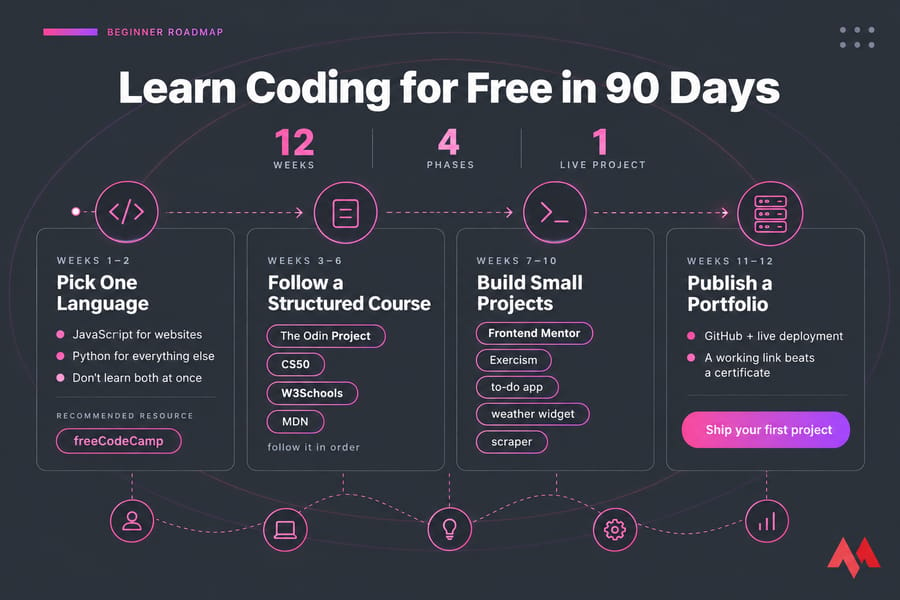
Weeks 1–2: Pick One Language
Go with JavaScript if you want to build websites and Python for everything else. Don't learn both at once. If you're not sure which language to start with, our breakdown of the 10 best programming languages to learn maps each one to common career paths.
Weeks 3–6: Follow a Structured Course
Choose freeCodeCamp, Odin, or CS50 and follow it in order. Use W3Schools or MDN when you get stuck on syntax. A proper editor makes a real difference here — our roundup of the best code editors covers what's worth installing on day one.
Weeks 7–10: Build Small Projects
Try a to-do app, a weather widget, or a scraper. Here's the thing: as soon as you can follow a tutorial without pausing it, you're ready to stop watching tutorials. If you're aiming at a career, our guide on how to become a front-end developer outlines what hiring managers actually look for, and the companion piece on how to become a web designer covers the design-heavy path. For the server side, our breakdown of how to choose the right backend framework helps you pick a stack before you commit.
Weeks 11–12: Publish a Portfolio
Push your code to GitHub, then deploy one project to a live URL. A working link does more for you than a certificate. If you're deploying your first project and want hands-on experience with a real Linux environment, a VPS is a cheap way to learn server management alongside your coding skills. Developers who outgrow that can look at a dedicated VPS for developers with more control. If you're building Node apps, a Node.js VPS is purpose-fit for that stack. And for a deeper look at what you actually get from a Linux server, our article on Linux VPS hosting benefits breaks it down.
🎯 Conclusions
Learning programming languages used to be hours of expensive education, but now you can do it from the comfort of your home with no money up-front. As you can see here, there are ample resources for you to learn programming for free at your own pace. The list is long, and this does not mean you need to go through everything mentioned here. Pick the ones that intrigue you and dive right in.
If you're feeling overwhelmed, forget about the other 34 sites for now and pick one based on your goal:
- Complete beginner: start freeCodeCamp's first certification today.
- Future web developer: open The Odin Project's Foundations course.
- Curious about computer science: sign up for CS50x and watch lecture 0.
Give it 30 days before you judge the choice. After that, the part that matters is building projects, publishing them, and deploying at least one to a real server. If you want a full-featured Linux environment for that final step, our Linux VPS plans give you root access, NVMe storage, and full control — the kind of setup real developers use in production. If you have any questions, let us know in the comments below.