![What Is a Secure Web Gateway (SWG)? 🛡️ Benefits & Uses [2026]](/wp-content/uploads/2025/04/Secure Web Gateway (SWG)250-main.webp)
Most of your company's real work now happens in a browser. People open SaaS apps, download files, click links in email, and paste data into web forms. They do it from the office, from home, and sometimes from an airport lounge with sketchy Wi-Fi. Every one of those requests can carry phishing, malware, or a data leak.
Gone are the days when firewalls could be trusted to protect organizations against an ever-evolving threat landscape of web applications. Nowadays, Secure Web Gateway (SWG) ensures that users are protected against malicious content on websites, enforces internet policies, and provides secure access to cloud applications, especially in hybrid and remote work environments. A secure web gateway (SWG) checks that traffic before it reaches your users. It's an old category that has changed a lot, and buying one in 2026 isn't the same decision it was five years ago.
With a transition to the cloud-first paradigm already underway, IT professionals, security engineers, and always-in-the-loop CISOs must learn about Secure Web Gateways, their differences with traditional solutions like firewalls, and the best SWG solutions to implement a resilient security infrastructure.
In this guide, we cover:
- What an SWG is and how it inspects traffic
- Core features and practical use cases
- SWG vs firewall, proxy, CASB, ZTNA, FWaaS, and SASE
- Cloud, on-prem, and hybrid deployment
- Current vendors, how to choose one, and rollout tips
🧩 What is a Secure Web Gateway (SWG)?
A Secure Web Gateway (SWG) is an application-based security solution that makes sure that users are safe from web threats, and at the same time, it monitors, filters, or controls the internet traffic that travels outside its boundary. It acts between its users and the Internet, enacting a detailed view of the enterprise security policy against web activities in real-time, making sure that all web activities are done accordingly to organizational standards.
Put simply, an SWG is a checkpoint between your users and the internet. Each web request goes through it. It allows the request, blocks it, or logs it, depending on policy. In security terms, an SWG is an inline policy engine. It uses URL filtering, content inspection, threat intelligence, and data loss prevention on outbound web and SaaS traffic. Today it's usually delivered from the cloud. It's also a core part of security service edge (SSE), which Gartner describes as securing access to the web, cloud services, and private apps wherever the user happens to be.
They usually include the following core functionalities: URL filtering, malware detection, data leakage prevention (DLP), HTTPS inspection, and application control. The new-generational Secure Web Gateway (SWG) is also frequently delivered as an on-cloud service to be scalable, offer remote access protection, and connect to any identity provider to complement security with context awareness.
.jpg?1743926251314)
While they inspect traffic as well, traditional firewalls and proxies do so with a somewhat different purpose and scope as compared to the SWG. Mainly working as a gatekeeper for inbound and outbound traffic based on IP addresses, ports, and protocols, a firewall is also a proxy network server.
Read this article to learn about Cloud Computing: What is Cloud Computing?
⚙️ How Does a Secure Web Gateway Work?
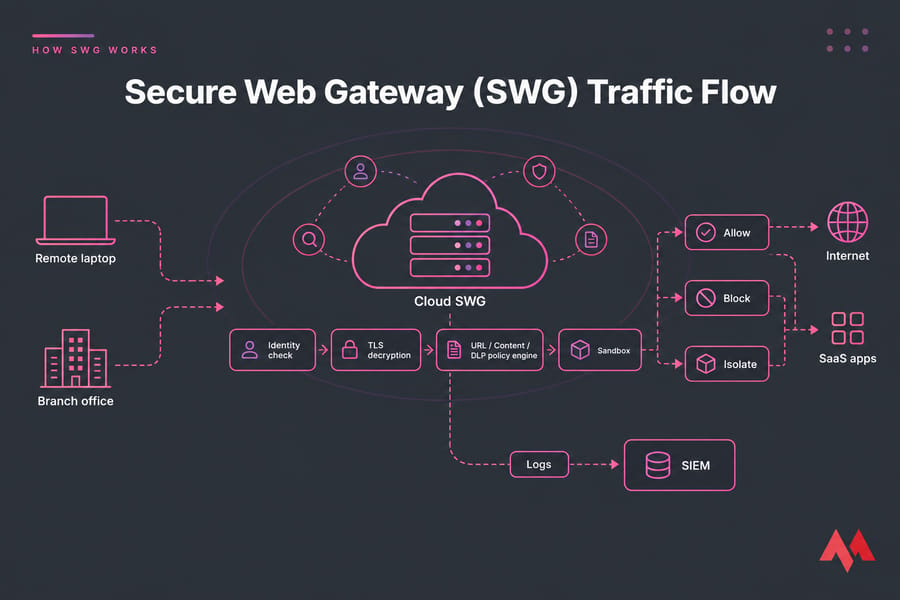
Secure Web Gateways intercept and examine web traffic as it enters contact with the user or endpoint. Corporate visibility into the web environment is achieved by allowing, blocking, or logging web activities, based on company security policy. Whether located directly in the corporate facility or harnessed as a service over the cloud, SWGs provide a complete aggregation of all security features in a single platform.
Here's the request flow in practice:
- A user requests a website or SaaS app.
- Traffic goes to the SWG through an endpoint agent, a PAC file, an explicit proxy, or a tunnel from the branch office.
- The gateway checks who the user is and what device they're on, usually through SAML with Okta or Entra ID.
- If the connection is HTTPS, the SWG can decrypt it and inspect what's inside.
- URL, content, application, and DLP policies run against the request.
- The SWG takes an action: allow, block, isolate in a remote browser, or log.
Core capabilities at a glance
- URL Filtering: Blocks access to unauthorized or risky websites based on categories or threat intelligence — gambling, newly registered domains, or known phishing.
- TLS/SSL inspection: Decrypts and inspects encrypted traffic. Most threats now hide in encrypted traffic; if your SWG can't decrypt, it can't see them.
- Malware Detection & Prevention: Scans web content and downloads in real time to detect and block viruses, spyware, and other threats, and detonates unknown files in a sandbox.
- Data Loss Prevention (DLP): Monitors outgoing traffic to prevent accidental or intentional data leaks — card numbers, patient records, or source code uploaded to personal Dropbox accounts.
- Application Control: Regulates access to web applications like social media, file sharing, and cloud services — allow Slack but block file uploads to it, for example.
- Policy Enforcement: Applies different rules based on user identity, role, device, or location. Finance gets one rule set and contractors get another.
- Reporting and SIEM integration: Sends audit logs to Splunk, Sentinel, or Elastic for investigations.
Remote browser isolation is offered by some vendors, but not all. Treat it as a bonus feature, not something you can assume is included.
✅ Benefits of Using a Secure Web Gateway (SWG)
The strength of a Secure Web Gateway (SWG) lies in the effective defense against modern threats from the internet as it provides methods for better control over the behavior of users online. Use by employees of web applications and cloud services to perform their work-from-anywhere makes the organization responsible for maintaining secure, compliant, and internally policy-aligned internet use.
By blocking malicious content, preventing unauthorized data transfers, and inspecting web traffic, these gateways help layer protection. Aside from blocking entry for threats, these guidelines will assist IT and security teams with the risks associated with shadow IT, help document policies regarding the acceptable use of applications, and facilitate insights on the use of cloud applications.
- Protection Against Malicious Websites and Phishing: SWGs use advanced threat intelligence, real-time URL filtering, and content inspection to block access to known malicious websites and detect phishing attempts. This helps prevent users from accidentally downloading malware or submitting credentials to fake login pages.
- Enforcement of Company Security Policies: Secure Web Gateways allow organizations to define and enforce acceptable use policies across all users and devices. For example, companies can block access to high-risk categories like gambling, adult content, or unauthorized file-sharing services.
- Reduction of Risks from Shadow IT and Unsanctioned Applications: With employees often using personal or unapproved apps for work tasks, shadow IT poses a serious security and compliance risk. SWGs provide visibility into all web and cloud application usage, including apps not officially sanctioned by IT.
- Data Loss Prevention (DLP) and Compliance Support: By monitoring outbound traffic, SWGs can detect and prevent the unauthorized transmission of sensitive information such as customer data, intellectual property, or financial records.
- Secure Remote and Hybrid Work Enablement: Cloud-based SWG solutions make it easier to enforce consistent web security policies for users working from home or on the go.
- Compliance and auditability: Logs and DLP make it easier to show evidence for GDPR, HIPAA, and PCI DSS audits.
🔍 SWG vs CASB vs ZTNA vs FWaaS (and Firewall, Proxy, SASE)
People mix these up all the time. This table covers the differences:
| Tool | Main purpose | Visibility scope | Best use case |
| SWG | Secure user-to-internet traffic | Web and SaaS content (layer 7) | Web filtering, threat blocking, DLP |
| Firewall | Control network traffic | Ports, protocols, IPs, plus some apps | Perimeter and segment protection |
| Proxy | Forward requests on behalf of users | Basic HTTP, often with little inspection | Caching and anonymity (see VPN vs proxy) |
| CASB | Govern sanctioned SaaS | Data at rest and in use inside SaaS through APIs | Misconfigured M365 or Salesforce sharing |
| ZTNA | Grant access to private apps | User-to-internal-application traffic | Replacing a flat VPN |
| FWaaS | Firewall delivered from the cloud | All ports and protocols | Branch traffic that isn't web |
| SASE | Combine networking and security | SD-WAN plus SSE (SWG, CASB, ZTNA, FWaaS) | Consolidating the whole stack |
The short version: an SWG looks after where your users go on the web, a CASB looks after what happens inside the SaaS apps you've approved, and ZTNA controls who can reach your internal systems. If you still run a VPN for that last job, hardening your VPN server still matters. Some teams also rely on a dedicated IP VPN so they can allowlist access. If you'd rather not share an endpoint with a public provider, you can run your own on a private VPN server from MonoVM.
🔗 How SWG Fits into SSE and SASE
SSE brings SWG, CASB, and ZTNA together, often with FWaaS added. SASE goes further and adds SD-WAN on top. HPE describes SWG as a core capability inside SSE.
When should you buy a standalone SWG? Mostly when you already have good ZTNA and CASB tools and only need to fill the web gap. If you're starting fresh, a platform usually costs less to run, even though the license looks more expensive at first.
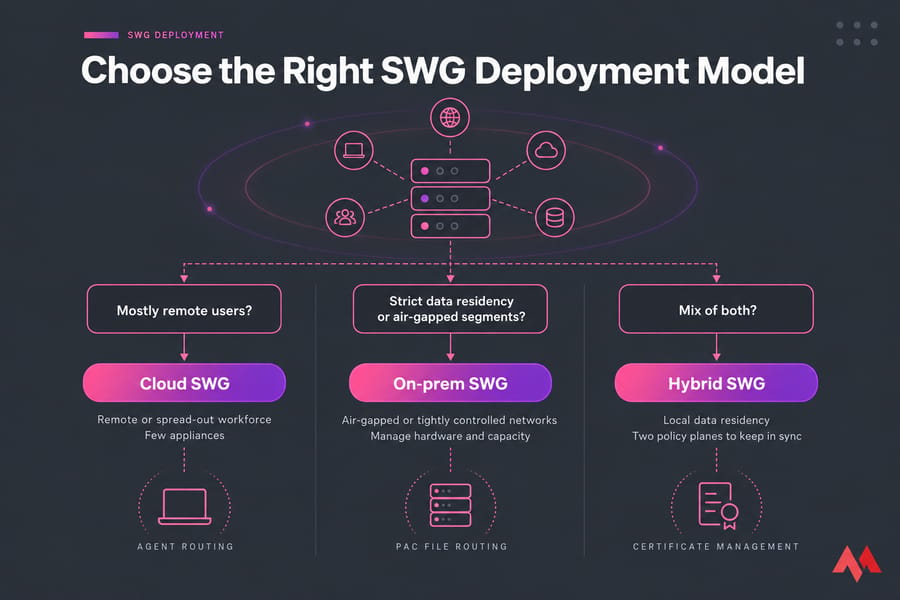
☁️ Cloud vs On-Premise vs Hybrid SWG Deployment
| Model | Fits best when | Trade-offs |
| Cloud | Your workforce is remote or spread out, and you have few appliances | Depends on the vendor's PoP locations and latency |
| On-prem | You have air-gapped or tightly controlled networks | You buy hardware, manage capacity, and remote users have to hairpin through it |
| Hybrid | You're regulated and need local data residency | Two policy planes to keep in sync |
For most teams with a lot of remote staff, cloud is the right choice. It's the same reasoning behind cloud hosting: capacity grows with demand, and you aren't stuck with a hardware refresh cycle. Hybrid makes sense when inspected traffic or logs legally have to stay in one country. If you want to run a self-hosted SWG, log aggregator, or policy controller yourself, a VPS server is usually the cheapest way to get started — you can deploy in minutes and scale up only if the rollout grows.
🏆 Top Secure Web Gateway Solutions in 2026
Organizations increasingly require advanced, scalable SWG solutions with the movement of infrastructures to the cloud. In 2026, several competing SWG platforms by leading vendors cater to all types of organizational requirements, from small businesses to large enterprises. Vendors rename and repackage these products often, so check current names with their sales teams. None of the vendors below publish standard list pricing, so expect a custom quote.
Core SWG capabilities like URL filtering, malware protection, and policy enforcement are standard in all these solutions, but they differ in deployment models, integration options, performance, and price. A neutral comparison of the top five players in the industry is offered: Palo Alto Networks, Cloudflare, Zscaler, Cisco, and Skyhigh Security.
Palo Alto Networks – Prisma Access
Prisma Access by Palo Alto Networks delivers a cloud-delivered SWG with advanced threat intelligence, inline DLP, and deep integration with its broader security ecosystem. It’s well-suited for enterprises already invested in Palo Alto firewalls and looking for unified policy enforcement across network and cloud environments.

The platform offers excellent threat detection capabilities powered by machine learning and behavioral analysis. However, its enterprise focus may make it more complex and costly for smaller organizations to deploy and manage. It’s a good fit if you already run Palo Alto firewalls and want one policy model across both.
Cloudflare Gateway
Cloudflare Gateway offers a lightweight, fully cloud-native Secure Web Gateway that’s part of the broader Cloudflare Zero Trust platform. It’s designed for speed and simplicity, with features like DNS filtering, identity-based policy controls, and easy integration with existing identity providers. Its globally distributed edge network ensures low-latency performance, even for remote users.
A huge edge network and simple onboarding make it popular with SMBs and teams that put developers first. While powerful for fast deployment, it may lack some of the deeper inspection or advanced analytics found in more enterprise-focused SWG solutions.
Zscaler Internet Access (ZIA)
Zscaler is a pioneer in the SWG-as-a-Service space, offering a fully cloud-native platform optimized for large, distributed enterprises. ZIA provides granular policy enforcement, SSL traffic inspection, threat sandboxing, and seamless integration with SASE and zero-trust architectures.
Its multi-tenant cloud infrastructure scales easily to support global users and enforces consistent policies regardless of location. Zscaler's own reference architecture recommends inspecting 100% of traffic. The platform’s rich feature set comes with a learning curve, and costs can add up depending on usage and licensing tiers.
Cisco Umbrella / Cisco Secure Access
Cisco Umbrella combines DNS-layer security with full SWG functionality, giving organizations layered protection from web threats without requiring a full network overhaul. It integrates well with other Cisco tools like SecureX and Duo, making it a solid choice for businesses already embedded in the Cisco ecosystem.
Umbrella supports a hybrid approach, offering both cloud and on-prem enforcement capabilities. While effective for core web security, it may not offer the same depth of DLP or behavioral analytics as some newer cloud-native platforms.
Heads-up for Cisco customers: In September 2026, Cisco announced that Umbrella SIG and DNS are evolving into Cisco Secure Access, with end of sale on 31 January 2027. If you're an Umbrella customer, plan your migration now. Umbrella's on-prem enforcement runs comfortably on a Windows VPS if you're testing the connector before rolling it out to production.
Skyhigh Security (formerly McAfee Enterprise)
Skyhigh Security delivers a robust SWG solution with a strong focus on data loss prevention, compliance, and cloud application visibility. It’s particularly well-suited for highly regulated industries that require fine-grained control over sensitive data across web and cloud environments.
With both cloud-native and hybrid deployment options, it provides flexibility for organizations at different stages of cloud adoption. It also has FedRAMP High authorization for its cloud SWG, which is a strong point for public-sector buyers. However, its legacy platform roots may feel less agile compared to newer, born-in-the-cloud competitors.
Side-by-side comparison
| Provider | Deployment Model | Key Features | Pricing Model | Ideal For |
| Palo Alto (Prisma) | Cloud-based & Hybrid | ML-powered threat detection, inline DLP, app control | Subscription (tiered) | Enterprises needing deep security stack integration |
| Cloudflare Gateway | Fully Cloud-based | DNS filtering, zero trust integration, fast deployment | Usage-based & flat-rate | Organizations seeking speed and simplicity |
| Zscaler Internet Access (ZIA) | Fully Cloud-native | Granular policy control, SSL inspection, threat sandboxing | Per-user subscription | Large, distributed workforces |
| Cisco Umbrella / Secure Access | Cloud-based with local enforcement options | DNS-layer security, CASB, IP filtering | Per-seat license | Businesses already using Cisco security stack |
| Skyhigh Security | Cloud-native & Hybrid | Advanced DLP, user behavior analytics, multi-cloud support | Tiered plans | Highly regulated industries and large enterprises |
🎯 How to Choose the Right Secure Web Gateway
Selecting a secure web gateway (SWG) aligned with an organization's size, architecture, and security objectives is a challenge. The first decision involves the deployment model: Should it be a cloud, on-premise, or hybrid SWG? Cloud-based SWGs typically fit better with remote and hybrid workforces because of their scalability and ease of management: on-premise is usually preferred by highly regulated industries with more stringent demands on data control.
It also turns out that evaluating the integration of the SWG with your existing security stack—i.e., identity providers, endpoint protection, CASB, and SIEM platforms—is critical for centralized management and streamlined policy enforcement among users.
Enterprises have comprehensive platforms like Palo Alto Prisma Access or Zscaler Internet Access. These provide rich functionality, global scalability, and integration with the broader security ecosystem as suitable for large, geographically dispersed teams that require granularity in policy controls and advanced threat protections.
Small and midsize businesses might be better served by faster, lower-cost cloud-based options, such as Cloudflare Gateway or Cisco Umbrella, because they also obviate the major difficulties of deployment and are relatively easy to use with good protection without the complication of complex configuration management overhead. Ultimately, the best SWG for an organization is one that combines security, usability, and scalability within operational and budget constraints.
Evaluation checklist
Don't trust feature checklists on their own. Run a 30-day proof of concept and check these points:
- Deployment options that match your workforce: agent, PAC file, or tunnel
- How well TLS inspection holds up, and how much latency it adds near your offices
- How deep the DLP goes, including EDM, OCR, and custom dictionaries
- IdP, CASB, ZTNA, and SIEM integrations
- Data residency choices and log retention
- Pricing model: per user, per bandwidth, or bundled into SSE tiers
🛠️ Implementation Best Practices
This is where most rollouts go wrong. I've seen a "quick" SWG deployment knock out a payroll app for two days because no one tested certificate pinning.
- Integrate your identity provider first. Without it, you can't build user-based policy.
- Roll out by group or location. Start with IT, then move to one department at a time.
- Plan TLS inspection. Push the root certificate through MDM or GPO. Exempt banking and healthcare sites, and anything that breaks because of pinning.
- Tune policies and exceptions. Begin in monitor-only mode, review false positives every week, and set up a documented process for requesting exceptions.
- Review log retention. Match retention periods to your GDPR, HIPAA, or PCI DSS obligations.
⚠️ Secure Web Gateway Limitations
An SWG isn't magic. Decrypting employee traffic raises real privacy questions, and in parts of the EU you may need to talk to works councils first. Inspection adds some latency. You'll also be managing certificates permanently, and the SWG will overlap with your firewall and CASB. Just as important, it doesn't replace endpoint protection, email security, or good infrastructure hardening. Think of it as one layer in a layered defense.
🎯 Final Verdict
Secure Web Gateways (SWGs) have turned out to be a critical stake in the modern enterprise security infrastructure, as they help clear the threat path of the stretching cyberworld, alongside the users who are wandering not just out of the intranet perimeter-bounds linearly but also altogether.
If your people work in browsers and SaaS (and almost everyone does now), a secure web gateway is basic protection, not a luxury. For distributed teams, choose a cloud SWG. Insist on solid TLS inspection and DLP. Think hard about whether buying it as part of an SSE platform will save you trouble later. Then roll it out slowly, because rushing is how you end up breaking payroll.
This means that on-premise or cloud-based SWG sorts with multi-layer security definitions by some policies related to the internet, real-time threat detection, and minimizing shadow IT and cloud apps risks are essential. Given that they are selected wisely, taking into account all deployment requirements, scalability, and integration, these SWGs protect users and allow organizations to function securely in a cloud-first, hybrid world.
Rolling out a self-hosted SWG or a private VPN gateway? A dedicated server gives you the compute, NVMe storage, and network throughput to run the inspection stack without noisy neighbors. Deploy in minutes and scale as your rollout grows.