
Running a FiveM server can be incredibly rewarding, but it also comes with serious technical challenges. One of the biggest threats server owners face today is a Distributed Denial of Service attack. A successful DDoS attack can instantly disrupt gameplay, kick players offline, damage your server reputation. That is why learning how to protect FiveM server from DDoS attacks is essential.
FiveM servers are especially attractive targets because they rely on real time network communication and UDP traffic, making them vulnerable to traffic floods and protocol abuse. Proper FiveM DDoS protection can mean the difference between a stable gaming experience and constant downtime.
In this guide, you will learn how DDoS attacks work, why FiveM servers are targeted, and most importantly how to prevent DDoS attack on gaming server environments using practical and proven techniques.
Introduction to DDoS Attacks on FiveM Servers
A DDoS attack is an attempt to overwhelm a server by flooding it with more traffic than it can handle. Instead of sending requests from a single source, attackers use thousands or even millions of compromised devices to bombard the server simultaneously. This causes legitimate players to experience lag, timeouts, or complete disconnections.
FiveM servers are particularly sensitive to this kind of attack because they depend on constant, low latency communication between players and the server. Even a short traffic spike can severely impact gameplay. Understanding how to protect FiveM server from DDoS attacks starts with understanding how these attacks function and what they target.
If you are new to this topic, we strongly recommend reading this detailed explanation of What is a DDoS Attack to build a solid foundation before moving on to mitigation strategies.
Common DDoS Attack Types Affecting FiveM Servers
Different DDoS attacks affect FiveM servers in different ways. Knowing the attack type helps you choose the right DDoS mitigation for FiveM strategy.
|
DDoS Attack Type |
How It Works |
Impact on FiveM Servers |
|
UDP Flood |
Overloads the server with fake UDP packets |
Severe lag, player timeouts |
|
SYN Flood |
Exploits TCP handshake to exhaust resources |
Connection failures |
|
Amplification Attacks |
Uses third party servers to multiply traffic |
Sudden bandwidth exhaustion |
|
Application Layer Attacks |
Targets game queries and scripts |
Server freezes or crashes |
This table highlights why generic protection is often not enough. FiveM servers require targeted gaming server security tips that address UDP based traffic and real time communication.
Understanding Different Types of DDoS Attacks
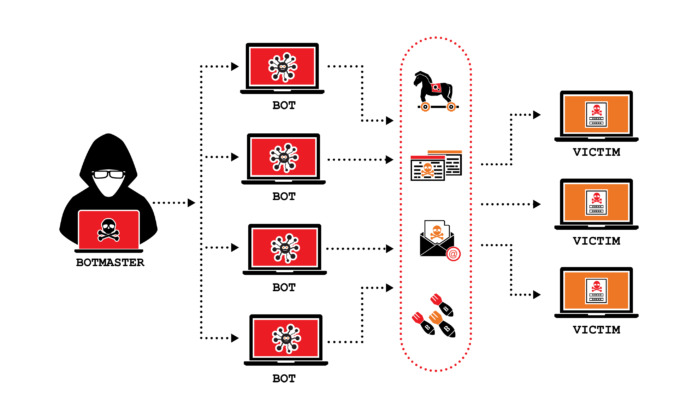
UDP Flood Attacks
UDP flood attacks are the most common threat to FiveM servers. Because FiveM relies on UDP for real time gameplay, attackers flood the server with fake packets, causing lag or crashes. To protect FiveM server from DDoS attacks like this, strict packet filtering and UDP rate limiting are required.
SYN Flood Attacks
SYN flood attacks exhaust server resources by sending incomplete TCP connection requests. While FiveM uses UDP, web panels and databases remain vulnerable, making TCP protection an important part of effective FiveM DDoS protection.
Amplification Attacks
Amplification attacks abuse public services such as DNS or NTP to generate massive traffic toward your server. These attacks can overwhelm even high bandwidth servers, making professional DDoS mitigation for FiveM essential.
Why FiveM Servers Are Vulnerable?
FiveM servers are attractive targets due to public IP exposure, reliance on real time traffic, and frequent use of VPS hosting with limited protection. Without proper planning, it becomes difficult to prevent DDoS attack on gaming server environments like FiveM. Secure configuration and choosing the right hosting provider are critical for long term stability.
If you want to learn more about Securing Your VPS, make sure to read our article on this topic.
Preventative Measures: How to Secure Your FiveM Server
Proactive security is the most effective defense. The following steps help protect FiveM server from DDoS attacks.
Keep Your Server Software Updated
Regularly update FiveM artifacts and your operating system to reduce exploitable vulnerabilities.
Hide Your Server IP
Using protected routing or encapsulation helps prevent direct targeting and strengthens DDoS mitigation for FiveM.
Choose the Right Hosting Environment
Hosting providers with built in DDoS filtering offer stronger protection. For high traffic servers, upgrading to protected infrastructure or Buy Dedicated server solutions improves reliability and uptime.
Step-by-Step Guide to Configuring Firewalls for DDoS Protection
A properly configured firewall is one of the most effective and affordable ways to protect FiveM server from DDoS attacks. Firewalls allow you to control how traffic reaches your server, filter malicious packets, and apply rate limits that prevent traffic floods from overwhelming your system.
Below is a practical, step-by-step firewall configuration guide for both Linux and Windows based FiveM servers.
Linux Firewall Configuration for FiveM Servers
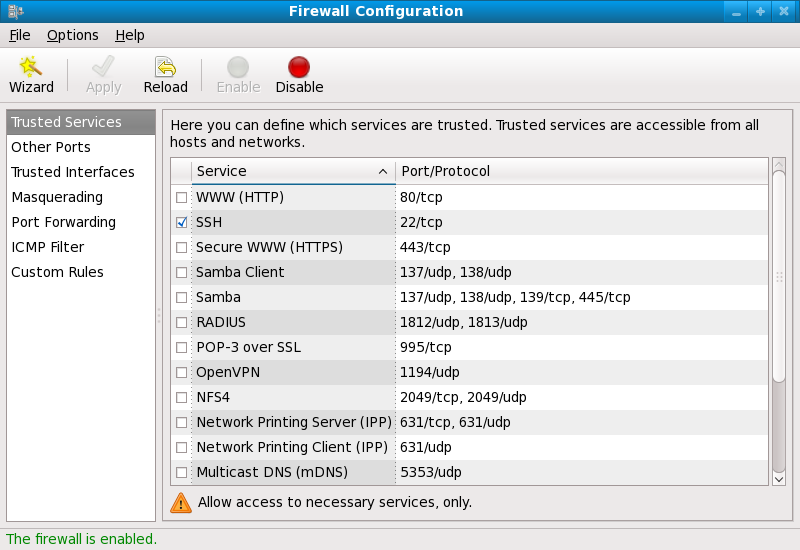
Linux servers are commonly used for hosting FiveM due to their performance and flexibility. Tools such as iptables and nftables allow precise control over network traffic and are essential for DDoS mitigation for FiveM.
Step 1: Allow Only Required Ports
Start by allowing only the ports necessary for FiveM and essential services. This reduces the attack surface and helps prevent DDoS attack on gaming server environments.
Common FiveM ports include:
- UDP 30120 for FiveM server traffic
- TCP 30120 for server queries
- SSH port (custom port recommended)
Example iptables rules:
iptables -A INPUT -p udp --dport 30120 -j ACCEPT
iptables -A INPUT -p tcp --dport 30120 -j ACCEPT
iptables -A INPUT -p tcp --dport 22 -j ACCEPT
iptables -A INPUT -j DROP
This ensures that all other unsolicited traffic is dropped automatically.
Step 2: Apply UDP Rate Limiting
UDP floods are one of the most common attacks targeting FiveM servers. Rate limiting prevents a single source from sending excessive packets.
Example rule to limit UDP packets:
iptables -A INPUT -p udp --dport 30120 -m limit --limit 50/second --limit-burst 100 -j ACCEPT
iptables -A INPUT -p udp --dport 30120 -j DROP
This configuration allows normal player traffic while blocking abusive packet rates, a key component of effective FiveM DDoS protection.
Step 3: Limit New Connections
Connection flooding can exhaust server resources. Limiting new connections per IP helps stop low volume attacks that are difficult to detect.
Example:
iptables -A INPUT -p tcp --syn --dport 30120 -m connlimit --connlimit-above 20 -j DROP
This prevents a single IP from opening excessive simultaneous connections.
Step 4: Enable Stateful Packet Inspection
Stateful inspection ensures that only valid packets associated with established connections are accepted.
iptables -A INPUT -m state --state ESTABLISHED,RELATED -j ACCEPT
iptables -A INPUT -m state --state INVALID -j DROP
This rule set is essential for gaming server security tips focused on stability and performance.
Step 5: Block Spoofed and Invalid Packets
Many DDoS attacks rely on spoofed IP addresses. Blocking these packets reduces attack effectiveness.
iptables -A INPUT -s 0.0.0.0/8 -j DROP
iptables -A INPUT -s 127.0.0.0/8 -j DROP
iptables -A INPUT -s 224.0.0.0/4 -j DROP
Windows Firewall Configuration for FiveM Servers
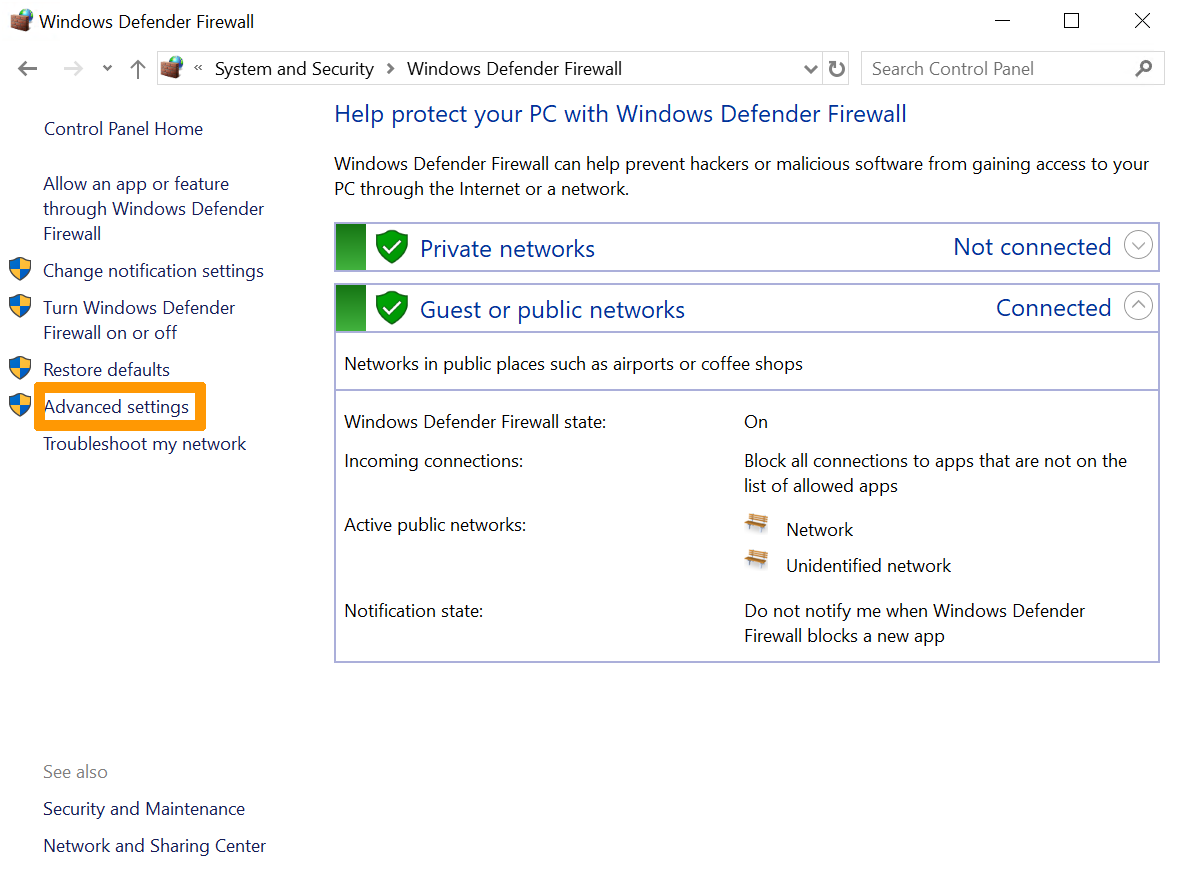
For FiveM servers running on Windows, Windows Defender Firewall provides robust filtering when configured correctly. Proper rules significantly improve your ability to protect FiveM server from DDoS attacks.
Step 1: Create Inbound Rules for FiveM Ports
Open Windows Defender Firewall with Advanced Security and create new inbound rules for the FiveM ports.
- Protocol: UDP
- Port: 30120
- Action: Allow
- Profile: Domain, Private
Repeat for TCP port 30120.
Restricting allowed ports is the foundation of prevent DDoS attack on gaming server strategies.
Step 2: Limit Connection Rates
Windows Firewall supports connection security rules that limit the number of allowed connections per IP.
Set rules to:
- Block excessive new connections
- Drop packets exceeding defined thresholds
This helps mitigate connection floods commonly used against gaming servers.
Step 3: Block Suspicious IP Ranges
If your monitoring tools detect malicious IP ranges, manually block them using firewall rules. This targeted blocking is especially effective during active attacks and strengthens DDoS mitigation for FiveM.
Step 4: Enable Logging and Alerts
Enable firewall logging to track dropped packets and suspicious behavior. Logs provide insight into attack patterns and help refine rules over time.
Firewall logs are invaluable for improving long-term FiveM DDoS protection.
Also, you can follow this comprehensive guide on How to Secure Windows Server to harden your environment and enhance FiveM DDoS protection.
Using Third Party DDoS Protection Services
Even with strong firewall rules, large scale attacks can overwhelm a server. This is where third party services play a major role in DDoS mitigation for FiveM.
Cloud based DDoS protection services analyze traffic patterns in real time and filter malicious packets before they reach your server. These services are particularly useful for servers with large player bases.
When choosing a provider, ensure it supports UDP traffic and gaming workloads. Not all generic protection services are suitable for FiveM servers.
Monitoring Your Server for Suspicious Traffic
Early detection allows faster response. Monitoring tools help you identify traffic spikes before they cause downtime.
Network Monitoring Tools
Tools like Netdata, Grafana, and built in hosting dashboards provide real time visibility into bandwidth usage, packet rates, and CPU load.
Consistent monitoring is one of the most overlooked gaming server security tips, yet it is essential for maintaining stability.
How to Respond During a DDoS Attack
If an attack is already happening, quick action is crucial.
First, contact your hosting provider immediately and activate emergency DDoS filtering. Second, temporarily restrict access using firewall rules. Third, avoid restarting the server repeatedly as this may worsen the situation.
Preparedness is a key element of effective FiveM DDoS protection. Having a response plan in place significantly reduces downtime.
Best Practices for Long-Term Server Security
Long-term security requires consistent configuration, monitoring, and review. To protect FiveM server from DDoS attacks over time, apply these essential best practices.
Limit Public Exposure
Only keep necessary ports and services accessible. Restrict admin panels, databases, and file access to trusted IPs to reduce your attack surface and prevent DDoS attack on gaming server environments.
Separate Services When Possible
Hosting game services, databases, and websites on separate systems reduces overall risk and improves DDoS mitigation for FiveM by isolating critical components.
Enforce Connection Limits
Set per-IP connection limits to prevent resource exhaustion caused by low-volume or slow DDoS attacks.
Regularly Review Logs
Monitor firewall and server logs for unusual spikes, repeated connection attempts, or abnormal traffic patterns.
Recommended Tools and Services for FiveM DDoS Protection
Using the right tools greatly improves your ability to protect FiveM server from DDoS attacks.
Network Level Protection
Hosting providers with built-in DDoS filtering block malicious traffic before it reaches your server. For large or competitive communities, upgrading to protected infrastructure or a Buy Dedicated server solution offers higher bandwidth and stronger FiveM DDoS protection.
Firewall and Rate Limiting Tools
Linux servers use iptables, nftables, or fail2ban, while Windows servers rely on Windows Defender Firewall. These tools control packet rates and connection limits and are essential for DDoS mitigation for FiveM.
Monitoring and Analytics
Tools like Netdata or Grafana help detect abnormal traffic early. Monitoring remains one of the most effective gaming server security tips for maintaining uptime.
How to Detect a DDoS Attack on a FiveM Server
Early detection allows faster response. Common signs of a DDoS attack include:
- Sudden lag affecting all players
- New players failing to connect
- High bandwidth usage without increased player count
- CPU spikes unrelated to gameplay
Identifying these symptoms early helps you activate your DDoS mitigation for FiveM strategy before major downtime occurs.
Incident Response Checklist for FiveM Servers
When under attack, follow this checklist to reduce downtime:
- Notify your hosting provider and enable DDoS filtering
- Activate strict firewall rules and rate limits
- Monitor traffic patterns in real time
- Avoid unnecessary restarts
- Communicate transparently with your player community
Prepared server owners are far more successful at maintaining uptime and protecting player trust.
Why Hosting Choice Matters for FiveM Security
Your hosting provider plays a critical role in your ability to protect FiveM server from DDoS attacks. Budget VPS plans often lack network level protection, making them unsuitable for public gaming servers.
If you are setting up a new server or upgrading an existing one, reviewing How to Run FiveM Server helps ensure your deployment follows best practices from the start.
Additionally, enterprise grade environments with high bandwidth and proactive filtering significantly improve your ability to prevent DDoS attack on gaming server infrastructures.
Conclusion
DDoS attacks are one of the most serious threats facing FiveM server owners today. Without proper preparation, a single attack can disrupt gameplay, frustrate players, and damage your community. Learning how to protect FiveM server from DDoS attacks is a necessary investment in long term success.
By understanding attack types, implementing firewall rules, monitoring traffic, and using professional protection services, you can significantly reduce downtime and maintain a smooth gaming experience. Strong FiveM DDoS protection is not about a single solution, but about building a resilient infrastructure designed for real time gaming.
If you are serious about stability, performance, and growth, choosing the right hosting environment is key. Consider upgrading your infrastructure and Buy Dedicated server solutions to gain higher bandwidth, advanced protection, and full control over your FiveM server security.


Hello, everyone, my name is Lisa. I'm a passionate electrical engineering student with a keen interest in technology. I'm fascinated by the intersection of engineering principles and technological advancements, and I'm eager to contribute to the field by applying my knowledge and skills to solve real-world problems.